
Turn on suggestions
Auto-suggest helps you quickly narrow down your search results by suggesting possible matches as you type.
Showing results for
EN
Turn on suggestions
Auto-suggest helps you quickly narrow down your search results by suggesting possible matches as you type.
Showing results for
- English
- :
- Developer Hub
- :
- Archicad C++ API
- :
- Re: CMake Error at C:\..\API Development Kit 27.30...
Options
- Subscribe to RSS Feed
- Mark Topic as New
- Mark Topic as Read
- Pin this post for me
- Bookmark
- Subscribe to Topic
- Mute
- Printer Friendly Page

LeeJaeYoung
Virtuoso
Options
- Mark as New
- Bookmark
- Subscribe
- Mute
- Subscribe to RSS Feed
- Permalink
- Report Inappropriate Content
2023-09-30
08:41 AM
- last edited on
2024-09-17
01:00 PM
by
 Doreena Deng
CMake Error at C:\..\API Development Kit 27.3001\Examples\Element_Test\CMakeLists.txt:85 (project):
2023-09-30
08:41 AM

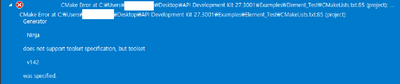
I'm trying to study API in Trier version Archicad 27.
What should I do if this error message appears?
AC27 on window 11
Solved! Go to Solution.
1 Solution
Accepted Solutions

BerndSchwarzenb
Mentor
Options
- Mark as New
- Bookmark
- Subscribe
- Mute
- Subscribe to RSS Feed
- Permalink
- Report Inappropriate Content
2023-10-02 08:33 AM - edited 2023-10-02 01:50 PM
2023-10-02
08:33 AM
Things change between versions, and a lot of things depend on whats currently installed on you machine etc.
From the errors you get I would specify the following (in the CMake Settings I mentioned in my previous command):
- CMakeGenerator:
"Visual Studio 16 2019 x64""Visual Studio 16 2019 Win64" - Toolset: "msvc_x64_x64"
- maybe also add the following flag to CMake command arguments: "-T v142"
Edit: Fix actual generator to use.
Automating Archicad with Add-Ons, GDL-Objects & Python Archi-XT.com
10 Replies 10
BerndSchwarzenb
Mentor
Options
- Mark as New
- Bookmark
- Subscribe
- Mute
- Subscribe to RSS Feed
- Permalink
- Report Inappropriate Content
2023-09-30 09:35 AM
2023-09-30
09:35 AM
Hi Lee,
You are using some incompatible settings with your CMake generator.
I had the best success with using "Visual Studio 16 2019" or "Visual Studio 17 2022" generators instead of the "Ninja" generator.
Here would be the option if you are using "CMakeSettings.json":
Hope that helps,
Bernd

Automating Archicad with Add-Ons, GDL-Objects & Python Archi-XT.com
LeeJaeYoung
Virtuoso
Options
- Mark as New
- Bookmark
- Subscribe
- Mute
- Subscribe to RSS Feed
- Permalink
- Report Inappropriate Content
2023-09-30 06:53 PM - edited 2023-09-30 06:58 PM
2023-09-30
06:53 PM
How can I access your cmake settings?

How can I access your cmake settings?
genenate is not included.
Python 3.10.11
In settings, the following settings appear.
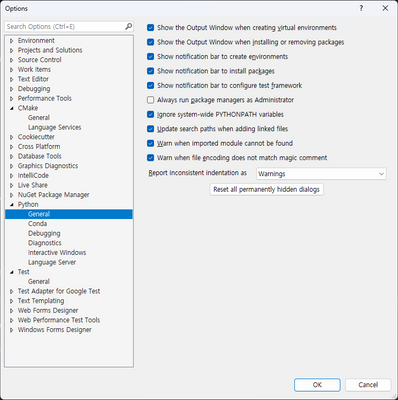
AC27 on window 11
LeeJaeYoung
Virtuoso
Options
- Mark as New
- Bookmark
- Subscribe
- Mute
- Subscribe to RSS Feed
- Permalink
- Report Inappropriate Content
2023-09-30 07:33 PM - edited 2023-10-01 07:11 AM
2023-09-30
07:33 PM
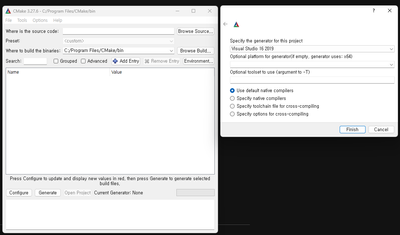
I set up what you asked me to do.
Even though I reinstalled it... ^^
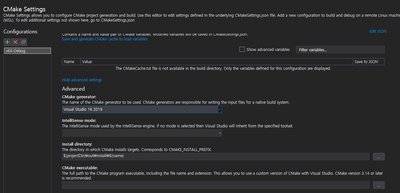
I came across these errors:
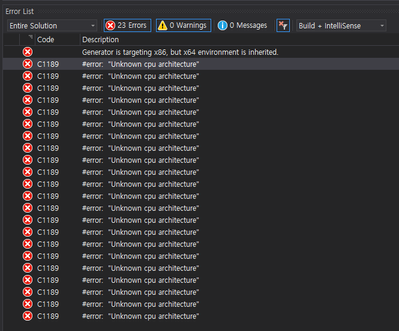
I want to know what the problem is.
This file was also compiled in archicad 26.
Why does archicad 27 produce this error message?
I need your help.
I am a beginner.


AC27 on window 11
BerndSchwarzenb
Mentor
Options
- Mark as New
- Bookmark
- Subscribe
- Mute
- Subscribe to RSS Feed
- Permalink
- Report Inappropriate Content
2023-10-02 08:33 AM - edited 2023-10-02 01:50 PM
2023-10-02
08:33 AM
Things change between versions, and a lot of things depend on whats currently installed on you machine etc.
From the errors you get I would specify the following (in the CMake Settings I mentioned in my previous command):
- CMakeGenerator:
"Visual Studio 16 2019 x64""Visual Studio 16 2019 Win64" - Toolset: "msvc_x64_x64"
- maybe also add the following flag to CMake command arguments: "-T v142"
Edit: Fix actual generator to use.
Automating Archicad with Add-Ons, GDL-Objects & Python Archi-XT.com
LeeJaeYoung
Virtuoso
Options
- Mark as New
- Bookmark
- Subscribe
- Mute
- Subscribe to RSS Feed
- Permalink
- Report Inappropriate Content
2023-10-02 01:01 PM - edited 2023-10-02 01:20 PM
2023-10-02
01:01 PM
thank you
With your help, I was able to study API. ^^
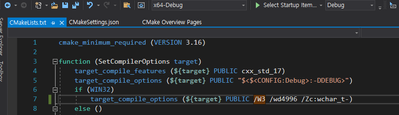
Because compilation failed due to the warning of C2220, I compiled by deleting /WX as shown in the picture below.
Q1. Is it right to do this?
컴파일러 오류 C2220 | Microsoft Learn
I didn't have x64, so I chose win64.

AC27 on window 11
BerndSchwarzenb
Mentor
Options
- Mark as New
- Bookmark
- Subscribe
- Mute
- Subscribe to RSS Feed
- Permalink
- Report Inappropriate Content
2023-10-02 01:49 PM
2023-10-02
01:49 PM
Glad I could help!
@LeeJaeYoung wrote:
Because compilation failed due to the warning of C2220, I compiled by deleting /WX as shown in the picture below.
Q1. Is it right to do this?
Yes that works. Alternatively you could keep the /WX flag and disable this specific warning with adding the flag /wd2220.
@LeeJaeYoung wrote:
I didn't have x64, so I chose win64.
That's the right one! I mistyped it.
The "-T v142" should maybe go to the "cmakeCommandArgs" instead of "ctestCommandArgs".
But since it works anyway for you, maybe it's not important.
Automating Archicad with Add-Ons, GDL-Objects & Python Archi-XT.com
LeeJaeYoung
Virtuoso
Options
- Mark as New
- Bookmark
- Subscribe
- Mute
- Subscribe to RSS Feed
- Permalink
- Report Inappropriate Content
2023-10-02 03:03 PM
2023-10-02
03:03 PM
Thank you again for your consideration. ^^
Well then, I hope you have a happy time.
AC27 on window 11
LeeJaeYoung
Virtuoso
Options
- Mark as New
- Bookmark
- Subscribe
- Mute
- Subscribe to RSS Feed
- Permalink
- Report Inappropriate Content
2023-10-02 03:09 PM - edited 2023-10-02 03:12 PM
2023-10-02
03:09 PM
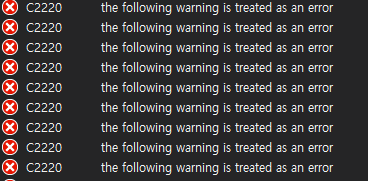
"The should maybe go to the "cmakeCommandArgs" instead of "ctestCommandArgs""
When I set it like this, this error occurs.

target_compile_options (${target} PUBLIC /W3 /WX /wd2220 /wd4996 /Zc:wchar_t-)
AC27 on window 11
BerndSchwarzenb
Mentor
Options
- Mark as New
- Bookmark
- Subscribe
- Mute
- Subscribe to RSS Feed
- Permalink
- Report Inappropriate Content
2023-10-02 03:13 PM
2023-10-02
03:13 PM
Looks like you need to delete your CMake cache and reconfigure CMake. (Project -> Delete Cache and Reconfigure)
Automating Archicad with Add-Ons, GDL-Objects & Python Archi-XT.com

Didn't find the answer?
Check other topics in this Forum
Back to ForumRead the latest accepted solutions!
Accepted SolutionsStart a new conversation!

Suggested topics
- Tapioca - UI for python commands in Archicad Python API
- Developer registration may not be approved – Add-On works in Demo but not FULL in Archicad C++ API
- Archicad API Developer Registration in Archicad C++ API
- ArchiCAD 27 Add-On: Menu not appearing in menubar in Archicad C++ API
- Developer Registration in Archicad C++ API
