
Turn on suggestions
Auto-suggest helps you quickly narrow down your search results by suggesting possible matches as you type.
Showing results for
EN
Turn on suggestions
Auto-suggest helps you quickly narrow down your search results by suggesting possible matches as you type.
Showing results for
- English
- :
- Developer Hub
- :
- Archicad Python API
- :
- Betreff: [PYTHON] Sum area script
Options
- Subscribe to RSS Feed
- Mark Topic as New
- Mark Topic as Read
- Pin this post for me
- Bookmark
- Subscribe to Topic
- Mute
- Printer Friendly Page

Mathias Jonathan
Expert
Options
- Mark as New
- Bookmark
- Subscribe
- Mute
- Subscribe to RSS Feed
- Permalink
- Report Inappropriate Content
2023-02-27 02:15 PM
[PYTHON] Sum area script
2023-02-27
02:15 PM
Hi everybody!
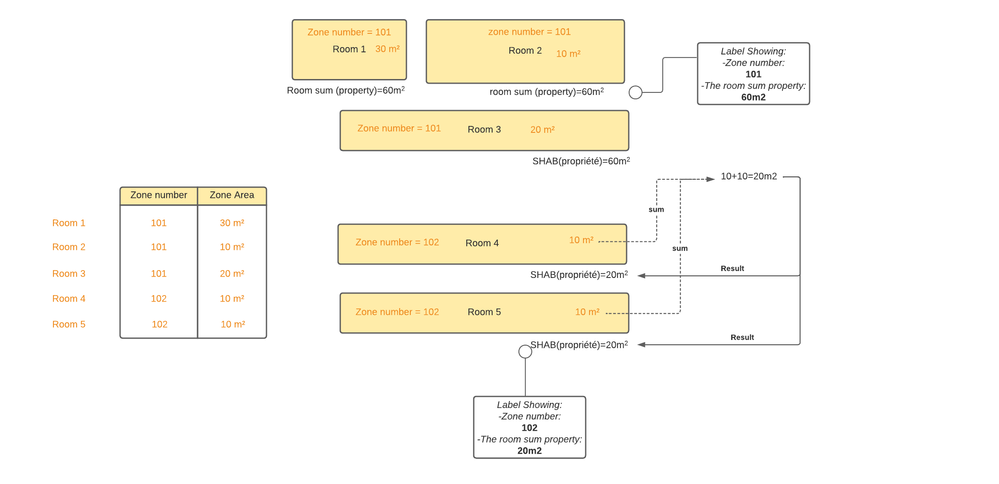
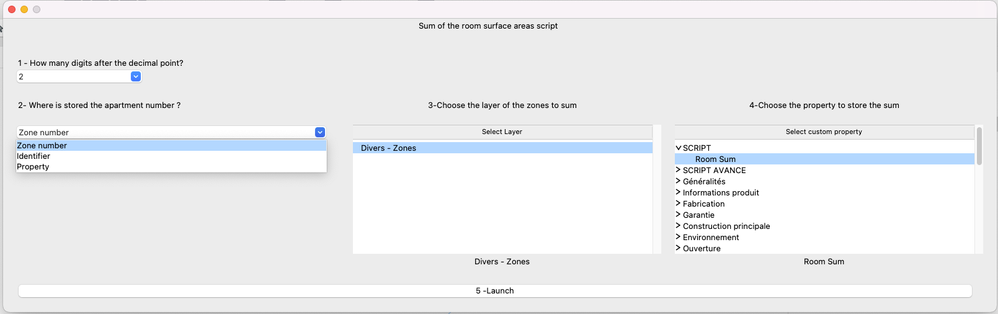
I developped a python script that sum the zone area with the help of Poco.
The script sum all zone of the same zone number and put the result in a custom property. You just have to retrieve the value with a label (example file in the zip).
The custom property has to be to string type.
The scrip uses the measured area.
Archicad 27 - GDL - PYTHON
Labels:
- Labels:
-
Automation (Python or JSON)
25 Replies 25

Gaberic
Participant
Options
- Mark as New
- Bookmark
- Subscribe
- Mute
- Subscribe to RSS Feed
- Permalink
- Report Inappropriate Content
2025-08-18 05:11 PM
2025-08-18
05:11 PM
Dear Jonathan,
Thank you for this script which solve a big loophole in the whole zones system,
one rather dumb question : I can't seem to find the way to run your python script from the TAPIR addon/palette I have installed following your advice. I am most likely missing something obvious - could you quickly explain the steps to do so ?
Thank you,
c

pr3
Advocate
Options
- Mark as New
- Bookmark
- Subscribe
- Mute
- Subscribe to RSS Feed
- Permalink
- Report Inappropriate Content
2025-10-10 10:13 AM
2025-10-10
10:13 AM
Hello Jonathan,
The Script is perfekt for us - we use it for multiple Projects and really like it. the New version increased the usability ever further.
I Would like to point a problem that Archicad has for decades - the Sum of Areas in an interactive schedule differs from the Sum the archicad built in system or your script gives us.
Thats clearly a rounding error but for some of our customers it's crucial that the sums are exactly the same. The error is in the 2 digit after the comma.
Are you aware of this and do you see a way to compensate or even solve this issue?
Archicad 28 | Mac Studio | OS 26
Mathias Jonathan
Expert
Options
- Mark as New
- Bookmark
- Subscribe
- Mute
- Subscribe to RSS Feed
- Permalink
- Report Inappropriate Content
2025-10-10 10:18 AM
2025-10-10
10:18 AM
Hi pr3 !
I'm well aware of this issue, this is the reason why there is a "Value type" parameter now:
-Displayed Area or Measured Area
Did you try this parameter? It is possible that there is a bug because I only use the Displayed Value area. If there is still an error, i'll investigate this.
Archicad 27 - GDL - PYTHON
Mathias Jonathan
Expert
Options
- Mark as New
- Bookmark
- Subscribe
- Mute
- Subscribe to RSS Feed
- Permalink
- Report Inappropriate Content
2025-10-10 10:20 AM
2025-10-10
10:20 AM
@Gaberic Where is the problem exactly? Is the script loaded in the Tapir palette?
Archicad 27 - GDL - PYTHON

Barry Kelly
Moderator
Options
- Mark as New
- Bookmark
- Subscribe
- Mute
- Subscribe to RSS Feed
- Permalink
- Report Inappropriate Content
2025-10-10 10:27 AM - edited 2025-10-10 10:56 AM
2025-10-10
10:27 AM
I have not studied the script, so I can't say how the totals are calculated there.
But in the schedules you do have an option.
Actually the setting is found in Project Preferences > Calculation Rules

It can total the exact figures you see in the schedule, or the real un-rounded figures that you don't see.
Barry.
One of the forum moderators.
Versions 6.5 to 27
i7-10700 @ 2.9Ghz, 32GB ram, GeForce RTX 2060 (6GB), Windows 10
Lenovo Thinkpad - i7-1270P 2.20 GHz, 32GB RAM, Nvidia T550, Windows 11
Versions 6.5 to 27
i7-10700 @ 2.9Ghz, 32GB ram, GeForce RTX 2060 (6GB), Windows 10
Lenovo Thinkpad - i7-1270P 2.20 GHz, 32GB RAM, Nvidia T550, Windows 11
pr3
Advocate
Options
- Mark as New
- Bookmark
- Subscribe
- Mute
- Subscribe to RSS Feed
- Permalink
- Report Inappropriate Content
2025-10-10 10:55 AM
2025-10-10
10:55 AM
Barry this is it - thank you so much.
Archicad 28 | Mac Studio | OS 26

- « Previous
- Next »
- « Previous
- Next »
Didn't find the answer?
Check other topics in this Forum
Back to ForumRead the latest accepted solutions!
Accepted SolutionsStart a new conversation!

Suggested topics
- macOS: numeric-keypad digits steal focus to the Tracker with numbers in the browser in Archicad C++ API
- Need Help with Python Script for Archicad (Excel → Custom Properties) in Archicad Python API
- macOS Issue with Archicad 27 Add-On: "Outdated Add-On" Error in Archicad C++ API
- How happy I'd be if someone recorded how 2 create an API-button... in Archicad C++ API
- [PYTHON TAPIR] Script to export issues to excel including screenshots and comments in Archicad Python API
