
Turn on suggestions
Auto-suggest helps you quickly narrow down your search results by suggesting possible matches as you type.
Showing results for
EN
Turn on suggestions
Auto-suggest helps you quickly narrow down your search results by suggesting possible matches as you type.
Showing results for
- English
- :
- Forum
- :
- Collaboration with other software
- :
- Re: Line break in schedules
Options
- Subscribe to RSS Feed
- Mark Topic as New
- Mark Topic as Read
- Pin this post for me
- Bookmark
- Subscribe to Topic
- Mute
- Printer Friendly Page

Karol Lozinski
Enthusiast
Options
- Mark as New
- Bookmark
- Subscribe
- Mute
- Subscribe to RSS Feed
- Permalink
- Report Inappropriate Content
2018-11-06 02:46 PM
Line break in schedules
2018-11-06
02:46 PM
AC 28 Win 11
Read-Only
Labels:
- Labels:
-
Data management
9 Replies 9

poco2013
Mentor
Options
- Mark as New
- Bookmark
- Subscribe
- Mute
- Subscribe to RSS Feed
- Permalink
- Report Inappropriate Content
2018-11-06 06:29 PM
2018-11-06
06:29 PM
You did not say what "text/comment/note" field you used -- so can't help there.
However, expressions will accept returns/line breaks in strings and it will show,as such, in schedules. Just link its classification to "doors" for all doors or make a new classification for a specific door.
However, expressions will accept returns/line breaks in strings and it will show,as such, in schedules. Just link its classification to "doors" for all doors or make a new classification for a specific door.
Gerry
Windows 11 - Visual Studio 2022; ArchiCAD 27
Windows 11 - Visual Studio 2022; ArchiCAD 27

Anonymous
Not applicable
Options
- Mark as New
- Bookmark
- Subscribe
- Mute
- Subscribe to RSS Feed
- Permalink
- Report Inappropriate Content
2019-01-30 02:34 AM
2019-01-30
02:34 AM
I too have the same problem with the wall schedule.
From the General section I have added a field (custom text) but cannot add line breaks.
I need to do this as I want to list one after another on separate lines each element that makes up the wall
I cannot find the option for "comment" or "note" when I press the "add fields" button
From the General section I have added a field (custom text) but cannot add line breaks.
I need to do this as I want to list one after another on separate lines each element that makes up the wall
I cannot find the option for "comment" or "note" when I press the "add fields" button

jl_lt
Ace
Options
- Mark as New
- Bookmark
- Subscribe
- Mute
- Subscribe to RSS Feed
- Permalink
- Report Inappropriate Content
2021-01-15 07:05 AM
2021-01-15
07:05 AM
Hi all. Same problem here. I added door and window info in the "model" space in IFC categories. The door and window schedule reads it, but presents it in one single line which is unusable. Any options for breaking text into many lines?
jl_lt
Ace
Options
- Mark as New
- Bookmark
- Subscribe
- Mute
- Subscribe to RSS Feed
- Permalink
- Report Inappropriate Content
2021-01-19 12:55 AM
2021-01-19
12:55 AM
Hi. I actually solved my issue. I just eliminated the field in the schedule, exited the edition window and then added it again. then in the actual schedule, on the edit text bar, i pressed "adjust text" and it worked like it always does.

JaseBee
Advocate
Options
- Mark as New
- Bookmark
- Subscribe
- Mute
- Subscribe to RSS Feed
- Permalink
- Report Inappropriate Content
2022-02-09 02:47 AM
2022-02-09
02:47 AM
Just came across this problem (again, ugh) but finally came up with a possible (albeit dirty) workaround.
Just add a bunch of spaces... 😞
It's not pretty, but I write most things I need to schedule to dedicated properties that only get displayed on a schedule. So in the properties expression if you just add a bunch of spaces it will stop adding them when it forces the text to the next line in the cell.
You could also have the expression recognise a certain character as a line break (and just add the spaces).
Just trialling it now, let me know if it works for you.
AC 24 5004 AUS
iMac OSX (10.13.6) 4.2ghz i7
8gb ram/8gb vram
iMac OSX (10.13.6) 4.2ghz i7
8gb ram/8gb vram

Durval
Expert
Options
- Mark as New
- Bookmark
- Subscribe
- Mute
- Subscribe to RSS Feed
- Permalink
- Report Inappropriate Content
2022-03-22 10:04 PM
2022-03-22
10:04 PM
How do you get a return/line break in an expression? Trying to do this inisde a CONCAT function, but did not succeed.
JaseBee
Advocate
Options
- Mark as New
- Bookmark
- Subscribe
- Mute
- Subscribe to RSS Feed
- Permalink
- Report Inappropriate Content
2022-04-20 02:30 AM
2022-04-20
02:30 AM
I played around with this idea after my last post and I think I found it didn't work in some instances, but I can't remember what those instances were.
Anyway if you schedule a property with something like this...
CONCAT ( "Text1", " ", "Text2" )
Then all the spaces push the text2 down onto the next line. Text wrap must be enabled in the schedule and the number of spaces needed must exceed the column width (extra spaces don't get added to the next line so go nuts 😛 ).
Like I said, real dirty workaround.
AC 24 5004 AUS
iMac OSX (10.13.6) 4.2ghz i7
8gb ram/8gb vram
iMac OSX (10.13.6) 4.2ghz i7
8gb ram/8gb vram

LeeJaeYoung
Virtuoso
Options
- Mark as New
- Bookmark
- Subscribe
- Mute
- Subscribe to RSS Feed
- Permalink
- Report Inappropriate Content
2022-06-18 07:47 PM
2022-06-18
07:47 PM
Is line break enabled in the schedule?
Don't do it with a lot of space
AC27 on window 11

Ben-Abo
Contributor
Options
- Mark as New
- Bookmark
- Subscribe
- Mute
- Subscribe to RSS Feed
- Permalink
- Report Inappropriate Content
2022-07-21 12:02 PM
2022-07-21
12:02 PM
Hi, I found the solution, if still anyone looking for it.
Just tick Wrap text, in Text style.
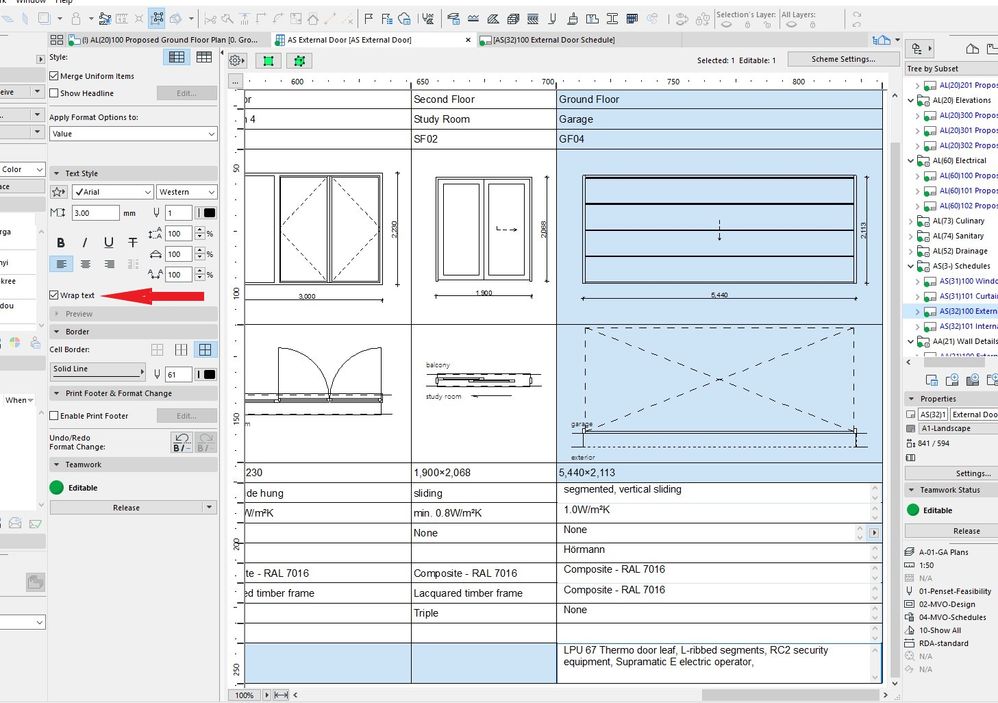
Still looking?

Suggested topics
- automatic sill line in window schedule in Project data & BIM
- Archicad to Revit for MEP: the workaround Graphisoft's own method couldn't give me in Collaboration with other software
- 2D views of windows & doors in schedule have unwanted lines. in Documentation
- Incomplete 2D Representation and Incorrect Placement of Handrail Fixings at Nodes in Documentation
- Schedule of doors and windows is summing in Project data & BIM
