
Turn on suggestions
Auto-suggest helps you quickly narrow down your search results by suggesting possible matches as you type.
Showing results for
EN
Turn on suggestions
Auto-suggest helps you quickly narrow down your search results by suggesting possible matches as you type.
Showing results for
- English
- :
- Forum
- :
- Documentation
- :
- Mirror surface setting for interior render Cineren...
Options
- Subscribe to RSS Feed
- Mark Topic as New
- Mark Topic as Read
- Pin this post for me
- Bookmark
- Subscribe to Topic
- Mute
- Printer Friendly Page

ayush_lohia
Participant
Options
- Mark as New
- Bookmark
- Subscribe
- Mute
- Subscribe to RSS Feed
- Permalink
- Report Inappropriate Content
2021-11-18 03:53 PM
Mirror surface setting for interior render Cinerender
2021-11-18
03:53 PM
Hello,
I want an interior render with "indoor lamps only" settings. The mirror in the interior space does not reflect the interior space in Cinerender. The rendered output shows a blackout area instead of reflection. I checked with surfaces settings, the environment is turned off. Please help!
Read-Only
6 Replies 6

Lingwisyer
Guru
Options
- Mark as New
- Bookmark
- Subscribe
- Mute
- Subscribe to RSS Feed
- Permalink
- Report Inappropriate Content
2021-11-19 08:34 AM
2021-11-19
08:34 AM
No idea what that preset contains, but are Reflections turned on?
| AC22-29 AUS 3200 | Help Those Help You - Add a Signature |
| Self-taught, bend it till it breaks | Creating a Thread |
| Win11 | i9 10850K | 64GB | RX6600 | Win11 | 7800X3D | 32GB | RTX5070TI |
ayush_lohia
Participant
Options
- Mark as New
- Bookmark
- Subscribe
- Mute
- Subscribe to RSS Feed
- Permalink
- Report Inappropriate Content
2021-11-19 08:36 AM
2021-11-19
08:36 AM
Issue resolved. Just an error with the working file.

MegH
Participant
Options
- Mark as New
- Bookmark
- Subscribe
- Mute
- Subscribe to RSS Feed
- Permalink
- Report Inappropriate Content
2021-12-08 09:06 AM
2021-12-08
09:06 AM
Hi ayush_lohia, How did you fix the issue as I seem to have the same problem? "Environment" is switched off and I don't get a realistic reflection of my surroundings, however I do see either a blacked out area or 'the sky'..

Barry Kelly
Moderator
Options
- Mark as New
- Bookmark
- Subscribe
- Mute
- Subscribe to RSS Feed
- Permalink
- Report Inappropriate Content
2021-12-08 09:21 AM
2021-12-08
09:21 AM
Try different render scenes - they will all have different settings.
Maybe it is to do with one of these general settings.
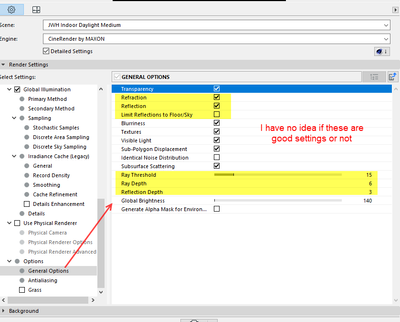
Barry.
One of the forum moderators.
Versions 6.5 to 27
i7-10700 @ 2.9Ghz, 32GB ram, GeForce RTX 2060 (6GB), Windows 10
Lenovo Thinkpad - i7-1270P 2.20 GHz, 32GB RAM, Nvidia T550, Windows 11
Versions 6.5 to 27
i7-10700 @ 2.9Ghz, 32GB ram, GeForce RTX 2060 (6GB), Windows 10
Lenovo Thinkpad - i7-1270P 2.20 GHz, 32GB RAM, Nvidia T550, Windows 11
ayush_lohia
Participant
Options
- Mark as New
- Bookmark
- Subscribe
- Mute
- Subscribe to RSS Feed
- Permalink
- Report Inappropriate Content
2021-12-08 07:51 PM
2021-12-08
07:51 PM
Does the blacked out area appear only in render preview or the processed render also? If it appears only in render preview, then the rendered image will come out fine. Also, is it an outdoor render or interior render?
Barry Kelly
Moderator
Options
- Mark as New
- Bookmark
- Subscribe
- Mute
- Subscribe to RSS Feed
- Permalink
- Report Inappropriate Content
2021-12-09 02:56 AM
2021-12-09
02:56 AM
Yes, we discovered that in another post that MegH started.
https://community.graphisoft.com/t5/Design-forum/Mirror-Render/m-p/324509/highlight/true#M156063
Barry.
One of the forum moderators.
Versions 6.5 to 27
i7-10700 @ 2.9Ghz, 32GB ram, GeForce RTX 2060 (6GB), Windows 10
Lenovo Thinkpad - i7-1270P 2.20 GHz, 32GB RAM, Nvidia T550, Windows 11
Versions 6.5 to 27
i7-10700 @ 2.9Ghz, 32GB ram, GeForce RTX 2060 (6GB), Windows 10
Lenovo Thinkpad - i7-1270P 2.20 GHz, 32GB RAM, Nvidia T550, Windows 11

Still looking?

Suggested topics
