
Turn on suggestions
Auto-suggest helps you quickly narrow down your search results by suggesting possible matches as you type.
Showing results for
EN
Turn on suggestions
Auto-suggest helps you quickly narrow down your search results by suggesting possible matches as you type.
Showing results for
- English
- :
- Developer Hub
- :
- GDL
- :
- Tube command 3d parts not aligned
Options
- Subscribe to RSS Feed
- Mark Topic as New
- Mark Topic as Read
- Pin this post for me
- Bookmark
- Subscribe to Topic
- Mute
- Printer Friendly Page

Options
- Mark as New
- Bookmark
- Subscribe
- Mute
- Subscribe to RSS Feed
- Permalink
- Report Inappropriate Content
2025-12-16 06:51 PM
Tube command 3d parts not aligned
2025-12-16
06:51 PM
I am creating an object that will be a parametric car ramp using a tube command as a base of geometry. The geometry is then cut to parametric outline in plan to fit the needed geometry.
And I found out that tube command (1st or 2nd) is buggy as hell with alignment of the geometry parts.
It is not visible from the outside, but doing a section reveals the "secret". Easy to check with the railing tool with the profile of the slab 3m wide with 2 layers one finish - 5cm and base - 20 cm.
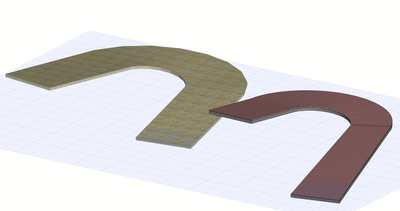
The left is a non cut one the right is using the cut to fit the outline.
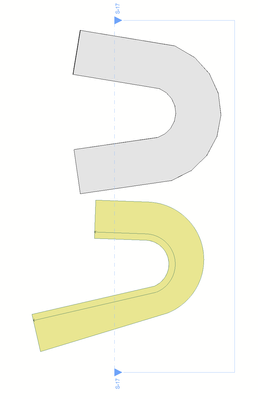
Plan i rotated 90 deg from what is seen in 3d
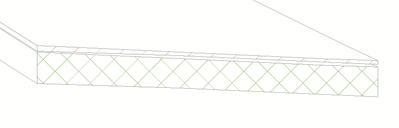
Here goes the section of the non cut one:

The outside is aligned...but not what happens inside.
But when it is cut it becomes even "funnier":
Any fix of this command is on the "go"?
It is very usable in many cases.
For finishing the tool I have on the workshop I will probably need to do a series of bolean operations which will slow down the model...or I will give the advice to use single, non composite slab...which sounds no good.
Piotr
Labels:
- Labels:
-
Possible Bug
11 Replies 11

rudl
Booster
Options
- Mark as New
- Bookmark
- Subscribe
- Mute
- Subscribe to RSS Feed
- Permalink
- Report Inappropriate Content
2025-12-17
02:37 PM
- last edited on
2025-12-18
12:06 PM
by
 Laszlo Nagy
2025-12-17
02:37 PM
My guess is:
Because its very thin and depending on how top and bottom faces are triangulated
-> some self intersection could happen.
And when you apply the cut it probably tries to "fix" it.
Solution would be to make the Tube more detailed, more controlpoints in the recetangle aswall as in the path curve
-rudl

Options
- Mark as New
- Bookmark
- Subscribe
- Mute
- Subscribe to RSS Feed
- Permalink
- Report Inappropriate Content
2025-12-17 06:37 PM
2025-12-17
06:37 PM
More detailed...meaning more vertices...does not help much - the triangulation algorithm is not aligned unfortunately.
What i noticed - the top surfaces of say. both tubes are aligned, but the top and bottom surface never. It seems the initial designer of this command did not take care about it 😞
So finally I will do the bolean ops 😞
rudl
Booster
Options
- Mark as New
- Bookmark
- Subscribe
- Mute
- Subscribe to RSS Feed
- Permalink
- Report Inappropriate Content
2025-12-17 06:56 PM - edited 2025-12-17 06:59 PM
2025-12-17
06:56 PM
Well you could use MULZ -1 to mirror it and code in the oposite Z-direction in addition one tube
So that two top or bottom surfaces touch 😅 that could work
Options
- Mark as New
- Bookmark
- Subscribe
- Mute
- Subscribe to RSS Feed
- Permalink
- Report Inappropriate Content
2025-12-18 12:03 PM
2025-12-18
12:03 PM
Not that easy...because the the path of the tube would have to be also mirrored in Z...and I need it to be universal and more layers as in the real life 😛

Hmooslechner
Moderator
Options
- Mark as New
- Bookmark
- Subscribe
- Mute
- Subscribe to RSS Feed
- Permalink
- Report Inappropriate Content
2025-12-19 06:17 AM - edited 2025-12-19 06:19 AM
2025-12-19
06:17 AM
Not exact the topic, but as reminder..
(Piotr - Thanks for the Profile-Code some Years before)
Do You Know the Ramps i made? Straight and rotated- even as Spiral?
https://bimcomponents.com/GSM/Details/23828

https://bimcomponents.com/GSM/Details/24250

AC5.5-AC27EduAut, PC-Win10, MacbookAirM1, MacbookM1Max, Win-I7+Nvidia
Options
- Mark as New
- Bookmark
- Subscribe
- Mute
- Subscribe to RSS Feed
- Permalink
- Report Inappropriate Content
2025-12-19 11:00 AM
2025-12-19
11:00 AM
If there is one material solution...it fairly ok with the tube, but when more (also profile with more than one element) it gets "dirty"
I am trying to make an element where first step is to draw/modify a path like a reference line in the wall/beam - and it will create a shape based on the tube.
The second step would be "unlink" the outline from the initial shape and further modify the outline to fit space sometimes not regular (like outline of the shell).
So when cutting of the tube is kicking-in...the tube kicks back with the irregularities of triangulation (which is always there but not so much visible when not cut).
Hmooslechner
Moderator
Options
- Mark as New
- Bookmark
- Subscribe
- Mute
- Subscribe to RSS Feed
- Permalink
- Report Inappropriate Content
2025-12-19 11:47 AM
2025-12-19
11:47 AM
in my recent codet Stair-Tool, using the Goodies-addon for Polylines, i did not use the tube-command - of that reason - but instead i used some SEO-operations to get similar forms - rough so far, but geometrically ok. (german, but i thin you get the point.. The script - Made by Google-KI Gemeni3Pro (and me)..
AC5.5-AC27EduAut, PC-Win10, MacbookAirM1, MacbookM1Max, Win-I7+Nvidia

cuba
Advisor
Options
- Mark as New
- Bookmark
- Subscribe
- Mute
- Subscribe to RSS Feed
- Permalink
- Report Inappropriate Content
2025-12-23 11:16 AM
2025-12-23
11:16 AM
Very cool! crazy!
Apple M1 Max 32 GB
Latest AC
Latest AC
Hmooslechner
Moderator
Options
- Mark as New
- Bookmark
- Subscribe
- Mute
- Subscribe to RSS Feed
- Permalink
- Report Inappropriate Content
2025-12-27 11:11 AM - edited 2025-12-27 11:20 AM
2025-12-27
11:11 AM
a ramp with mass-command - not directly with tube. Tubes just for the ramp edges - made 95% with Google-Gemini3Pro AI and my corrections in a few hours. You just have to make very little steps (prompts) and have patience, let it correct the errors from Archicad's test routines - simply copy the error messages to the prompts - it mostly corrects it, if not, try again. Sometimes it "halluzinates" commands from other Script-languages, but Archicad's test-routine will point at it, so You can send a correction-promt to the AI.
(german)
https://www.youtube.com/watch?v=3kemRVxB1PA
AC29EduAut-Version: https://www.dropbox.com/scl/fi/kepw3jkgl9uiketrpj2hi/Strassen-T-8-und-Rampe-29a.pln?rlkey=r5b5hqamqv...
AC5.5-AC27EduAut, PC-Win10, MacbookAirM1, MacbookM1Max, Win-I7+Nvidia

Didn't find the answer?
Check other topics in this Forum
Back to ForumRead the latest accepted solutions!
Accepted SolutionsStart a new conversation!

