
Turn on suggestions
Auto-suggest helps you quickly narrow down your search results by suggesting possible matches as you type.
Showing results for
EN
Turn on suggestions
Auto-suggest helps you quickly narrow down your search results by suggesting possible matches as you type.
Showing results for
- English
- :
- Forum
- :
- Libraries & objects
- :
- Fixed width/height windows and doors
Options
- Subscribe to RSS Feed
- Mark Topic as New
- Mark Topic as Read
- Pin this post for me
- Bookmark
- Subscribe to Topic
- Mute
- Printer Friendly Page

Anonymous
Not applicable
Options
- Mark as New
- Bookmark
- Subscribe
- Mute
- Subscribe to RSS Feed
- Permalink
- Report Inappropriate Content
2015-05-19
05:18 PM
- last edited on
2023-05-24
12:32 PM
by
 Rubia Torres
Fixed width/height windows and doors
2015-05-19
05:18 PM
I wish to have a special library folder with a limited number of windows we use in a project to avoid having same ID windows with different parameters. That would make scheduling much easier.
17 Replies 17
 Laszlo Nagy
Community Admin
Options
- Mark as New
- Bookmark
- Subscribe
- Mute
- Subscribe to RSS Feed
- Permalink
- Report Inappropriate Content
2015-05-19 06:15 PM
2015-05-19
06:15 PM
You would have to modify the Parameter Script of those Window objects to achieve that.
If you are interested in knowing how, we can provide you the steps...
If you are interested in knowing how, we can provide you the steps...
Loving Archicad since 1995 - Find Archicad Tips at x.com/laszlonagy
AMD Ryzen9 5900X CPU, 64 GB RAM 3600 MHz, Nvidia GTX 1060 6GB, 500 GB NVMe SSD
2x28" (2560x1440), Windows 10 PRO ENG, Ac20-Ac29
AMD Ryzen9 5900X CPU, 64 GB RAM 3600 MHz, Nvidia GTX 1060 6GB, 500 GB NVMe SSD
2x28" (2560x1440), Windows 10 PRO ENG, Ac20-Ac29
Anonymous
Not applicable
Options
- Mark as New
- Bookmark
- Subscribe
- Mute
- Subscribe to RSS Feed
- Permalink
- Report Inappropriate Content
2015-05-19 07:35 PM
2015-05-19
07:35 PM
laszlonagy wrote:
You would have to modify the Parameter Script of those Window objects to achieve that.
If you are interested in knowing how, we can provide you the steps...
Hi laszlonagy!
I'm interested. I tried to open standard library windows but all available scripts relate to "migration". I just don't know where to look for it.
Laszlo Nagy
Community Admin
Options
- Mark as New
- Bookmark
- Subscribe
- Mute
- Subscribe to RSS Feed
- Permalink
- Report Inappropriate Content
2015-05-20 01:13 AM
2015-05-20
01:13 AM
Here is a sample code based on which you can do your own types.
You can either modify default AC GDL Objects or save a copy and modify that (may be better choice because Library update will overwrite any changes made to the default library):
This code should be placed into the Parameter Script of the Door or Window.
In this example I created a new parameter with the parameter name "WindowType" and Description "Window Type". Its parameter types is "Text".
What it does is it defines window types (such as "900x1500") in a value list for the WindowType parameter. It locks the A and B parameters so they cannot be set. Then using the PARAMETERS command it sets the values of the A and B parameters based on the value you selected for the WindowType parameter:
You can either modify default AC GDL Objects or save a copy and modify that (may be better choice because Library update will overwrite any changes made to the default library):
This code should be placed into the Parameter Script of the Door or Window.
In this example I created a new parameter with the parameter name "WindowType" and Description "Window Type". Its parameter types is "Text".
What it does is it defines window types (such as "900x1500") in a value list for the WindowType parameter. It locks the A and B parameters so they cannot be set. Then using the PARAMETERS command it sets the values of the A and B parameters based on the value you selected for the WindowType parameter:
LOCK "A", "B"

VALUES "WindowType" "900x1200", "900x1500", "900x1800",
		"1200x1200", "1200x1500", "1200x1800",
		"1500x1500", "1500x1800"

IF WindowType = "900x1200" THEN
	PARAMETERS A = 0.900, B = 1.200
ELSE
	IF WindowType = "900x1500" THEN
		PARAMETERS A = 0.900, B = 1.500
	ELSE
		IF WindowType = "900x1800" THEN
			PARAMETERS A = 0.900, B = 1.800
		ENDIF
	ENDIF
ENDIF

IF WindowType = "1200x1200" THEN
	PARAMETERS A = 1.200, B = 1.200
ELSE
	IF WindowType = "1200x1500" THEN
		PARAMETERS A = 1.200, B = 1.500
	ELSE
		IF WindowType = "1200x1800" THEN
			PARAMETERS A = 1.200, B = 1.800
		ENDIF
	ENDIF
ENDIF

IF WindowType = "1500x1500" THEN
	PARAMETERS A = 1.500, B = 1.500
ELSE
	IF WindowType = "1500x1800" THEN
		PARAMETERS A = 1.500, B = 1.800
	ENDIF
ENDIF
Loving Archicad since 1995 - Find Archicad Tips at x.com/laszlonagy
AMD Ryzen9 5900X CPU, 64 GB RAM 3600 MHz, Nvidia GTX 1060 6GB, 500 GB NVMe SSD
2x28" (2560x1440), Windows 10 PRO ENG, Ac20-Ac29
AMD Ryzen9 5900X CPU, 64 GB RAM 3600 MHz, Nvidia GTX 1060 6GB, 500 GB NVMe SSD
2x28" (2560x1440), Windows 10 PRO ENG, Ac20-Ac29
Laszlo Nagy
Community Admin
Options
- Mark as New
- Bookmark
- Subscribe
- Mute
- Subscribe to RSS Feed
- Permalink
- Report Inappropriate Content
2015-05-20 01:18 AM
2015-05-20
01:18 AM
And here is how it looks in the Window Settings Dialog in action.
Notice that the Width and Height fields are grayed (locked), and their values are set based on the value selected for the Window Type parameter.
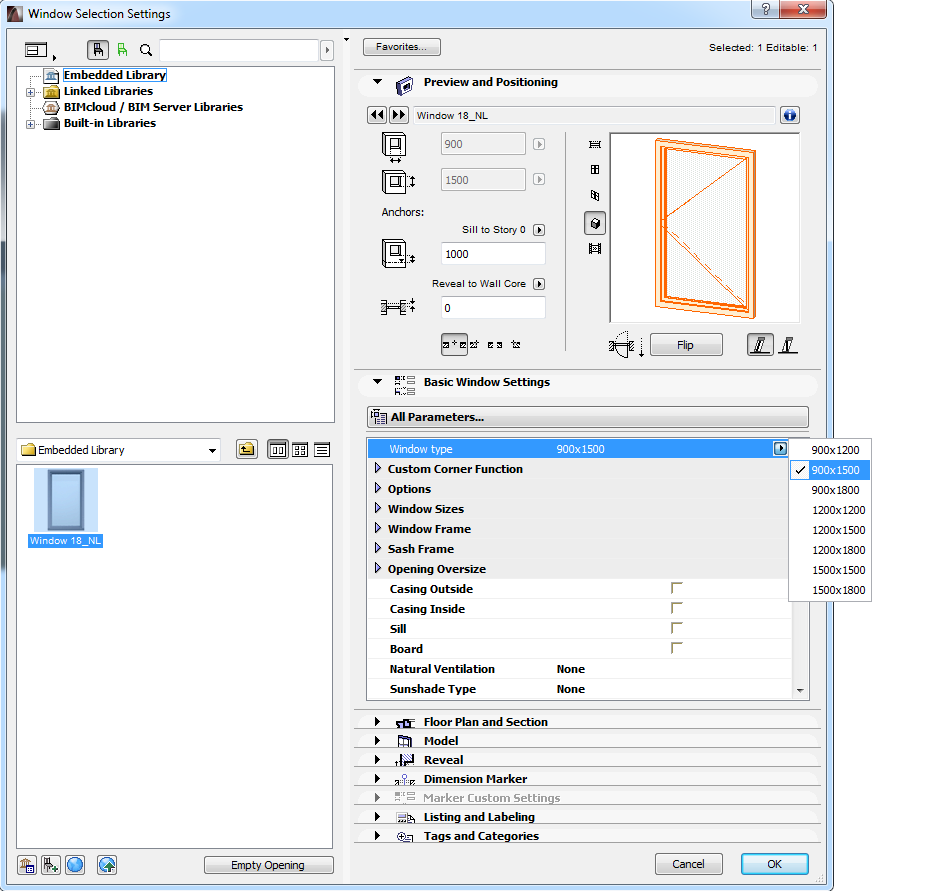
Notice that the Width and Height fields are grayed (locked), and their values are set based on the value selected for the Window Type parameter.
Loving Archicad since 1995 - Find Archicad Tips at x.com/laszlonagy
AMD Ryzen9 5900X CPU, 64 GB RAM 3600 MHz, Nvidia GTX 1060 6GB, 500 GB NVMe SSD
2x28" (2560x1440), Windows 10 PRO ENG, Ac20-Ac29
AMD Ryzen9 5900X CPU, 64 GB RAM 3600 MHz, Nvidia GTX 1060 6GB, 500 GB NVMe SSD
2x28" (2560x1440), Windows 10 PRO ENG, Ac20-Ac29
Anonymous
Not applicable
Options
- Mark as New
- Bookmark
- Subscribe
- Mute
- Subscribe to RSS Feed
- Permalink
- Report Inappropriate Content
2015-05-20 02:08 AM
2015-05-20
02:08 AM
Wow Laszlo! This works super cool!
Thank you so much.
Thank you so much.
Laszlo Nagy
Community Admin
Options
- Mark as New
- Bookmark
- Subscribe
- Mute
- Subscribe to RSS Feed
- Permalink
- Report Inappropriate Content
2015-05-20 02:27 AM
2015-05-20
02:27 AM
I am glad you find it useful.
I was also thinking that if you want to do this Parameter Script for many Door/Window objects, then it may be better to create a Macro Object that has only a Parameter Script and then use the CALL command to call that macro object from the Parameter Script of all Doors/Windows you wish to use it with.
This way, if the Window Type definitions change there is only one macro object you need to modify and all Door/Window objects using it would update perfectly.
So in each Door or Window object the PARAMETER Script would look something like this:
So this macro would have only a Parameter Script that is called as a macro from all Window objects using it to have these types available.
The macro object should not be placeable (placeable checkbox unchecked), should have the same parameters (which it will if it is created by using Save As on an existing Window.
I tried this an it works for me just fine.
Actually, it is also possible that in all Window objects you create another Parameter, called e.g. "Use Window Types", which would be an ON/OFF parameters. If it was ON, the Parameter Script would call the above macro, if it was OFF, it would not call the macro and the Window would work as before.
I was also thinking that if you want to do this Parameter Script for many Door/Window objects, then it may be better to create a Macro Object that has only a Parameter Script and then use the CALL command to call that macro object from the Parameter Script of all Doors/Windows you wish to use it with.
This way, if the Window Type definitions change there is only one macro object you need to modify and all Door/Window objects using it would update perfectly.
So in each Door or Window object the PARAMETER Script would look something like this:
CALL "WindowTypeMacro" PARAMETERS ALLAnd you could use the Save as command on any Window object, save it under the specified macro name ("WindowTypeMacro" in this example), delete the contents of all scripts, add the WindowType parameter, and paste the PARAMETER script I have given you in my previous post into the parameter script of this macro object.
So this macro would have only a Parameter Script that is called as a macro from all Window objects using it to have these types available.
The macro object should not be placeable (placeable checkbox unchecked), should have the same parameters (which it will if it is created by using Save As on an existing Window.
I tried this an it works for me just fine.
Actually, it is also possible that in all Window objects you create another Parameter, called e.g. "Use Window Types", which would be an ON/OFF parameters. If it was ON, the Parameter Script would call the above macro, if it was OFF, it would not call the macro and the Window would work as before.
Loving Archicad since 1995 - Find Archicad Tips at x.com/laszlonagy
AMD Ryzen9 5900X CPU, 64 GB RAM 3600 MHz, Nvidia GTX 1060 6GB, 500 GB NVMe SSD
2x28" (2560x1440), Windows 10 PRO ENG, Ac20-Ac29
AMD Ryzen9 5900X CPU, 64 GB RAM 3600 MHz, Nvidia GTX 1060 6GB, 500 GB NVMe SSD
2x28" (2560x1440), Windows 10 PRO ENG, Ac20-Ac29
Anonymous
Not applicable
Options
- Mark as New
- Bookmark
- Subscribe
- Mute
- Subscribe to RSS Feed
- Permalink
- Report Inappropriate Content
2015-06-11 03:01 PM
2015-06-11
03:01 PM
Hi,
why don't we change point of view? Instead of calling the same object from all windows why don't you call all windows from one object with the parameter script.
You don't modify windows but call them with the parameters you want.
Hope it helps
Ilder
why don't we change point of view? Instead of calling the same object from all windows why don't you call all windows from one object with the parameter script.
You don't modify windows but call them with the parameters you want.
Hope it helps
Ilder
Laszlo Nagy
Community Admin
Options
- Mark as New
- Bookmark
- Subscribe
- Mute
- Subscribe to RSS Feed
- Permalink
- Report Inappropriate Content
2015-06-11 05:34 PM
2015-06-11
05:34 PM
But how do you solve the situation that the object that would have to be able to call all Window objects would need to have the Interface Script and parameters of every single Window it can call?
Interesting idea (one Window object) but how would it be implemented?
Interesting idea (one Window object) but how would it be implemented?
Loving Archicad since 1995 - Find Archicad Tips at x.com/laszlonagy
AMD Ryzen9 5900X CPU, 64 GB RAM 3600 MHz, Nvidia GTX 1060 6GB, 500 GB NVMe SSD
2x28" (2560x1440), Windows 10 PRO ENG, Ac20-Ac29
AMD Ryzen9 5900X CPU, 64 GB RAM 3600 MHz, Nvidia GTX 1060 6GB, 500 GB NVMe SSD
2x28" (2560x1440), Windows 10 PRO ENG, Ac20-Ac29
Anonymous
Not applicable
Options
- Mark as New
- Bookmark
- Subscribe
- Mute
- Subscribe to RSS Feed
- Permalink
- Report Inappropriate Content
2015-06-12 03:56 PM
2015-06-12
03:56 PM
Yes and no,
the goal was to have a list of windows that user can't accidentally modify.
So the "to rule them all" object has only few parameters:
a parameter with the windows types
and some parameters to rule the position,
then each single call must have the parameters needed to model the window as was intended to be.
the goal was to have a list of windows that user can't accidentally modify.
So the "to rule them all" object has only few parameters:
a parameter with the windows types
and some parameters to rule the position,
then each single call must have the parameters needed to model the window as was intended to be.
Didn't find the answer?
Check other topics in this Forum
Back to ForumRead the latest accepted solutions!
Accepted SolutionsStart a new conversation!

Suggested topics
- Curved wall bug...any way to fix? in Modeling
- MEP AC29 Incorrect behavior of the Z mark in the tracking display when editing the Z mark of a pipe in Modeling
- Roof custom layers in/out in Modeling
- BIMcloud Basic 2026.1 – Activate button does not open Graphisoft ID activation in Teamwork & BIMcloud
- Wall surface offset in Modeling
