
Turn on suggestions
Auto-suggest helps you quickly narrow down your search results by suggesting possible matches as you type.
Showing results for
EN
Turn on suggestions
Auto-suggest helps you quickly narrow down your search results by suggesting possible matches as you type.
Showing results for
Options
- Subscribe to RSS Feed
- Mark Topic as New
- Mark Topic as Read
- Pin this post for me
- Bookmark
- Subscribe to Topic
- Mute
- Printer Friendly Page

Borshchyk
Booster
Options
- Mark as New
- Bookmark
- Subscribe
- Mute
- Subscribe to RSS Feed
- Permalink
- Report Inappropriate Content
2024-02-26 09:59 AM
Roof Accessories, point origin
2024-02-26
09:59 AM
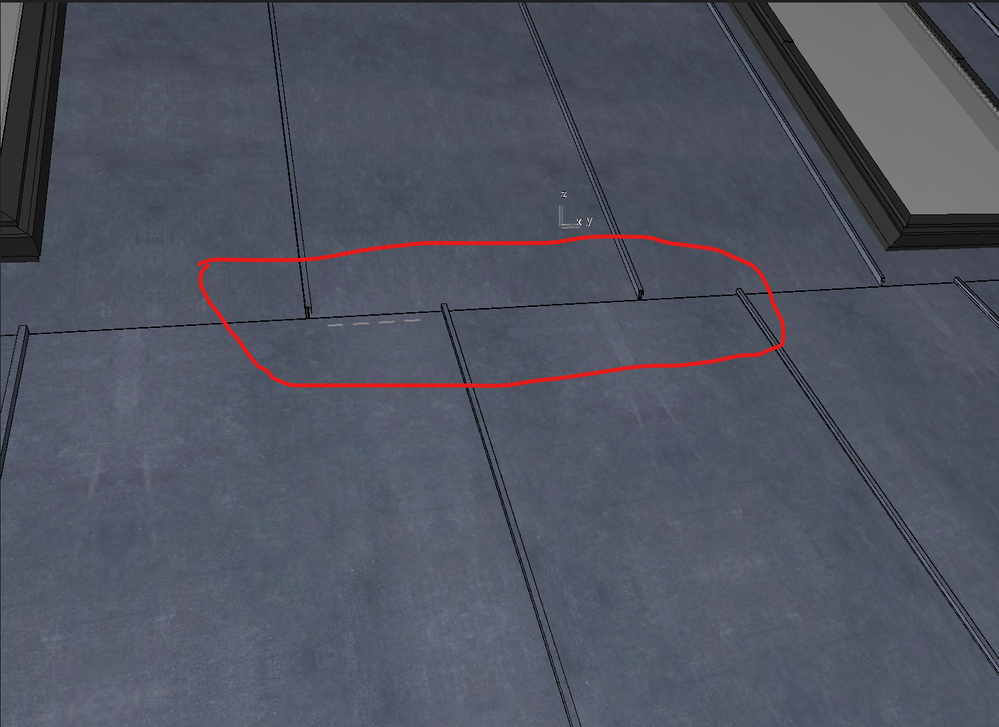
Hi. I use Roof Accessories for the roof, but if I have a roof with a different degree of slope, the sheet metal does not connect at one point. Please take a look at the screen.
Please advise how I can adjust it?
11 Replies 11

Barry Kelly
Moderator
Options
- Mark as New
- Bookmark
- Subscribe
- Mute
- Subscribe to RSS Feed
- Permalink
- Report Inappropriate Content
2024-02-26 10:05 AM
2024-02-26
10:05 AM
I believe it is linked to the length of the roof pivot (pitching) line.
Try adjusting the start and end points of that line and see if it has any affect.
The line doesn't print and so long as you only adjust the length of the line, it will not affect the actual roof element.
Barry.
One of the forum moderators.
Versions 6.5 to 27
i7-10700 @ 2.9Ghz, 32GB ram, GeForce RTX 2060 (6GB), Windows 10
Lenovo Thinkpad - i7-1270P 2.20 GHz, 32GB RAM, Nvidia T550, Windows 11
Versions 6.5 to 27
i7-10700 @ 2.9Ghz, 32GB ram, GeForce RTX 2060 (6GB), Windows 10
Lenovo Thinkpad - i7-1270P 2.20 GHz, 32GB RAM, Nvidia T550, Windows 11
Borshchyk
Booster
Options
- Mark as New
- Bookmark
- Subscribe
- Mute
- Subscribe to RSS Feed
- Permalink
- Report Inappropriate Content
2024-02-26 10:53 AM - edited 2024-02-26 10:54 AM
2024-02-26
10:53 AM
Hi Barry
I adjusted the length of the roof pivot line, but it had no effect.
Borshchyk
Booster
Options
- Mark as New
- Bookmark
- Subscribe
- Mute
- Subscribe to RSS Feed
- Permalink
- Report Inappropriate Content
2024-02-26 11:00 AM - edited 2024-02-26 11:12 AM
2024-02-26
11:00 AM
I noticed that the problem was at the starting point of roof modeling.
Because when I create one roof and then divide it into two slopes with different angles, it's OK, but when I only cut off or stretched a piece where there was a starting point, everything breaks down.
Borshchyk
Booster
Options
- Mark as New
- Bookmark
- Subscribe
- Mute
- Subscribe to RSS Feed
- Permalink
- Report Inappropriate Content
2024-02-26 11:24 AM - edited 2024-02-26 02:42 PM
2024-02-26
11:24 AM
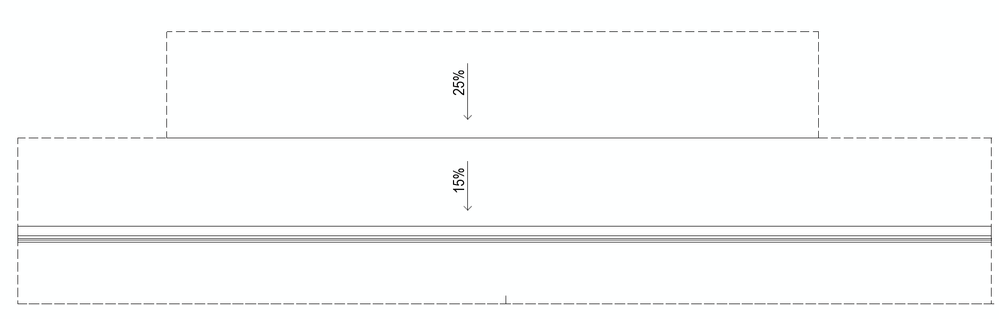
This means that there is no chance to model a roof in the shape I am attaching and have a similar position of the sheet metal.
This tool cannot be controlled, It makes no sense.

SenecaDesignLLC
Ace
Options
- Mark as New
- Bookmark
- Subscribe
- Mute
- Subscribe to RSS Feed
- Permalink
- Report Inappropriate Content
2024-02-26 03:33 PM
2024-02-26
03:33 PM
I fixed this with some light GDL coding, if you are interested I can post the code change

cuba
Advisor
Options
- Mark as New
- Bookmark
- Subscribe
- Mute
- Subscribe to RSS Feed
- Permalink
- Report Inappropriate Content
2024-02-26 03:39 PM
2024-02-26
03:39 PM
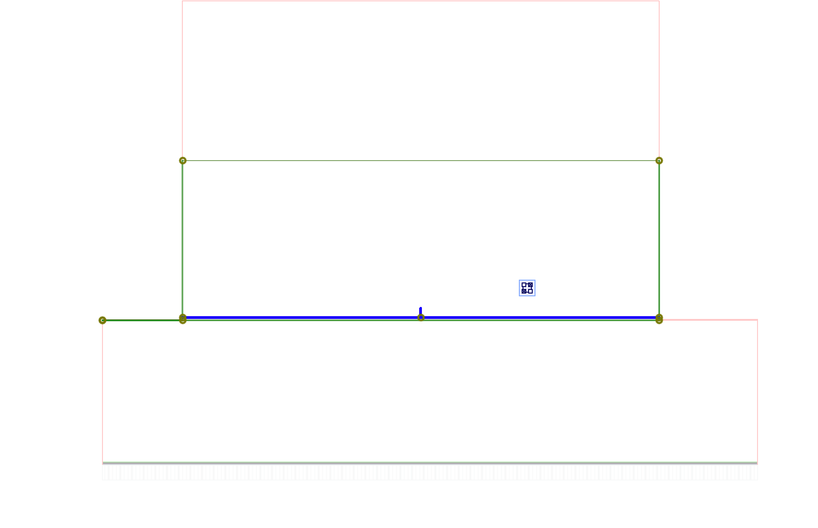
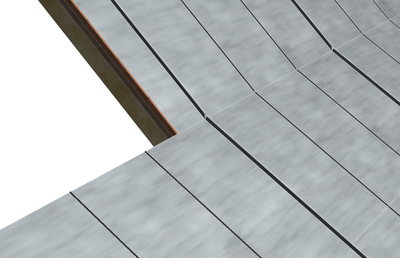
If you make the small roof as wide as the large roof over a very, very, very narrow section, the roofs do align.
Apple M1 Max 32 GB
Latest AC
Latest AC
SenecaDesignLLC
Ace
Options
- Mark as New
- Bookmark
- Subscribe
- Mute
- Subscribe to RSS Feed
- Permalink
- Report Inappropriate Content
2024-02-26 03:43 PM
2024-02-26
03:43 PM
True, I just didn't like the work around so I lined things up and added a parameter to shift the roofing when needed.
Borshchyk
Booster
Options
- Mark as New
- Bookmark
- Subscribe
- Mute
- Subscribe to RSS Feed
- Permalink
- Report Inappropriate Content
2024-02-26 04:55 PM - edited 2024-02-26 05:42 PM
2024-02-26
04:55 PM
Hi Cuba
If you pull out one side of the roof (the one where the starting point was) to edit the roof, everything will break. I know we can move and adjust the lines, but I have a very complicated roof and I can't move it. My question was mainly about controlling this tool.
Borshchyk
Booster
Options
- Mark as New
- Bookmark
- Subscribe
- Mute
- Subscribe to RSS Feed
- Permalink
- Report Inappropriate Content
2024-02-26 04:57 PM
2024-02-26
04:57 PM
Hei Seneca DesignLLC
Thanks, I could try it, but I'm not familiar with GDL.

Still looking?

Suggested topics
- Project origin error, intangible second project origin in 3D view in Modeling
- IFC export ignoring rotation and elevation of survey point in Collaboration with other software
- Default Localized Template -vs- New and Reset All in Project data & BIM
- Unable to hide Survey Point in Modeling
- Archicad 28 – Custom Inner Post Issue in Libraries & objects
