
Turn on suggestions
Auto-suggest helps you quickly narrow down your search results by suggesting possible matches as you type.
Showing results for
EN
Turn on suggestions
Auto-suggest helps you quickly narrow down your search results by suggesting possible matches as you type.
Showing results for
- English
- :
- Developer Hub
- :
- GDL
- :
- Re: GDL:How to get a list of font names with the '...
Options
- Subscribe to RSS Feed
- Mark Topic as New
- Mark Topic as Read
- Pin this post for me
- Bookmark
- Subscribe to Topic
- Mute
- Printer Friendly Page

yongler
Enthusiast
Options
- Mark as New
- Bookmark
- Subscribe
- Mute
- Subscribe to RSS Feed
- Permalink
- Report Inappropriate Content
2023-03-28 04:00 AM - edited 2023-03-28 04:21 AM
GDL:How to get a list of font names with the '@' symbol ?
2023-03-28
04:00 AM
The font list is long. How do I display only a list of font names with the "@" symbol?
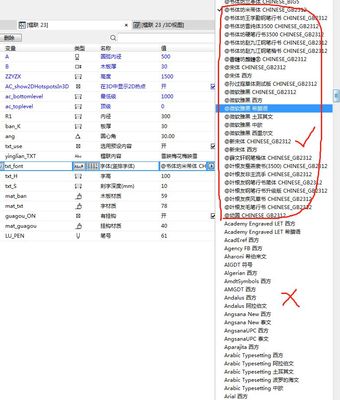
The following script is incorrect. How should I write?
dim fontNames[]
n = request("FONTNAMES_LIST", "", fontNames)

if STRSTR ("fontNames", "@") =1 then    !!! ===There is an error here ?
    values "txt_font" fontNames, custom
endif
Labels:
- Labels:
-
Library (GDL)
2 Replies 2

scottjm
Mentor
Options
- Mark as New
- Bookmark
- Subscribe
- Mute
- Subscribe to RSS Feed
- Permalink
- Report Inappropriate Content
2023-03-28 05:05 AM - edited 2023-03-28 05:07 AM
2023-03-28
05:05 AM
You need to iterate through each item in the font list array and create a new array with only the items you want. And then assign that shortened list back to your fontName parameter.
Give this a go.
dim fontList[]
dim shortFontNames[]
n = request("FONTNAMES_LIST", "", fontList)

k = 1                                   	  !! a separate counter for shortfontnames index
for i = 1 to vardim1(fontList)         		  !! iterate through each font name in the array

	if STRSTR (fontList[i], "@" ) = 1 then    !! check it has an @ symbol in the name
      	shortFontNames[k] = fontList[i]    	  !! add it to the new lists
    	k = k+1                                 !! increase the separate counter by one
	endif
next i

values "fontName" shortFontNames
Scott J. Moore | Fulton Trotter Architects | BIM Manager, Associate, Architect
Since AC13 | Current versions AC23.7000 & AC26.5002 | BIMCloud Basic | Python, GDL, VBA, PHP, SQL, CSS
Certified Graphisoft BIM Manger (2022)
Win 10, i9-9900K, 32GB, Quadro P2200, 500GB NVMe
Since AC13 | Current versions AC23.7000 & AC26.5002 | BIMCloud Basic | Python, GDL, VBA, PHP, SQL, CSS
Certified Graphisoft BIM Manger (2022)
Win 10, i9-9900K, 32GB, Quadro P2200, 500GB NVMe
yongler
Enthusiast
Options
- Mark as New
- Bookmark
- Subscribe
- Mute
- Subscribe to RSS Feed
- Permalink
- Report Inappropriate Content
2023-03-28 06:11 AM
2023-03-28
06:11 AM
Perfect! thank you very much!

Didn't find the answer?
Check other topics in this Forum
Back to ForumRead the latest accepted solutions!
Accepted SolutionsStart a new conversation!

Suggested topics
