
Turn on suggestions
Auto-suggest helps you quickly narrow down your search results by suggesting possible matches as you type.
Showing results for
EN
Turn on suggestions
Auto-suggest helps you quickly narrow down your search results by suggesting possible matches as you type.
Showing results for
Options
- Subscribe to RSS Feed
- Mark Topic as New
- Mark Topic as Read
- Pin this post for me
- Bookmark
- Subscribe to Topic
- Mute
- Printer Friendly Page

INTEXHOMES
Booster
Options
- Mark as New
- Bookmark
- Subscribe
- Mute
- Subscribe to RSS Feed
- Permalink
- Report Inappropriate Content
2022-07-28 03:19 AM - edited 2022-07-28 03:21 AM
Custom Text in Zones
2022-07-28
03:19 AM
I have a custom text setup in my Zone Stamp. Where do I edit the value of this custom text? Looked everywhere. Achicad 25
Solved! Go to Solution.
Solved
Read-Only
2 Solutions
Accepted Solutions

Barry Kelly
Moderator
Options
- Mark as New
- Bookmark
- Subscribe
- Mute
- Subscribe to RSS Feed
- Permalink
- Report Inappropriate Content
2022-07-28 05:02 AM - edited 2022-07-28 05:03 AM
2022-07-28
05:02 AM
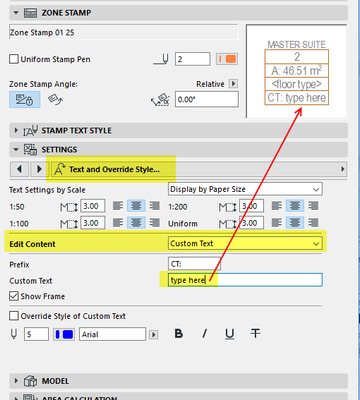
I don't use these zone stamps and it took me a while to work it out.
Zone Stamp 01 is set out differently to Zone Stamp 02.
in 01 ...
Barry.
One of the forum moderators.
Versions 6.5 to 27
i7-10700 @ 2.9Ghz, 32GB ram, GeForce RTX 2060 (6GB), Windows 10
Lenovo Thinkpad - i7-1270P 2.20 GHz, 32GB RAM, Nvidia T550, Windows 11
Versions 6.5 to 27
i7-10700 @ 2.9Ghz, 32GB ram, GeForce RTX 2060 (6GB), Windows 10
Lenovo Thinkpad - i7-1270P 2.20 GHz, 32GB RAM, Nvidia T550, Windows 11
INTEXHOMES
Booster
Options
- Mark as New
- Bookmark
- Subscribe
- Mute
- Subscribe to RSS Feed
- Permalink
- Report Inappropriate Content
2022-07-28 05:12 AM
2022-07-28
05:12 AM
Wow. Thank you Barry! I must be blind. Was looking everywhere. Yes. this is where it is.
Solution
6 Replies 6
Barry Kelly
Moderator
Options
- Mark as New
- Bookmark
- Subscribe
- Mute
- Subscribe to RSS Feed
- Permalink
- Report Inappropriate Content
2022-07-28 03:23 AM
2022-07-28
03:23 AM
I would assume it is in the settings for the zone stamp.
What stamp are you using?
Can you show a screen shot of the stamp and its settings?
Barry.
One of the forum moderators.
Versions 6.5 to 27
i7-10700 @ 2.9Ghz, 32GB ram, GeForce RTX 2060 (6GB), Windows 10
Lenovo Thinkpad - i7-1270P 2.20 GHz, 32GB RAM, Nvidia T550, Windows 11
Versions 6.5 to 27
i7-10700 @ 2.9Ghz, 32GB ram, GeForce RTX 2060 (6GB), Windows 10
Lenovo Thinkpad - i7-1270P 2.20 GHz, 32GB RAM, Nvidia T550, Windows 11
INTEXHOMES
Booster
Options
- Mark as New
- Bookmark
- Subscribe
- Mute
- Subscribe to RSS Feed
- Permalink
- Report Inappropriate Content
2022-07-28 03:28 AM - edited 2022-07-28 03:28 AM
2022-07-28
03:28 AM
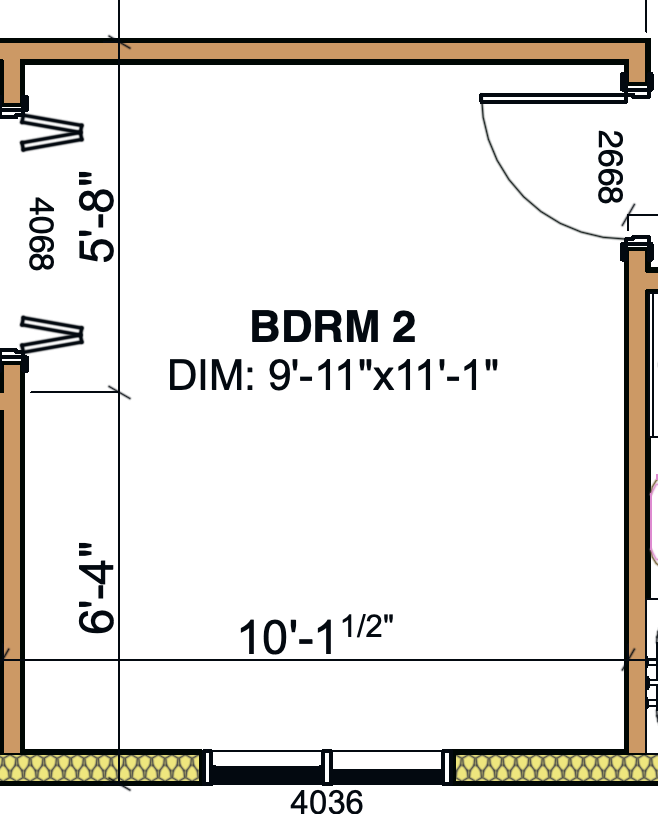
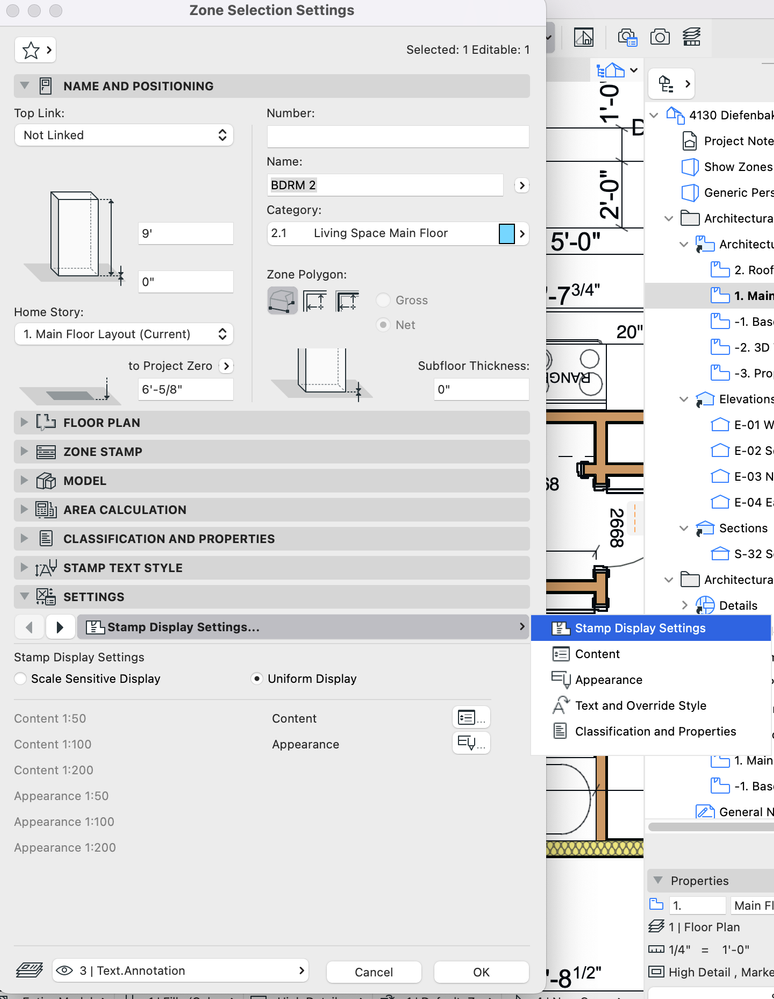
I thought so too. Funny thing I set up those Custom Zone. Can't find how to edit values in 25. In 22 it was in stamp settings. I need to change DIM values can't find where.
Barry Kelly
Moderator
Options
- Mark as New
- Bookmark
- Subscribe
- Mute
- Subscribe to RSS Feed
- Permalink
- Report Inappropriate Content
2022-07-28 03:50 AM
2022-07-28
03:50 AM
In the 'Stamp Display Settings' what do you see when you click on the 'Content' button or browse the interface pages.
Is this custom text in the 'Custom texts' page?
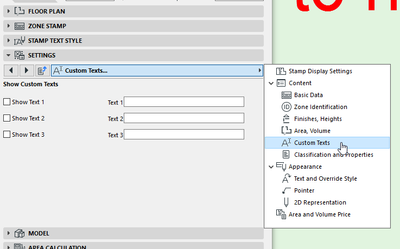
This image was from 'Zone stamp 02 25'.
I can't tell from those images what zone stamp you are actually using - I might not even have it in the AUS library.
But if you can say what the name of the zone stamp is, I can see if I have something similar.
Barry.
One of the forum moderators.
Versions 6.5 to 27
i7-10700 @ 2.9Ghz, 32GB ram, GeForce RTX 2060 (6GB), Windows 10
Lenovo Thinkpad - i7-1270P 2.20 GHz, 32GB RAM, Nvidia T550, Windows 11
Versions 6.5 to 27
i7-10700 @ 2.9Ghz, 32GB ram, GeForce RTX 2060 (6GB), Windows 10
Lenovo Thinkpad - i7-1270P 2.20 GHz, 32GB RAM, Nvidia T550, Windows 11
INTEXHOMES
Booster
Options
- Mark as New
- Bookmark
- Subscribe
- Mute
- Subscribe to RSS Feed
- Permalink
- Report Inappropriate Content
2022-07-28 04:05 AM
2022-07-28
04:05 AM
I am using Zone Stamp 01 25. I don't have the fields you have on your screen for some reason. I used to have them. I remember it was easy to make changes. Now that the custom text section is gone.
Barry Kelly
Moderator
Options
- Mark as New
- Bookmark
- Subscribe
- Mute
- Subscribe to RSS Feed
- Permalink
- Report Inappropriate Content
2022-07-28 05:02 AM - edited 2022-07-28 05:03 AM
2022-07-28
05:02 AM
I don't use these zone stamps and it took me a while to work it out.
Zone Stamp 01 is set out differently to Zone Stamp 02.
in 01 ...
Barry.
One of the forum moderators.
Versions 6.5 to 27
i7-10700 @ 2.9Ghz, 32GB ram, GeForce RTX 2060 (6GB), Windows 10
Lenovo Thinkpad - i7-1270P 2.20 GHz, 32GB RAM, Nvidia T550, Windows 11
Versions 6.5 to 27
i7-10700 @ 2.9Ghz, 32GB ram, GeForce RTX 2060 (6GB), Windows 10
Lenovo Thinkpad - i7-1270P 2.20 GHz, 32GB RAM, Nvidia T550, Windows 11
INTEXHOMES
Booster
Options
- Mark as New
- Bookmark
- Subscribe
- Mute
- Subscribe to RSS Feed
- Permalink
- Report Inappropriate Content
2022-07-28 05:12 AM
2022-07-28
05:12 AM
Wow. Thank you Barry! I must be blind. Was looking everywhere. Yes. this is where it is.
Solution

Still looking?
Suggested topics
