
Turn on suggestions
Auto-suggest helps you quickly narrow down your search results by suggesting possible matches as you type.
Showing results for
EN
Turn on suggestions
Auto-suggest helps you quickly narrow down your search results by suggesting possible matches as you type.
Showing results for
- English
- :
- Forum
- :
- Visualization
- :
- How can I use the maxwell material in Archicad 12 ...
Options
- Subscribe to RSS Feed
- Mark Topic as New
- Mark Topic as Read
- Pin this post for me
- Bookmark
- Subscribe to Topic
- Mute
- Printer Friendly Page

Anonymous
Not applicable
Options
- Mark as New
- Bookmark
- Subscribe
- Mute
- Subscribe to RSS Feed
- Permalink
- Report Inappropriate Content
2009-04-07
04:11 AM
- last edited on
2023-05-11
12:17 PM
by
 Noemi Balogh
How can I use the maxwell material in Archicad 12 ...
2009-04-07
04:11 AM
I try to use the material of maxwell, I do:
1- material settings box;
I duplicate an archicad material
2- I select "Maxwell material" in the box and I load the material (see attachement)
3- I apply the new material on my wall by "wall selection settings" (but its the materiel duplicate of archicad who appear)
4- I start the render and its a message error in maxwell:
ERROR: - File "C:/Program Files/Next Limit/Maxwell/materials database/textures/arroway/metal+plate+01_d100.jpg" has not been found. Render cannot continue.
ERROR: - Render Failed
5- I realised that my material is NOT a JPEG but an MXM...
6- I feel stupid...
So, what is the good move to apply the material of maxwell in ARchicad?
In the 2 attachement, i place the box material that I would like use.
Excuse for my english.... I talk french....
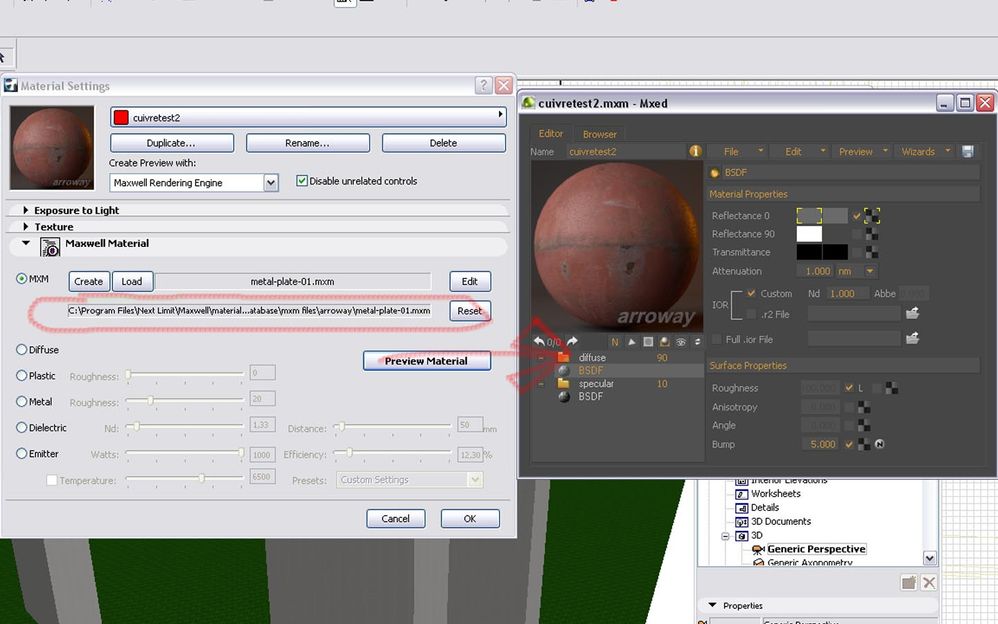
7 Replies 7
Anonymous
Not applicable
Options
- Mark as New
- Bookmark
- Subscribe
- Mute
- Subscribe to RSS Feed
- Permalink
- Report Inappropriate Content
2009-04-07 04:14 AM
2009-04-07
04:14 AM
the second attachement...


TMA_80
Enthusiast
Options
- Mark as New
- Bookmark
- Subscribe
- Mute
- Subscribe to RSS Feed
- Permalink
- Report Inappropriate Content
2009-04-07 04:46 PM
2009-04-07
04:46 PM
hi!
have a look:
http://think.maxwellrender.com/archicad_plugin___basic_render_diretto_con_mxm_63.html
have a look:
AC12_27 |Win11_64bit|
Anonymous
Not applicable
Options
- Mark as New
- Bookmark
- Subscribe
- Mute
- Subscribe to RSS Feed
- Permalink
- Report Inappropriate Content
2009-04-07 07:42 PM
2009-04-07
07:42 PM
Thank TMA_80,
I watch the movie and I choose a path for my texture in the material editor but now, when I start the render I have an other error:
[07/April/2009 13:40:26] Checking Data
[07/April/2009 13:40:26] Loading Bitmaps & Preprocessing Data
ERROR: - Render Failed
Do you know what it is?
I watch the movie and I choose a path for my texture in the material editor but now, when I start the render I have an other error:
[07/April/2009 13:40:26] Checking Data
[07/April/2009 13:40:26] Loading Bitmaps & Preprocessing Data
ERROR: - Render Failed
Do you know what it is?
TMA_80
Enthusiast
Options
- Mark as New
- Bookmark
- Subscribe
- Mute
- Subscribe to RSS Feed
- Permalink
- Report Inappropriate Content
2009-04-07 08:21 PM
2009-04-07
08:21 PM
I suspect that there is a missing texture...probably not updated ...so:
1- as shown in the video, open the material editor, open there all the attached mxm files in your archicad file...reload all the texture paths, save.
OR
2- export to maxwell studio and render from there , it will probably replace the missing material with a default one....( if every thing goes well)
1- as shown in the video, open the material editor, open there all the attached mxm files in your archicad file...reload all the texture paths, save.
OR
2- export to maxwell studio and render from there , it will probably replace the missing material with a default one....( if every thing goes well)
AC12_27 |Win11_64bit|
Anonymous
Not applicable
Options
- Mark as New
- Bookmark
- Subscribe
- Mute
- Subscribe to RSS Feed
- Permalink
- Report Inappropriate Content
2009-04-07 09:16 PM
2009-04-07
09:16 PM
TMA,
For the secon option... I dont know how export from Archicad in MXM for r
reopen in maxwell...
For the secon option... I dont know how export from Archicad in MXM for r
reopen in maxwell...
TMA_80
Enthusiast
Options
- Mark as New
- Bookmark
- Subscribe
- Mute
- Subscribe to RSS Feed
- Permalink
- Report Inappropriate Content
2009-04-08 10:51 AM
2009-04-08
10:51 AM
Hi!
You should see these videos , exlain very well the ac2maxwell workflow:
so, according to your question check this points::
1- are you using the latest maxwell version with the latest plugin version ?
2- i'm pretty sure it's a texture path problem again , to resolve this issue:
a- in Archicad detach all the material assosiated (press reset) and reatach the new saved material.... ( or create a new archicad file and merge the old one and there attach the material).
b- to open the file in maxwell studio ( see the attached image)
c- Consult the maxwell forum (or for the french one) ..there is this post for example.
and Bonne chance ....
....
You should see these videos , exlain very well the ac2maxwell workflow:
so, according to your question check this points::
1- are you using the latest maxwell version with the latest plugin version ?
2- i'm pretty sure it's a texture path problem again , to resolve this issue:
a- in Archicad detach all the material assosiated (press reset) and reatach the new saved material.... ( or create a new archicad file and merge the old one and there attach the material).
b- to open the file in maxwell studio ( see the attached image)
c- Consult the maxwell forum (or for the french one) ..there is this post for example.
and Bonne chance
....
AC12_27 |Win11_64bit|

Anonymous
Not applicable
Options
- Mark as New
- Bookmark
- Subscribe
- Mute
- Subscribe to RSS Feed
- Permalink
- Report Inappropriate Content
2010-07-03 11:53 PM
2010-07-03
11:53 PM
Hi, did you manage to solve this issue?
I am having the same problem!.
Please any help or advise would be great!
Mario Gomez
Archicad 13
Maxwell render2
Macbook pro intel core duo
Thanks.
I am having the same problem!.
Please any help or advise would be great!
Mario Gomez
Archicad 13
Maxwell render2
Macbook pro intel core duo
Thanks.
Didn't find the answer?
Check other topics in this Forum
Back to ForumRead the latest accepted solutions!
Accepted SolutionsStart a new conversation!

Suggested topics
- Some free useful objects: Road signs, parametric pathway, roof crickets, crowds in Libraries & objects
- Surface / Component Schedule Bug: Automatic Column Wrapping Ignores Folded Geometry and Returns Flat in Project data & BIM
- Ci Tools Keynotes | Archicad Keynotes | Properties | Attributes in Project data & BIM
- Renovation filter changing surface colors of walls in Modeling
- Schedule values rounding on beams and columns in Modeling
