
Turn on suggestions
Auto-suggest helps you quickly narrow down your search results by suggesting possible matches as you type.
Showing results for
EN
Turn on suggestions
Auto-suggest helps you quickly narrow down your search results by suggesting possible matches as you type.
Showing results for
- English
- :
- Developer Hub
- :
- Archicad Python API
- :
- There is no Python panel
Options
- Subscribe to RSS Feed
- Mark Topic as New
- Mark Topic as Read
- Pin this post for me
- Bookmark
- Subscribe to Topic
- Mute
- Printer Friendly Page

hybrid
Enthusiast
Options
- Mark as New
- Bookmark
- Subscribe
- Mute
- Subscribe to RSS Feed
- Permalink
- Report Inappropriate Content
2021-09-30
01:47 PM
- last edited on
2023-05-23
04:35 PM
by
 Rubia Torres
There is no Python panel
2021-09-30
01:47 PM
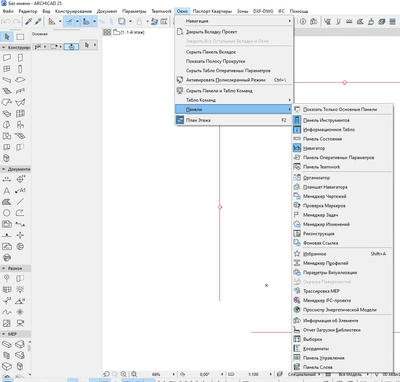
Hello everyone. There is no Python panel in AC24/25 RUS. The INT version has everything.
Yes, an experimental feature is enabled in the settings.

AMD R7 2700 3.8@GHz | 32 Gb RAM | SSD | GTX 1050Ti
Solved! Go to Solution.
1 Solution
Accepted Solutions

 Minh Nguyen
Graphisoft Alumni
Options
- Mark as New
- Bookmark
- Subscribe
- Mute
- Subscribe to RSS Feed
- Permalink
- Report Inappropriate Content
2021-10-07 10:55 AM
2021-10-07
10:55 AM
Hello,
Thank you very much for the report!
This problem can happen if you have a custom Work Environment applied. Please try with a default one and see if the command appears.
Also, you can add the palette manually by navigating to Options > Work Environment > Menus, then sort All commands in alphabetical order. You will be able to search for Python palette and add it to your existing menus.
Please let me know if it helps with the issue!
Best regards,
Minh
Minh Nguyen
Technical Support Engineer
GRAPHISOFT
4 Replies 4
Minh Nguyen
Graphisoft Alumni
Options
- Mark as New
- Bookmark
- Subscribe
- Mute
- Subscribe to RSS Feed
- Permalink
- Report Inappropriate Content
2021-10-07 10:55 AM
2021-10-07
10:55 AM
Hello,
Thank you very much for the report!
This problem can happen if you have a custom Work Environment applied. Please try with a default one and see if the command appears.
Also, you can add the palette manually by navigating to Options > Work Environment > Menus, then sort All commands in alphabetical order. You will be able to search for Python palette and add it to your existing menus.
Please let me know if it helps with the issue!
Best regards,
Minh
Minh Nguyen
Technical Support Engineer
GRAPHISOFT
hybrid
Enthusiast
Options
- Mark as New
- Bookmark
- Subscribe
- Mute
- Subscribe to RSS Feed
- Permalink
- Report Inappropriate Content
2021-10-07 11:21 AM
2021-10-07
11:21 AM
Thanks. It worked. Now it looks like it is necessary to create a working environment from scratch on the AC25, and not import the old ones
AMD R7 2700 3.8@GHz | 32 Gb RAM | SSD | GTX 1050Ti

Barry Kelly
Moderator
Options
- Mark as New
- Bookmark
- Subscribe
- Mute
- Subscribe to RSS Feed
- Permalink
- Report Inappropriate Content
2021-10-07 11:36 AM - edited 2021-10-07 11:36 AM
2021-10-07
11:36 AM
Never import old Work Environments unless you go through all the settings to make sure you are using the new features.
This includes add new commands to menus and tool bars as well as checking all the other settings.
If you import an old WE, you will only have what was contained in the old WE with regard to commands in menus an tool bars.
Other new settings will be set with default settings which you may want to check and change.
Barry.
One of the forum moderators.
Versions 6.5 to 27
i7-10700 @ 2.9Ghz, 32GB ram, GeForce RTX 2060 (6GB), Windows 10
Lenovo Thinkpad - i7-1270P 2.20 GHz, 32GB RAM, Nvidia T550, Windows 11
Versions 6.5 to 27
i7-10700 @ 2.9Ghz, 32GB ram, GeForce RTX 2060 (6GB), Windows 10
Lenovo Thinkpad - i7-1270P 2.20 GHz, 32GB RAM, Nvidia T550, Windows 11
hybrid
Enthusiast
Options
- Mark as New
- Bookmark
- Subscribe
- Mute
- Subscribe to RSS Feed
- Permalink
- Report Inappropriate Content
2021-10-07 11:42 AM
2021-10-07
11:42 AM
I just have a lot of custom panels. It also takes a lot of time to re-tune everything
AMD R7 2700 3.8@GHz | 32 Gb RAM | SSD | GTX 1050Ti

Didn't find the answer?
Check other topics in this Forum
Back to ForumRead the latest accepted solutions!
Accepted SolutionsStart a new conversation!

Suggested topics
- Archicad 30 DevKits are available in Developer Insights
- Building a timber frame from Python: 54 steps, 1,549 elements, and the API traps I hit in Archicad Python API
- GetElementsRelatedToZones batching provides no performance benefit — expected? in Archicad Python API
- Tapioca - UI for python commands in Archicad Python API
- ArchiCAD 27 Add-On: Menu not appearing in menubar in Archicad C++ API
