
Turn on suggestions
Auto-suggest helps you quickly narrow down your search results by suggesting possible matches as you type.
Showing results for
EN
Turn on suggestions
Auto-suggest helps you quickly narrow down your search results by suggesting possible matches as you type.
Showing results for
- English
- :
- Forum
- :
- Installation & update
- :
- Re: License activation EDU
Options
- Subscribe to RSS Feed
- Mark Topic as New
- Mark Topic as Read
- Pin this post for me
- Bookmark
- Subscribe to Topic
- Mute
- Printer Friendly Page

3dontwerpvisual
Participant
Options
- Mark as New
- Bookmark
- Subscribe
- Mute
- Subscribe to RSS Feed
- Permalink
- Report Inappropriate Content
2022-03-27 12:30 PM
License activation EDU
2022-03-27
12:30 PM
good day
I am a teacher and since yesterday I have a new laptop. I would like to have Archicad on this again as I need it for my lessons.
However, normally after logging in I could choose which software I wanted and there was also the license code. Now I can't get any further after logging in, the page doesn't change I think. I have installed a new version of Archicad 25, but I can't find my license code anywhere. What am I doing wrong? Does anyone else have a direct link where I can find the license code for my account?
note: myarchicad is not the first time that this site has malfunctioned on a computer. on my old desktop i couldn't even get to the login screen.
Solved! Go to Solution.
Solved
Read-Only
1 Solution
Accepted Solutions

Martin Jules
Mentor
Options
- Mark as New
- Bookmark
- Subscribe
- Mute
- Subscribe to RSS Feed
- Permalink
- Report Inappropriate Content
2022-03-28 02:33 AM - edited 2022-03-28 02:35 AM
2022-03-28
02:33 AM
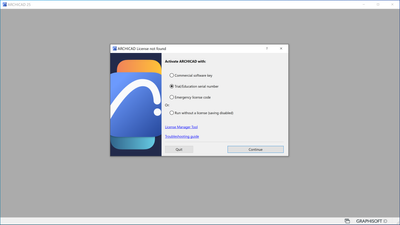
You can install the Educational version you have on your laptop and use the information you got from your phone to activate it.
After doing that, start Archicad and follow the following steps:
Martin Luther Jules
AC 10-29 (Full)
Asus | 64 GB RAM | Windows 11
AC 10-29 (Full)
Asus | 64 GB RAM | Windows 11
13 Replies 13
Martin Jules
Mentor
Options
- Mark as New
- Bookmark
- Subscribe
- Mute
- Subscribe to RSS Feed
- Permalink
- Report Inappropriate Content
2022-03-28 01:14 AM - edited 2022-03-28 01:15 AM
2022-03-28
01:14 AM
Here's the hyperlink: Try Archicad for Free – Graphisoft
Martin Luther Jules
AC 10-29 (Full)
Asus | 64 GB RAM | Windows 11
AC 10-29 (Full)
Asus | 64 GB RAM | Windows 11
3dontwerpvisual
Participant
Options
- Mark as New
- Bookmark
- Subscribe
- Mute
- Subscribe to RSS Feed
- Permalink
- Report Inappropriate Content
2022-03-28 02:03 AM
2022-03-28
02:03 AM
if i try https://myarchicad.com/PROFILE/
and also your hyperlink
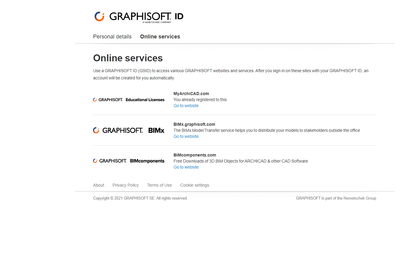
i get this, login will redirect my to the same page...

The page will be the same
3dontwerpvisual
Participant
Options
- Mark as New
- Bookmark
- Subscribe
- Mute
- Subscribe to RSS Feed
- Permalink
- Report Inappropriate Content
2022-03-28 02:05 AM
2022-03-28
02:05 AM
some setting after inlog.
Martin Jules
Mentor
Options
- Mark as New
- Bookmark
- Subscribe
- Mute
- Subscribe to RSS Feed
- Permalink
- Report Inappropriate Content
2022-03-28 02:11 AM
2022-03-28
02:11 AM
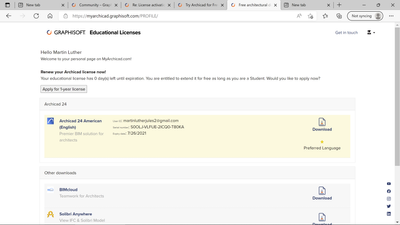
Click on go to website, you'll be redirected to a page as shown on the following screenshot:
Martin Luther Jules
AC 10-29 (Full)
Asus | 64 GB RAM | Windows 11
AC 10-29 (Full)
Asus | 64 GB RAM | Windows 11
Martin Jules
Mentor
Options
- Mark as New
- Bookmark
- Subscribe
- Mute
- Subscribe to RSS Feed
- Permalink
- Report Inappropriate Content
2022-03-28 02:12 AM
2022-03-28
02:12 AM
If you license expires, apply for a 1-year license again.
Martin Luther Jules
AC 10-29 (Full)
Asus | 64 GB RAM | Windows 11
AC 10-29 (Full)
Asus | 64 GB RAM | Windows 11
Martin Jules
Mentor
Options
- Mark as New
- Bookmark
- Subscribe
- Mute
- Subscribe to RSS Feed
- Permalink
- Report Inappropriate Content
2022-03-28 02:18 AM
2022-03-28
02:18 AM
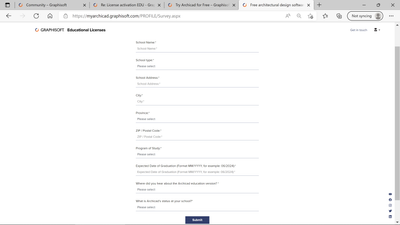
Here's an idea about the form you ought to sign out to renew your educational license:
Martin Luther Jules
AC 10-29 (Full)
Asus | 64 GB RAM | Windows 11
AC 10-29 (Full)
Asus | 64 GB RAM | Windows 11
3dontwerpvisual
Participant
Options
- Mark as New
- Bookmark
- Subscribe
- Mute
- Subscribe to RSS Feed
- Permalink
- Report Inappropriate Content
2022-03-28 02:23 AM
2022-03-28
02:23 AM
correct your snapshot of the license key i am missing. that page do not pop up.
the https://myarchicad.com/PROFILE/ will be showing with my mobile tho.
What can be the problem that my laptop do not want to show it?
Martin Jules
Mentor
Options
- Mark as New
- Bookmark
- Subscribe
- Mute
- Subscribe to RSS Feed
- Permalink
- Report Inappropriate Content
2022-03-28 02:25 AM
2022-03-28
02:25 AM
Check out your browser.
Martin Luther Jules
AC 10-29 (Full)
Asus | 64 GB RAM | Windows 11
AC 10-29 (Full)
Asus | 64 GB RAM | Windows 11
Martin Jules
Mentor
Options
- Mark as New
- Bookmark
- Subscribe
- Mute
- Subscribe to RSS Feed
- Permalink
- Report Inappropriate Content
2022-03-28 02:27 AM
2022-03-28
02:27 AM
Do you have a Graphisoft ID?
Martin Luther Jules
AC 10-29 (Full)
Asus | 64 GB RAM | Windows 11
AC 10-29 (Full)
Asus | 64 GB RAM | Windows 11

Still looking?

Suggested topics
- Welcome to our AI Solutions forum | Guidelines for participating in AI solutions
- BIMcloud Basic 2026.1 – Activate button does not open Graphisoft ID activation in Teamwork & BIMcloud
- My request ti renew my license is not yet approved in Licensing
- License Sell - Buy in General discussions
- License in Licensing
