
Turn on suggestions
Auto-suggest helps you quickly narrow down your search results by suggesting possible matches as you type.
Showing results for
EN
Turn on suggestions
Auto-suggest helps you quickly narrow down your search results by suggesting possible matches as you type.
Showing results for
Options
- Subscribe to RSS Feed
- Mark Topic as New
- Mark Topic as Read
- Pin this post for me
- Bookmark
- Subscribe to Topic
- Mute
- Printer Friendly Page

 ci-JoshOs
Graphisoft
Options
- Mark as New
- Bookmark
- Subscribe
- Mute
- Subscribe to RSS Feed
- Permalink
- Report Inappropriate Content
2008-06-23 11:25 PM
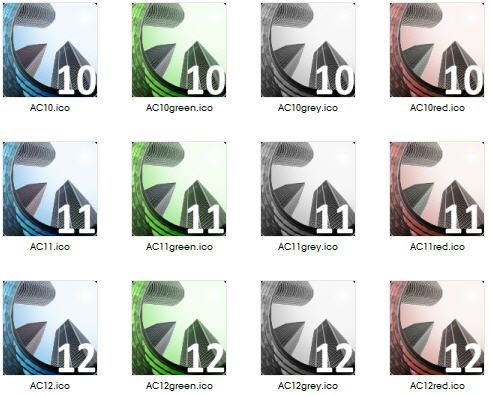
!Restored: ArchiCAD Icons for the less discerning amongst us
2008-06-23
11:25 PM
Add a label showing the version number, and(for the more flamboyant types) change the colour entirely!
These will change your life(or possibly not)!
Josh Osborne - Central Innovation
Mac Mini
Mac Mini
Read-Only
47 Replies 47
ci-JoshOs
Graphisoft
Options
- Mark as New
- Bookmark
- Subscribe
- Mute
- Subscribe to RSS Feed
- Permalink
- Report Inappropriate Content
2008-06-23 11:26 PM
ci-JoshOs
Graphisoft
Options
- Mark as New
- Bookmark
- Subscribe
- Mute
- Subscribe to RSS Feed
- Permalink
- Report Inappropriate Content
2008-06-23 11:26 PM
ci-JoshOs
Graphisoft
Options
- Mark as New
- Bookmark
- Subscribe
- Mute
- Subscribe to RSS Feed
- Permalink
- Report Inappropriate Content
2008-06-23 11:27 PM
Mats_Knutsson
Mentor
Options
- Mark as New
- Bookmark
- Subscribe
- Mute
- Subscribe to RSS Feed
- Permalink
- Report Inappropriate Content
2008-06-24 12:59 AM
2008-06-24
12:59 AM
henrypootel wrote:Haha!!! If I knew how to change icon on the mac I'd say thank you! The beta12 had a nice orange icon...I was pretty disappointed when the final version came with the old one.
AC12
 Mats
Mats
AC 25 SWE Full
HP Zbook Fury 15,6 G8. 32 GB RAM. Nvidia RTX A3000.
HP Zbook Fury 15,6 G8. 32 GB RAM. Nvidia RTX A3000.
ci-JoshOs
Graphisoft
Options
- Mark as New
- Bookmark
- Subscribe
- Mute
- Subscribe to RSS Feed
- Permalink
- Report Inappropriate Content
2008-06-24 01:21 AM
2008-06-24
01:21 AM
ah yes.
For OSX, grab the PNGs that i am about to attach. then you just open one up in the image editor/viewer of your choice, copy it, and then in the ArchiCAD applications 'Get Info' box, select the icon(up at the top) and go 'Edit' -> 'Paste' and that will throw in whatever you just copied as the icon.
For OSX, grab the PNGs that i am about to attach. then you just open one up in the image editor/viewer of your choice, copy it, and then in the ArchiCAD applications 'Get Info' box, select the icon(up at the top) and go 'Edit' -> 'Paste' and that will throw in whatever you just copied as the icon.
Josh Osborne - Central Innovation
Mac Mini
Mac Mini
ci-JoshOs
Graphisoft
Options
- Mark as New
- Bookmark
- Subscribe
- Mute
- Subscribe to RSS Feed
- Permalink
- Report Inappropriate Content
2008-06-24 01:21 AM
ci-JoshOs
Graphisoft
Options
- Mark as New
- Bookmark
- Subscribe
- Mute
- Subscribe to RSS Feed
- Permalink
- Report Inappropriate Content
2008-06-24 01:23 AM

Karl Ottenstein
Moderator Emeritus
Options
- Mark as New
- Bookmark
- Subscribe
- Mute
- Subscribe to RSS Feed
- Permalink
- Report Inappropriate Content
2008-06-24 05:08 AM
2008-06-24
05:08 AM
Mats_Knutsson wrote:None of us know what the final icon for AC12 will be yet, as nobody has a copy of the final version, Mats.
The beta12 had a nice orange icon...I was pretty disappointed when the final version came with the old one.
Cheers,
Karl
Vote for Wish: Copy/Paste in 3D
AC 29 USA and earlier • hardware key • macOS Tahoe 26.7 MacBook Pro M2 Max 12CPU/30GPU cores, 32GB
AC 29 USA and earlier • hardware key • macOS Tahoe 26.7 MacBook Pro M2 Max 12CPU/30GPU cores, 32GB
ci-JoshOs
Graphisoft
Options
- Mark as New
- Bookmark
- Subscribe
- Mute
- Subscribe to RSS Feed
- Permalink
- Report Inappropriate Content
2008-06-24 05:42 AM
2008-06-24
05:42 AM
Karl wrote:Well,Mats_Knutsson wrote:None of us know what the final icon for AC12 will be yet, as nobody has a copy of the final version, Mats.
The beta12 had a nice orange icon...I was pretty disappointed when the final version came with the old one.😉
Cheers,
Karl
Josh Osborne - Central Innovation
Mac Mini
Mac Mini

Still looking?
Suggested topics
- Missing Attributes in Library Elements – Teamwork File / Educational Version in Libraries & objects
- Restoring Lost Properties After Replacing Old Classifications in Archicad 26 in Project data & BIM
- There is a bug in Archicad 28 version 3060 where changing quick select with the spacebar is not poss in Installation & update
- Dimension Instability in Documentation
- Additional Surface Catalog cannot be downloaded for Archicad 26 in Visualization
