
Turn on suggestions
Auto-suggest helps you quickly narrow down your search results by suggesting possible matches as you type.
Showing results for
EN
Turn on suggestions
Auto-suggest helps you quickly narrow down your search results by suggesting possible matches as you type.
Showing results for
- English
- :
- Forum
- :
- Visualization
- :
- Re: archicad to C4D
Options
- Subscribe to RSS Feed
- Mark Topic as New
- Mark Topic as Read
- Pin this post for me
- Bookmark
- Subscribe to Topic
- Mute
- Printer Friendly Page

Anonymous
Not applicable
Options
- Mark as New
- Bookmark
- Subscribe
- Mute
- Subscribe to RSS Feed
- Permalink
- Report Inappropriate Content
2012-07-14
09:00 PM
- last edited on
2023-05-11
12:06 PM
by
 Noemi Balogh
archicad to C4D
2012-07-14
09:00 PM
I need to make some renders in Cinema 4d but when i try to open the project I can't see it -check the image for details-
It is not the first time when I'm using C4D but i have never met this problem ever before.
The project was initially made in Autocad (2D), then imported to Archicad(3D) and then to Cinema 4D (render. Until now i used only Archicad and C4D and it worked perfectly but this project had to be imported from Autocad to Archicad. Could that be the problem?
What can I do about it? [/img]

5 Replies 5
Anonymous
Not applicable
Options
- Mark as New
- Bookmark
- Subscribe
- Mute
- Subscribe to RSS Feed
- Permalink
- Report Inappropriate Content
2012-07-16 09:33 AM
2012-07-16
09:33 AM
I found the answer and I am sharing it just in case you might have the same problem.
You have to save the project with the .obj extension, make the settings you want and then open it with C4D. It is not the perfect answer, but it is the only one I found.
You have to save the project with the .obj extension, make the settings you want and then open it with C4D. It is not the perfect answer, but it is the only one I found.
Anonymous
Not applicable
Options
- Mark as New
- Bookmark
- Subscribe
- Mute
- Subscribe to RSS Feed
- Permalink
- Report Inappropriate Content
2012-07-16 11:12 PM
2012-07-16
11:12 PM
Have you tried this plugin? It is the only one I have used for over 2 years.
http://din3d.net/products/din3d-exporter-archicad
http://din3d.net/products/din3d-exporter-archicad

Achille Pavlidis
Advocate
Options
- Mark as New
- Bookmark
- Subscribe
- Mute
- Subscribe to RSS Feed
- Permalink
- Report Inappropriate Content
2012-07-30 04:51 PM
2012-07-30
04:51 PM
Missa wrote:Hi Missa,
I found the answer and I am sharing it just in case you might have the same problem.
You have to save the project with the .obj extension, make the settings you want and then open it with C4D. It is not the perfect answer, but it is the only one I found.
could you elaborate on that please?
I have the same problem, and I think it is a project origin problem
Mac OS 26.4 | AC 29.2.1 INT 5101 FULL
Anonymous
Not applicable
Options
- Mark as New
- Bookmark
- Subscribe
- Mute
- Subscribe to RSS Feed
- Permalink
- Report Inappropriate Content
2012-12-03 05:26 PM
2012-12-03
05:26 PM
I have the same issue. Attached the export from AC16 to C4D R12.
Same issue with export in Artlantis 4.1.
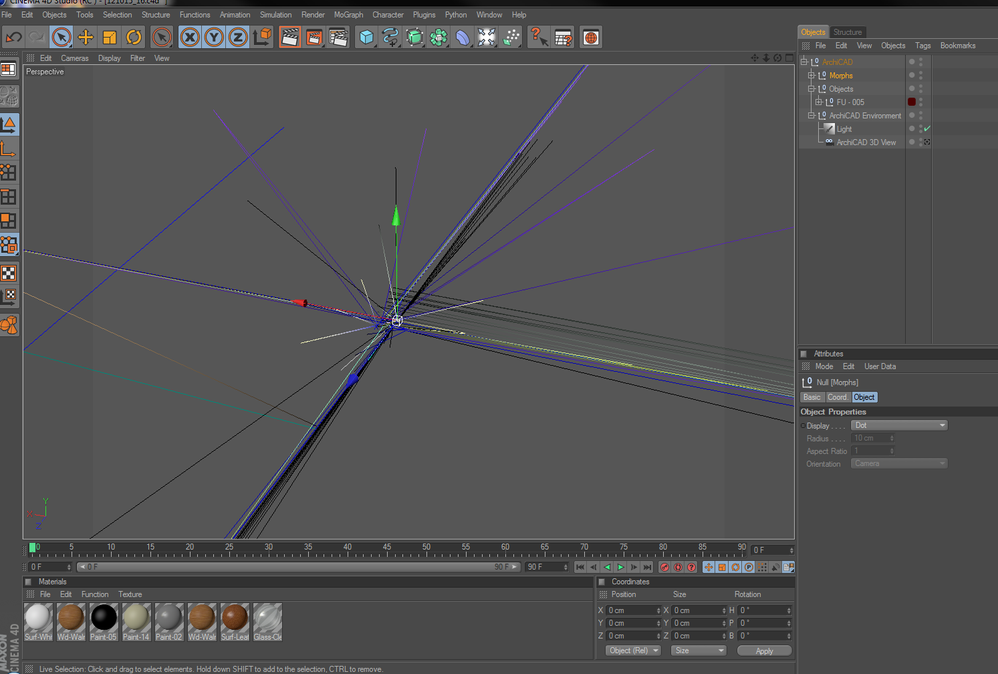
Same issue with export in Artlantis 4.1.

 Katalin Takacs
Graphisoft Alumni
Options
- Mark as New
- Bookmark
- Subscribe
- Mute
- Subscribe to RSS Feed
- Permalink
- Report Inappropriate Content
2012-12-20 04:02 PM
2012-12-20
04:02 PM
Dear Catalin,
thank you for your cooperation. As the result of our investigation we have found that some model elements were placed far from each other in the ArchiCAD project.
You can move them closer with the steps described here:http://www.archicadwiki.com/RelocateProjectsPlacedFarFromOrigin
I hope it helps.
thank you for your cooperation. As the result of our investigation we have found that some model elements were placed far from each other in the ArchiCAD project.
You can move them closer with the steps described here:
I hope it helps.
Katalin Takacs
Didn't find the answer?
Check other topics in this Forum
Back to ForumRead the latest accepted solutions!
Accepted SolutionsStart a new conversation!

Suggested topics
- Issues with 3Dconnexxion CadMouse Pro Wireless in Installation & update
- Should I be using Archicad 28 instead of 29? in Teamwork & BIMcloud
- Brazilian Plugins for Archicad in General discussions
- License Sell - Buy in General discussions
- Climate and sunpath objects for analysis presentation in Libraries & objects
