
Turn on suggestions
Auto-suggest helps you quickly narrow down your search results by suggesting possible matches as you type.
Showing results for
EN
Turn on suggestions
Auto-suggest helps you quickly narrow down your search results by suggesting possible matches as you type.
Showing results for
- English
- :
- Developer Hub
- :
- Archicad C++ API
- :
- Re: Finding .pln file written ArchiCAD Version.
Options
- Subscribe to RSS Feed
- Mark Topic as New
- Mark Topic as Read
- Pin this post for me
- Bookmark
- Subscribe to Topic
- Mute
- Printer Friendly Page

Anonymous
Not applicable
Options
- Mark as New
- Bookmark
- Subscribe
- Mute
- Subscribe to RSS Feed
- Permalink
- Report Inappropriate Content
2009-12-18
02:08 AM
- last edited on
2023-08-03
01:13 PM
by
 Doreena Deng
Finding .pln file written ArchiCAD Version.
2009-12-18
02:08 AM
Hi,
I have two types of ArcheCAD7.0 .pln files one type is saved before ArchiCAD9.0 was installed on our systems and second types is saved after ArchiCAD9.0 was installed.
If I open the drawings with ArchiCAD9.0 of type one (drawings saved in ArcheCAD7.0 before ArchiCAD9.0 was installed) system is crashing. Other type of files no problem.
That is the reason I want to know which version of ArchiCAD (7, 9, 12, 13) saved that drawing.
Please any one tells me how do I find ArchiCAD version on which that .pln file was saved or how do I access Info & Preview page on the file properties on the windows?
Is there any classes, lib or dll available to get file written by (ArchiCAD Version)?
Ranga.
I have two types of ArcheCAD7.0 .pln files one type is saved before ArchiCAD9.0 was installed on our systems and second types is saved after ArchiCAD9.0 was installed.
If I open the drawings with ArchiCAD9.0 of type one (drawings saved in ArcheCAD7.0 before ArchiCAD9.0 was installed) system is crashing. Other type of files no problem.
That is the reason I want to know which version of ArchiCAD (7, 9, 12, 13) saved that drawing.
Please any one tells me how do I find ArchiCAD version on which that .pln file was saved or how do I access Info & Preview page on the file properties on the windows?
Is there any classes, lib or dll available to get file written by (ArchiCAD Version)?
Ranga.

Read-Only
Labels:
- Labels:
-
Add-On (C++)
6 Replies 6

Karl Ottenstein
Moderator Emeritus
Options
- Mark as New
- Bookmark
- Subscribe
- Mute
- Subscribe to RSS Feed
- Permalink
- Report Inappropriate Content
2009-12-18 06:12 AM
2009-12-18
06:12 AM
Hi Ranga,
The AC File Open dialog tells you the version and build with which the file was last saved. See attached screenshot. Even though I am on Mac, it shows that the PLN was last saved with v 9 under Windows ("W") and build 1812...
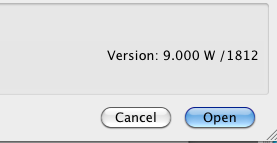
The AC File Open dialog tells you the version and build with which the file was last saved. See attached screenshot. Even though I am on Mac, it shows that the PLN was last saved with v 9 under Windows ("W") and build 1812...
Vote for Wish: Copy/Paste in 3D
AC 29 USA and earlier • hardware key • macOS Tahoe 26.7 MacBook Pro M2 Max 12CPU/30GPU cores, 32GB
AC 29 USA and earlier • hardware key • macOS Tahoe 26.7 MacBook Pro M2 Max 12CPU/30GPU cores, 32GB
Karl Ottenstein
Moderator Emeritus
Options
- Mark as New
- Bookmark
- Subscribe
- Mute
- Subscribe to RSS Feed
- Permalink
- Report Inappropriate Content
2009-12-18 06:13 AM
2009-12-18
06:13 AM
...and here's a shot of a file last saved with AC 7 build 1877 on Windows.
Not sure if that's what you meant?
Cheers,
Karl
Not sure if that's what you meant?
Cheers,
Karl
Vote for Wish: Copy/Paste in 3D
AC 29 USA and earlier • hardware key • macOS Tahoe 26.7 MacBook Pro M2 Max 12CPU/30GPU cores, 32GB
AC 29 USA and earlier • hardware key • macOS Tahoe 26.7 MacBook Pro M2 Max 12CPU/30GPU cores, 32GB

Anonymous
Not applicable
Options
- Mark as New
- Bookmark
- Subscribe
- Mute
- Subscribe to RSS Feed
- Permalink
- Report Inappropriate Content
2009-12-18 06:49 AM
2009-12-18
06:49 AM
Hi Karl Ottenstein,
Thanks for replay.
I can access version information by clicking the file properties in the windows and on the file open dialog. But, I want to access this information form apx, any application or any class(example FileInfo or FileVersionInfo classes from .net framework).
Is there any way can I access this information programmatically?.
Ranga
Thanks for replay.
I can access version information by clicking the file properties in the windows and on the file open dialog. But, I want to access this information form apx, any application or any class(example FileInfo or FileVersionInfo classes from .net framework).
Is there any way can I access this information programmatically?.
Ranga
Karl Ottenstein
Moderator Emeritus
Options
- Mark as New
- Bookmark
- Subscribe
- Mute
- Subscribe to RSS Feed
- Permalink
- Report Inappropriate Content
2009-12-18 06:12 PM
2009-12-18
06:12 PM
Oops. Sorry, I had not noticed that you were in the Developer Forum. 
I've never looked into this from the API. Perhaps someone else knows.
Cheers,
Karl
I've never looked into this from the API. Perhaps someone else knows.
Cheers,
Karl
Vote for Wish: Copy/Paste in 3D
AC 29 USA and earlier • hardware key • macOS Tahoe 26.7 MacBook Pro M2 Max 12CPU/30GPU cores, 32GB
AC 29 USA and earlier • hardware key • macOS Tahoe 26.7 MacBook Pro M2 Max 12CPU/30GPU cores, 32GB
Anonymous
Not applicable
Options
- Mark as New
- Bookmark
- Subscribe
- Mute
- Subscribe to RSS Feed
- Permalink
- Report Inappropriate Content
2009-12-23 01:55 AM
2009-12-23
01:55 AM
Is there any one have any ideas?

Ralph Wessel
Virtuoso
Options
- Mark as New
- Bookmark
- Subscribe
- Mute
- Subscribe to RSS Feed
- Permalink
- Report Inappropriate Content
2009-12-23 11:19 AM
2009-12-23
11:19 AM
Ranga wrote:Sorry, no. I can only suggest looking at the API for the host operating system instead. There will be ways of extracting additional information from files, but I don't know if it will include the data you're seeking.
Is there any one have any ideas?
Ralph Wessel BArch
Central Innovation
Central Innovation
Didn't find the answer?
Check other topics in this Forum
Back to ForumRead the latest accepted solutions!
Accepted SolutionsStart a new conversation!

Suggested topics
- Interior Elevation: how to change the visible depth after CreateExt? ieCreationSegmentDepth reads ba in Archicad C++ API
- Try to Create associative Dimensions with tapir and claude in Archicad Python API
- Developer registration may not be approved – Add-On works in Demo but not FULL in Archicad C++ API
- ArchiCAD 27 Add-On: Menu not appearing in menubar in Archicad C++ API
- IFCAPI::PropertyAccessor::GetAttributes issue in custom add‑on in Archicad C++ API
