
Turn on suggestions
Auto-suggest helps you quickly narrow down your search results by suggesting possible matches as you type.
Showing results for
EN
Turn on suggestions
Auto-suggest helps you quickly narrow down your search results by suggesting possible matches as you type.
Showing results for
- English
- :
- Forum
- :
- Collaboration with other software
- :
- Re: First time at importing .xyz file, please help
Options
- Subscribe to RSS Feed
- Mark Topic as New
- Mark Topic as Read
- Pin this post for me
- Bookmark
- Subscribe to Topic
- Mute
- Printer Friendly Page

svpribyl
Enthusiast
Options
- Mark as New
- Bookmark
- Subscribe
- Mute
- Subscribe to RSS Feed
- Permalink
- Report Inappropriate Content
2023-05-03 08:27 PM
First time at importing .xyz file, please help
2023-05-03
08:27 PM
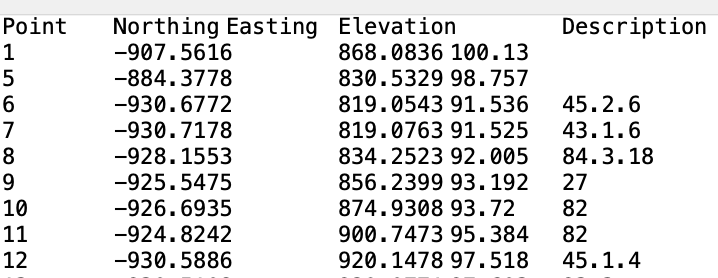
I'm trying to import .xyz files. I got a sample text file from my surveyor. I renamed it with a .xyz extension.
It has this kind of data (see attachment). I tried to import it using the interoperability menu, but the file is not recognized and will not import. How do I get the file to import?
Thanks!
Steve Pribyl
MAC OS Sequoia 15.5
ArchiCAD 28
MAC OS Sequoia 15.5
ArchiCAD 28
Labels:
- Labels:
-
Data Exchange
22 Replies 22
svpribyl
Enthusiast
Options
- Mark as New
- Bookmark
- Subscribe
- Mute
- Subscribe to RSS Feed
- Permalink
- Report Inappropriate Content
2023-06-01 08:08 PM
2023-06-01
08:08 PM
MW, that video seems to be a "how to" for using Land4. I am not using Land4.
Steve Pribyl
MAC OS Sequoia 15.5
ArchiCAD 28
MAC OS Sequoia 15.5
ArchiCAD 28
svpribyl
Enthusiast
Options
- Mark as New
- Bookmark
- Subscribe
- Mute
- Subscribe to RSS Feed
- Permalink
- Report Inappropriate Content
2023-06-01 08:10 PM
2023-06-01
08:10 PM
I hoped I had cracked this issue, but I have not! I had someone check the file that I created and I found out the 3d realization is incorrect. It should have been a simple rectangular site. I haven't had a chance to work on this again, but I am open to any additional suggestions.
Thanks!
Steve Pribyl
MAC OS Sequoia 15.5
ArchiCAD 28
MAC OS Sequoia 15.5
ArchiCAD 28

Barry Kelly
Moderator
Options
- Mark as New
- Bookmark
- Subscribe
- Mute
- Subscribe to RSS Feed
- Permalink
- Report Inappropriate Content
2023-06-02 03:16 AM
2023-06-02
03:16 AM
If you are able to create a mesh from the file, but the mesh is not rectangular, then the points in that file are not just for the rectangular site.
I have tried with files from surveyors in the past, but they also include many points outside of the site boundary, like roads, kerbs, manholes, etc., so you are not getting just the site boundaries and contours as you would expect.
Barry.
One of the forum moderators.
Versions 6.5 to 27
i7-10700 @ 2.9Ghz, 32GB ram, GeForce RTX 2060 (6GB), Windows 10
Lenovo Thinkpad - i7-1270P 2.20 GHz, 32GB RAM, Nvidia T550, Windows 11
Versions 6.5 to 27
i7-10700 @ 2.9Ghz, 32GB ram, GeForce RTX 2060 (6GB), Windows 10
Lenovo Thinkpad - i7-1270P 2.20 GHz, 32GB RAM, Nvidia T550, Windows 11

- « Previous
- Next »
- « Previous
- Next »
Still looking?
Suggested topics
- DWG import in Archicad: incorrect text alignment in Archicad in Collaboration with other software
- Model View Options UX missing in Libraries & objects
- Issues locating .GSM and .XML objects in Tool Settings after import in Libraries & objects
- CAD import in hotlink floor plan is not visible in master file in Collaboration with other software
- Archicad 3D model export to CATT acoustic software in Collaboration with other software
