
Turn on suggestions
Auto-suggest helps you quickly narrow down your search results by suggesting possible matches as you type.
Showing results for
EN
Turn on suggestions
Auto-suggest helps you quickly narrow down your search results by suggesting possible matches as you type.
Showing results for
- English
- :
- Forum
- :
- Collaboration with other software
- :
- IFC Site Location at Survey Point Position - Archi...
Options
- Subscribe to RSS Feed
- Mark Topic as New
- Mark Topic as Read
- Pin this post for me
- Bookmark
- Subscribe to Topic
- Mute
- Printer Friendly Page

Anonymous
Not applicable
Options
- Mark as New
- Bookmark
- Subscribe
- Mute
- Subscribe to RSS Feed
- Permalink
- Report Inappropriate Content
2020-10-31 02:17 AM
IFC Site Location at Survey Point Position - Archicad 24
2020-10-31
02:17 AM
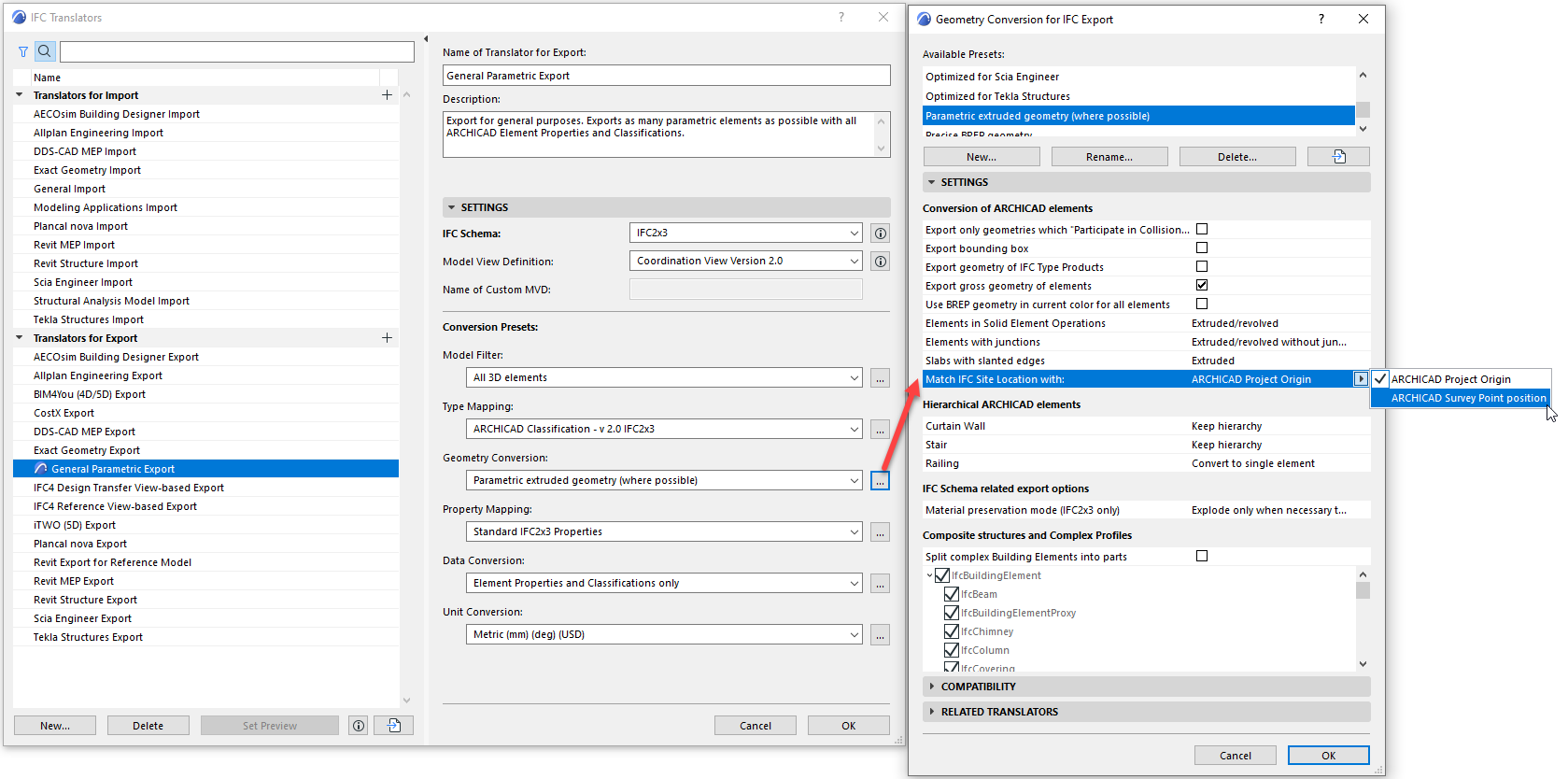
I would like to know how to select the "IFC Site location (if Survey Point is available)" on the 24 version. I have seen Graphisoft's instructions pointing to the IFC Translator Export, however I have not found where to change this site option in there. I have explored all the Conversion Presets with no success.
I can only find references to previous versions on where to find this.
Thank you in advance
Solved! Go to Solution.
1 Solution
Accepted Solutions

 Laszlo Nagy
Community Admin
Options
- Mark as New
- Bookmark
- Subscribe
- Mute
- Subscribe to RSS Feed
- Permalink
- Report Inappropriate Content
2020-11-01 09:20 PM
2020-11-01
09:20 PM
It can be found in the Geometry Conversion Dialog.
Loving Archicad since 1995 - Find Archicad Tips at x.com/laszlonagy
AMD Ryzen9 5900X CPU, 64 GB RAM 3600 MHz, Nvidia GTX 1060 6GB, 500 GB NVMe SSD
2x28" (2560x1440), Windows 10 PRO ENG, Ac20-Ac29
AMD Ryzen9 5900X CPU, 64 GB RAM 3600 MHz, Nvidia GTX 1060 6GB, 500 GB NVMe SSD
2x28" (2560x1440), Windows 10 PRO ENG, Ac20-Ac29
Solution
2 Replies 2
Laszlo Nagy
Community Admin
Options
- Mark as New
- Bookmark
- Subscribe
- Mute
- Subscribe to RSS Feed
- Permalink
- Report Inappropriate Content
2020-11-01 09:20 PM
2020-11-01
09:20 PM
It can be found in the Geometry Conversion Dialog.
Loving Archicad since 1995 - Find Archicad Tips at x.com/laszlonagy
AMD Ryzen9 5900X CPU, 64 GB RAM 3600 MHz, Nvidia GTX 1060 6GB, 500 GB NVMe SSD
2x28" (2560x1440), Windows 10 PRO ENG, Ac20-Ac29
AMD Ryzen9 5900X CPU, 64 GB RAM 3600 MHz, Nvidia GTX 1060 6GB, 500 GB NVMe SSD
2x28" (2560x1440), Windows 10 PRO ENG, Ac20-Ac29
Solution
Anonymous
Not applicable
Options
- Mark as New
- Bookmark
- Subscribe
- Mute
- Subscribe to RSS Feed
- Permalink
- Report Inappropriate Content
2020-11-09 04:48 PM
2020-11-09
04:48 PM
LaszloNagy wrote:
It can be found in the Geometry Conversion Dialog.
IFC_Site_Location.png
Thank you very much!
Still looking?

Suggested topics
- Climate and sunpath objects for analysis presentation in Libraries & objects
- Archicad 29 : Positioning a Door Unit Above the Wallhole Base in Libraries & objects
- Window with adjustable frame extensions (jamb) and automatic insulation return – AC29 / GDL in Modeling
- Silpu Render for Archicad: photoreal AI renders from your live view, in about a minute (free to try) in General discussions
- Archicad to Revit for MEP: the workaround Graphisoft's own method couldn't give me in Collaboration with other software
