Turn on suggestions
Auto-suggest helps you quickly narrow down your search results by suggesting possible matches as you type.
Showing results for
EN
Turn on suggestions
Auto-suggest helps you quickly narrow down your search results by suggesting possible matches as you type.
Showing results for
- English
- :
- Forum
- :
- Collaboration with other software
- :
- RE: WINDOW/DOOR SCHEDULE; FIRE RATING & EGRESS
Options
- Subscribe to RSS Feed
- Mark Topic as New
- Mark Topic as Read
- Pin this post for me
- Bookmark
- Subscribe to Topic
- Mute
- Printer Friendly Page

Anonymous
Not applicable
Options
- Mark as New
- Bookmark
- Subscribe
- Mute
- Subscribe to RSS Feed
- Permalink
- Report Inappropriate Content
2014-05-08 04:39 PM
RE: WINDOW/DOOR SCHEDULE; FIRE RATING & EGRESS
2014-05-08
04:39 PM
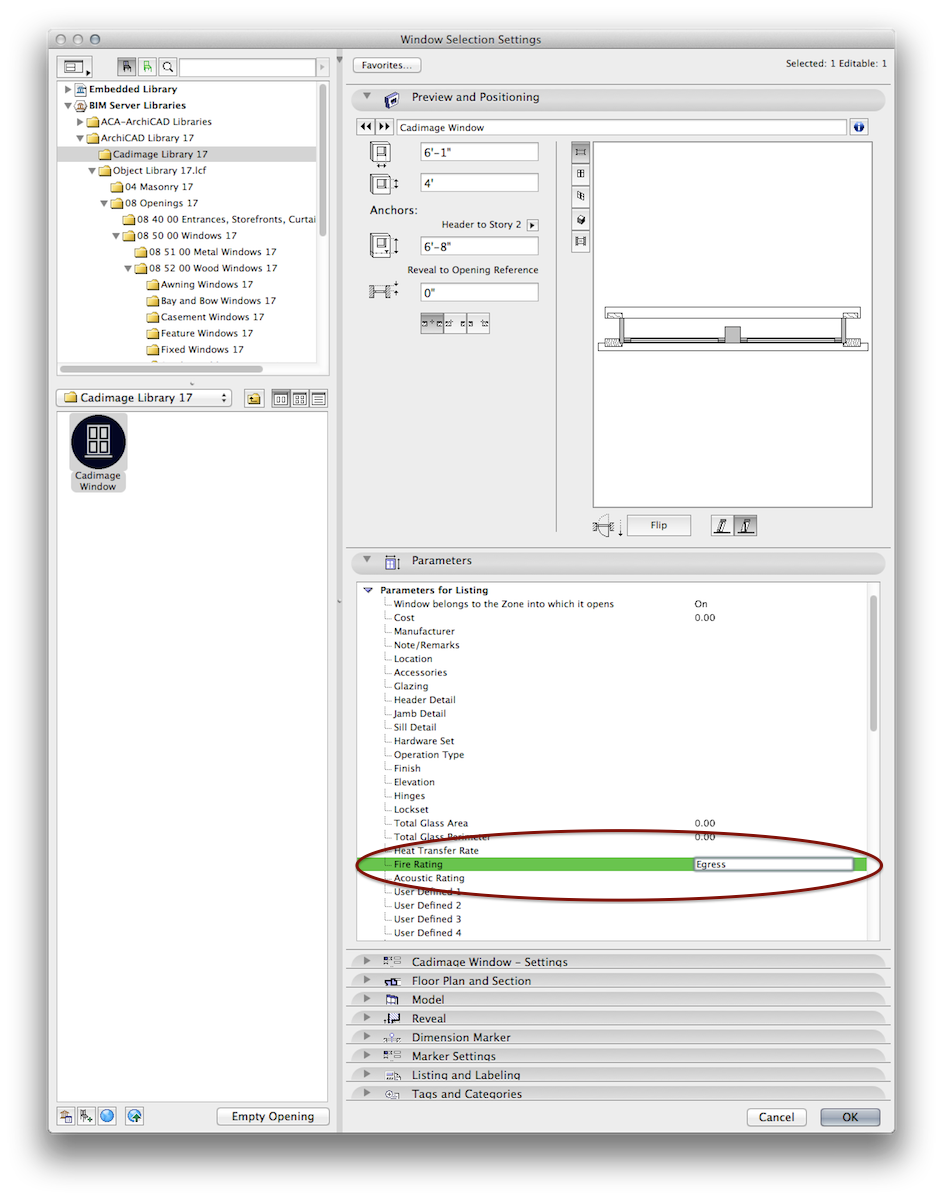
I was thinking I would use my fire rating as my place where i would label it as egress.
That is where it shows up in plan with my dimension marker.
But i can't get that to show up in my schedule.
I have the field in my schedule, but it stays empty even when I have it filled in my window settings.
If I fill in my prefix with "egress" or my custom text value as "egress" it stays empty in my schedule.
Any thoughts on that?
Or any suggestions on another way to have my dimension marker label my window as egress and for it to show up in my schedule?
Read-Only
Labels:
- Labels:
-
Data management
7 Replies 7

Karl Ottenstein
Moderator Emeritus
Options
- Mark as New
- Bookmark
- Subscribe
- Mute
- Subscribe to RSS Feed
- Permalink
- Report Inappropriate Content
2014-05-08 05:16 PM
2014-05-08
05:16 PM
Cannot guess what's going wrong for you Jessica. Just tested, and any text I enter into the Fire Rating listing field shows up fine when that field is included in my Window schedule.
Vote for Wish: Copy/Paste in 3D
AC 29 USA and earlier • hardware key • macOS Tahoe 26.7 MacBook Pro M2 Max 12CPU/30GPU cores, 32GB
AC 29 USA and earlier • hardware key • macOS Tahoe 26.7 MacBook Pro M2 Max 12CPU/30GPU cores, 32GB
Anonymous
Not applicable
Options
- Mark as New
- Bookmark
- Subscribe
- Mute
- Subscribe to RSS Feed
- Permalink
- Report Inappropriate Content
2014-05-08 05:22 PM
2014-05-08
05:22 PM
Well, that is a bummer.
Those are the hardest kinds of problems to solve.
I thought maybe because they were CAD image windows, but it doens't chow up with regular windows either . . .

so sad.
Those are the hardest kinds of problems to solve.
I thought maybe because they were CAD image windows, but it doens't chow up with regular windows either . . .
so sad.
Anonymous
Not applicable
Options
- Mark as New
- Bookmark
- Subscribe
- Mute
- Subscribe to RSS Feed
- Permalink
- Report Inappropriate Content
2014-05-08 05:23 PM
2014-05-08
05:23 PM
it has the option to show the MEASURED value
where is archicad getting that MEASURED value from?
where is archicad getting that MEASURED value from?
Anonymous
Not applicable
Options
- Mark as New
- Bookmark
- Subscribe
- Mute
- Subscribe to RSS Feed
- Permalink
- Report Inappropriate Content
2014-05-08 05:33 PM

Karl Ottenstein
Moderator Emeritus
Options
- Mark as New
- Bookmark
- Subscribe
- Mute
- Subscribe to RSS Feed
- Permalink
- Report Inappropriate Content
2014-05-08 05:48 PM
2014-05-08
05:48 PM
Glad you figured it out! I had just assumed that that was where you were entering your text. Assumptions always get us into trouble! 😉
Vote for Wish: Copy/Paste in 3D
AC 29 USA and earlier • hardware key • macOS Tahoe 26.7 MacBook Pro M2 Max 12CPU/30GPU cores, 32GB
AC 29 USA and earlier • hardware key • macOS Tahoe 26.7 MacBook Pro M2 Max 12CPU/30GPU cores, 32GB
Anonymous
Not applicable
Options
- Mark as New
- Bookmark
- Subscribe
- Mute
- Subscribe to RSS Feed
- Permalink
- Report Inappropriate Content
2014-05-08 06:03 PM
Karl Ottenstein
Moderator Emeritus
Options
- Mark as New
- Bookmark
- Subscribe
- Mute
- Subscribe to RSS Feed
- Permalink
- Report Inappropriate Content
2014-05-08 06:59 PM
2014-05-08
06:59 PM
Thanks for posting that, Jessica. A very common misunderstanding of where AC stores things that will help many other users: the marker and its settings
Vote for Wish: Copy/Paste in 3D
AC 29 USA and earlier • hardware key • macOS Tahoe 26.7 MacBook Pro M2 Max 12CPU/30GPU cores, 32GB
AC 29 USA and earlier • hardware key • macOS Tahoe 26.7 MacBook Pro M2 Max 12CPU/30GPU cores, 32GB
Still looking?