
Turn on suggestions
Auto-suggest helps you quickly narrow down your search results by suggesting possible matches as you type.
Showing results for
EN
Turn on suggestions
Auto-suggest helps you quickly narrow down your search results by suggesting possible matches as you type.
Showing results for
- English
- :
- Forum
- :
- Collaboration with other software
- :
- RFA objects importing upside down into Archicad
Options
- Subscribe to RSS Feed
- Mark Topic as New
- Mark Topic as Read
- Pin this post for me
- Bookmark
- Subscribe to Topic
- Mute
- Printer Friendly Page

onestoreyllc
Booster
Options
- Mark as New
- Bookmark
- Subscribe
- Mute
- Subscribe to RSS Feed
- Permalink
- Report Inappropriate Content
2022-04-15 09:31 PM
RFA objects importing upside down into Archicad
2022-04-15
09:31 PM
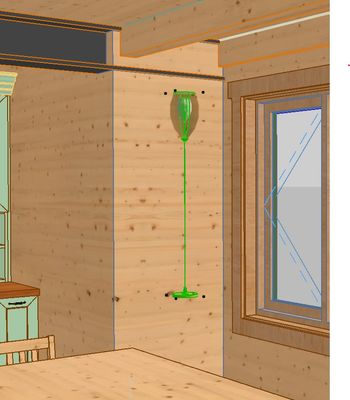
Has anyone else had the problem when importing RFA into GDB files into Archicad they show import upside down? How do I fix this?

Meredith
AC26 USA - Lenovo P17 - Intel(R) Core(TM) i9-10885H CPU @ 2.4GHz - 32.0GB - Windows 11 Pro
AC26 USA - Lenovo P17 - Intel(R) Core(TM) i9-10885H CPU @ 2.4GHz - 32.0GB - Windows 11 Pro
Solved! Go to Solution.
Solved
Read-Only
1 Solution
Accepted Solutions

Barry Kelly
Moderator
Options
- Mark as New
- Bookmark
- Subscribe
- Mute
- Subscribe to RSS Feed
- Permalink
- Report Inappropriate Content
2022-04-16 07:48 AM
2022-04-16
07:48 AM
When you import, is there an option to adjust the z-axis.
Give it a negative value?
I think that might be 3DS import.
Otherwise use the 'Rotation angle (x axis) parameter and set that to 180°.
Barry.
One of the forum moderators.
Versions 6.5 to 27
i7-10700 @ 2.9Ghz, 32GB ram, GeForce RTX 2060 (6GB), Windows 10
Lenovo Thinkpad - i7-1270P 2.20 GHz, 32GB RAM, Nvidia T550, Windows 11
Versions 6.5 to 27
i7-10700 @ 2.9Ghz, 32GB ram, GeForce RTX 2060 (6GB), Windows 10
Lenovo Thinkpad - i7-1270P 2.20 GHz, 32GB RAM, Nvidia T550, Windows 11
Solution
3 Replies 3
Barry Kelly
Moderator
Options
- Mark as New
- Bookmark
- Subscribe
- Mute
- Subscribe to RSS Feed
- Permalink
- Report Inappropriate Content
2022-04-16 07:48 AM
2022-04-16
07:48 AM
When you import, is there an option to adjust the z-axis.
Give it a negative value?
I think that might be 3DS import.
Otherwise use the 'Rotation angle (x axis) parameter and set that to 180°.
Barry.
One of the forum moderators.
Versions 6.5 to 27
i7-10700 @ 2.9Ghz, 32GB ram, GeForce RTX 2060 (6GB), Windows 10
Lenovo Thinkpad - i7-1270P 2.20 GHz, 32GB RAM, Nvidia T550, Windows 11
Versions 6.5 to 27
i7-10700 @ 2.9Ghz, 32GB ram, GeForce RTX 2060 (6GB), Windows 10
Lenovo Thinkpad - i7-1270P 2.20 GHz, 32GB RAM, Nvidia T550, Windows 11
Solution

Lee Hankins
Virtuoso
Options
- Mark as New
- Bookmark
- Subscribe
- Mute
- Subscribe to RSS Feed
- Permalink
- Report Inappropriate Content
2022-04-16 04:47 PM
2022-04-16
04:47 PM
I have experienced this. I just rotated about the Z axis to flip it the right way up and then saved as a Favourite. One thing I have experienced issues with is when a Revit object has variations which can obviously be selected within Revit but Archicad translates them all in to one fixed object so you end up with all the variations. It would be great if the add-on were updated to allow which option is required to be chosen.
Lee Hankins
ArchiCAD 4.5 - Archicad 29
macOS Tahoe (26.0)
ArchiCAD 4.5 - Archicad 29
macOS Tahoe (26.0)
onestoreyllc
Booster
Options
- Mark as New
- Bookmark
- Subscribe
- Mute
- Subscribe to RSS Feed
- Permalink
- Report Inappropriate Content
2022-04-18 07:43 PM
2022-04-18
07:43 PM
Setting the X axis to 180 worked, thank you!
Meredith
AC26 USA - Lenovo P17 - Intel(R) Core(TM) i9-10885H CPU @ 2.4GHz - 32.0GB - Windows 11 Pro
AC26 USA - Lenovo P17 - Intel(R) Core(TM) i9-10885H CPU @ 2.4GHz - 32.0GB - Windows 11 Pro

Still looking?

Suggested topics
- Climate and sunpath objects for analysis presentation in Libraries & objects
- Some free useful objects: Road signs, parametric pathway, roof crickets, crowds in Libraries & objects
- Linking and Managing Office Custom Libraries in Libraries & objects
- Custom objects become invalid when downgraded from AC29 to 27 in Libraries & objects
- Detailing | Better methods of 2d drafting, creation of Blocks , Detail Elements , 2d Objects in Documentation
