
Turn on suggestions
Auto-suggest helps you quickly narrow down your search results by suggesting possible matches as you type.
Showing results for
EN
Turn on suggestions
Auto-suggest helps you quickly narrow down your search results by suggesting possible matches as you type.
Showing results for
- English
- :
- Forum
- :
- Collaboration with other software
- :
- Re: Schedule export to Excel cuts of numbers after...
Options
- Subscribe to RSS Feed
- Mark Topic as New
- Mark Topic as Read
- Pin this post for me
- Bookmark
- Subscribe to Topic
- Mute
- Printer Friendly Page

Anonymous
Not applicable
Options
- Mark as New
- Bookmark
- Subscribe
- Mute
- Subscribe to RSS Feed
- Permalink
- Report Inappropriate Content
2016-07-22 09:28 AM
Schedule export to Excel cuts of numbers after comma/decimal
2016-07-22
09:28 AM
Is this a bug or what ?
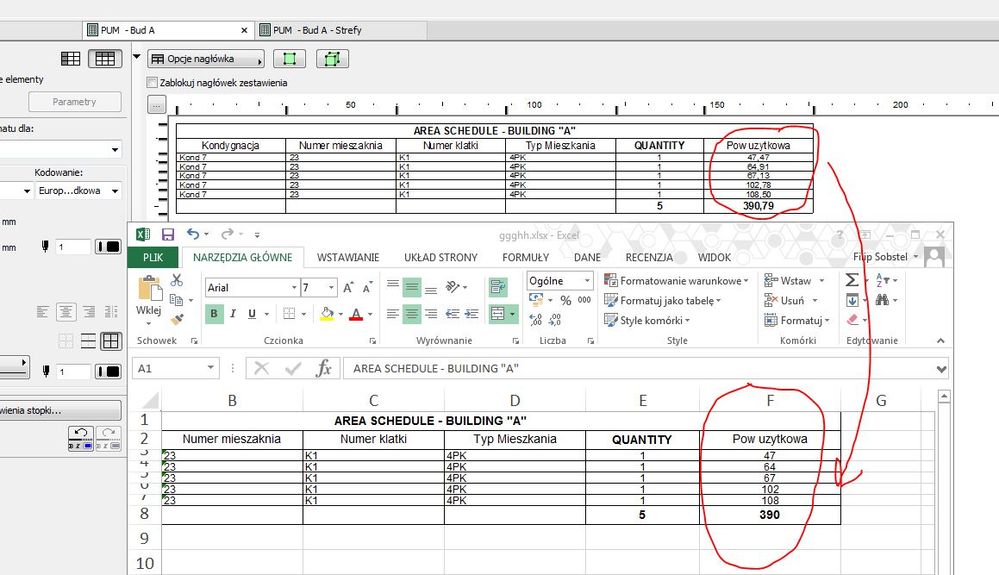
After "save as" a schedule to Excel ( no matter if .xls or .xlsx) numbers are flattened to integer numbers without anything after the coma.
number 45,23 becomes 45
number 23,78 becomes 23
This happens for every number, area, dimension etc.
Schedule exported to Word (.doc) has all numbers perfectly OK.
I'm working on AC19 with latest update "5005 POL FULL".
Any ideas on "options" for exporting to Excel,
Am I missing a place where can some option be changed on how to export a schedule ?
PS - It's not about formatting cells in Excel, those numbers have their values really changed.
Read-Only
Labels:
- Labels:
-
Data management
1 Reply 1

rozky
Contributor
Options
- Mark as New
- Bookmark
- Subscribe
- Mute
- Subscribe to RSS Feed
- Permalink
- Report Inappropriate Content
2016-07-22 11:08 AM
2016-07-22
11:08 AM
Yes this is bug. new update 6006 will fix it.
Ryzen Threadripper 1950X - 64GB RAM; NVidia GTX 1080Ti ; Windows 10 64bit; AC10-AC23 (64bit)
Still looking?

Suggested topics
- Archicad to Revit for MEP: the workaround Graphisoft's own method couldn't give me in Collaboration with other software
- Weird bolded ID numbers in door schedule in Documentation
- Schedule Advance in Project data & BIM
- Data conversion in schedules in Project data & BIM
- Schedule xml import in Archicad 29 is removing fields in Project data & BIM
