
Turn on suggestions
Auto-suggest helps you quickly narrow down your search results by suggesting possible matches as you type.
Showing results for
EN
Turn on suggestions
Auto-suggest helps you quickly narrow down your search results by suggesting possible matches as you type.
Showing results for
- English
- :
- Forum
- :
- Documentation
- :
- Detail marker lines
Options
- Subscribe to RSS Feed
- Mark Topic as New
- Mark Topic as Read
- Pin this post for me
- Bookmark
- Subscribe to Topic
- Mute
- Printer Friendly Page

Strawbale23
Expert
Options
- Mark as New
- Bookmark
- Subscribe
- Mute
- Subscribe to RSS Feed
- Permalink
- Report Inappropriate Content
2023-03-01
10:21 PM
- last edited on
2023-05-30
12:17 PM
by
 Rubia Torres
Detail marker lines
2023-03-01
10:21 PM
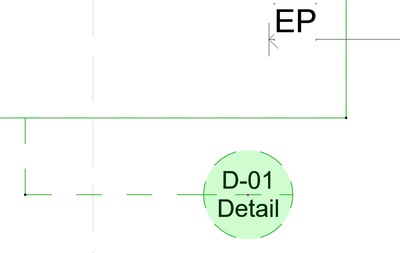
Hi , can anyone tell me how to get a dashed line around my detail marker?
It seems to want to do it but its as if there is a 2nd line there. I cannot find the setting for this
thanks
AC26
https://www.zendsign.fr/
Solved! Go to Solution.
1 Solution
Accepted Solutions

Lee Hankins
Virtuoso
Options
- Mark as New
- Bookmark
- Subscribe
- Mute
- Subscribe to RSS Feed
- Permalink
- Report Inappropriate Content
2023-03-01 10:50 PM - edited 2023-03-01 10:52 PM
2023-03-01
10:50 PM
The second line is the on screen reference for the detail boundary box. It won’t print or publish it’s just an onscreen option. You can turn them off globally (affects sections and elevation markers too). I think it’s in the on screen view options menu.
Turn off the Marker Range.
Lee Hankins
ArchiCAD 4.5 - Archicad 29
macOS Tahoe (26.0)
ArchiCAD 4.5 - Archicad 29
macOS Tahoe (26.0)
1 Reply 1
Lee Hankins
Virtuoso
Options
- Mark as New
- Bookmark
- Subscribe
- Mute
- Subscribe to RSS Feed
- Permalink
- Report Inappropriate Content
2023-03-01 10:50 PM - edited 2023-03-01 10:52 PM
2023-03-01
10:50 PM
The second line is the on screen reference for the detail boundary box. It won’t print or publish it’s just an onscreen option. You can turn them off globally (affects sections and elevation markers too). I think it’s in the on screen view options menu.
Turn off the Marker Range.
Lee Hankins
ArchiCAD 4.5 - Archicad 29
macOS Tahoe (26.0)
ArchiCAD 4.5 - Archicad 29
macOS Tahoe (26.0)

Still looking?
Suggested topics
- Detailing | Better methods of 2d drafting, creation of Blocks , Detail Elements , 2d Objects in Documentation
- Railing and Curtain Wall in Modeling
- Archicad to Revit for MEP: the workaround Graphisoft's own method couldn't give me in Collaboration with other software
- interior elevation marker glitch in Documentation
- Updated Change Markers in Libraries & objects
