
Turn on suggestions
Auto-suggest helps you quickly narrow down your search results by suggesting possible matches as you type.
Showing results for
EN
Turn on suggestions
Auto-suggest helps you quickly narrow down your search results by suggesting possible matches as you type.
Showing results for
- English
- :
- Forum
- :
- Documentation
- :
- Re: Eric Milberger
Options
- Subscribe to RSS Feed
- Mark Topic as New
- Mark Topic as Read
- Pin this post for me
- Bookmark
- Subscribe to Topic
- Mute
- Printer Friendly Page

Eric Milberger
Advisor
Options
- Mark as New
- Bookmark
- Subscribe
- Mute
- Subscribe to RSS Feed
- Permalink
- Report Inappropriate Content
2023-01-15
06:41 PM
- last edited on
2025-07-16
02:09 PM
by
 Aruzhan Ilaikova
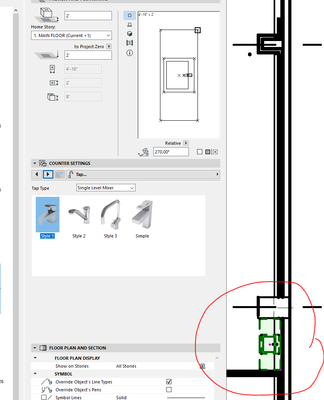
Placed objects show with dashed line type
2023-01-15
06:41 PM
This may be my understanding but.
Placing a Stock object
It is DASHED and not solid line as shown in this clip.
Eric Milberger, Architect | Master Planner
Labels:
5 Replies 5

Steve Masey
Contributor
Options
- Mark as New
- Bookmark
- Subscribe
- Mute
- Subscribe to RSS Feed
- Permalink
- Report Inappropriate Content
2023-01-15 09:37 PM
2023-01-15
09:37 PM
Hi Eric,
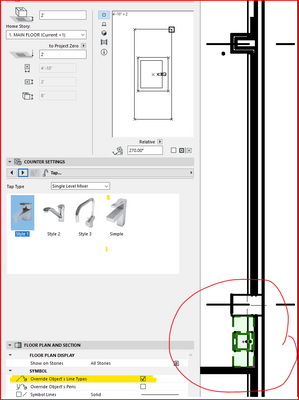
Uncheck the "Override Object's Line Types" checkbox as highlighted below.
Hope that helps.
Steve M
Regards, Steve Masey | Architectural Designer | Whangaparaoa New Zealand
Archicad 10 - 27 NZE | Win11. Pro | AMD Ryzen 9 3900x X570 | Nvidia RTX2060Super 8GB | 32GB RAM | too many SSDs....
Archicad 10 - 27 NZE | Win11. Pro | AMD Ryzen 9 3900x X570 | Nvidia RTX2060Super 8GB | 32GB RAM | too many SSDs....
Eric Milberger
Advisor
Options
- Mark as New
- Bookmark
- Subscribe
- Mute
- Subscribe to RSS Feed
- Permalink
- Report Inappropriate Content
2023-01-15 09:43 PM
2023-01-15
09:43 PM
Thanks - is there a reason the default is to override reality?
Eric Milberger, Architect | Master Planner
Steve Masey
Contributor
Options
- Mark as New
- Bookmark
- Subscribe
- Mute
- Subscribe to RSS Feed
- Permalink
- Report Inappropriate Content
2023-01-15 09:47 PM
2023-01-15
09:47 PM
It comes in handy sometimes. (I've used it a few times in the last 16 years).
Open the Object toolbox & un-check the "Override Object's Line Types" checkbox, otherwise the override will apply to every object you place until it's turned off.
Regards, Steve Masey | Architectural Designer | Whangaparaoa New Zealand
Archicad 10 - 27 NZE | Win11. Pro | AMD Ryzen 9 3900x X570 | Nvidia RTX2060Super 8GB | 32GB RAM | too many SSDs....
Archicad 10 - 27 NZE | Win11. Pro | AMD Ryzen 9 3900x X570 | Nvidia RTX2060Super 8GB | 32GB RAM | too many SSDs....
Eric Milberger
Advisor
Options
- Mark as New
- Bookmark
- Subscribe
- Mute
- Subscribe to RSS Feed
- Permalink
- Report Inappropriate Content
2023-01-15 09:57 PM
2023-01-15
09:57 PM
OK I know about the objet toolbox for a singular item but do not know where to find a "Objects Toodbox" that sets the standards.
And thanks again
Eric Milberger, Architect | Master Planner

Karl Ottenstein
Moderator Emeritus
Options
- Mark as New
- Bookmark
- Subscribe
- Mute
- Subscribe to RSS Feed
- Permalink
- Report Inappropriate Content
2023-01-15 11:18 PM
2023-01-15
11:18 PM
@Eric Milberger wrote:
Thanks - is there a reason the default is to override reality?
It shouldn't be the default (e.g., opening a fresh project from the delivered template). But, every tool, not just the Object tool, uses its last settings for the next use. It's up to you to check the settings if you have (ever) changed them. This is another case where Favorites can be useful, as each tool can have a Favorite which resets it to (your) desired defaults.
Vote for Wish: Copy/Paste in 3D
AC 29 USA and earlier • hardware key • macOS Tahoe 26.7 MacBook Pro M2 Max 12CPU/30GPU cores, 32GB
AC 29 USA and earlier • hardware key • macOS Tahoe 26.7 MacBook Pro M2 Max 12CPU/30GPU cores, 32GB

Still looking?

Suggested topics
- Need assistance on setting up a mac server in Teamwork & BIMcloud
- Displaying only zone number and subtotals in schedule in Project data & BIM
- Transparent FIlls for Zones in Documentation
- Registry of Archicad Users in General discussions
- BIMcloud Basic spiking at 80% memory usage in Teamwork & BIMcloud
