
Turn on suggestions
Auto-suggest helps you quickly narrow down your search results by suggesting possible matches as you type.
Showing results for
EN
Turn on suggestions
Auto-suggest helps you quickly narrow down your search results by suggesting possible matches as you type.
Showing results for
- English
- :
- Forum
- :
- Documentation
- :
- Re: Show X & Y dimensions of zone tool in plan vie...
Options
- Subscribe to RSS Feed
- Mark Topic as New
- Mark Topic as Read
- Pin this post for me
- Bookmark
- Subscribe to Topic
- Mute
- Printer Friendly Page

fortyone
Participant
Options
- Mark as New
- Bookmark
- Subscribe
- Mute
- Subscribe to RSS Feed
- Permalink
- Report Inappropriate Content
2019-09-11
05:39 AM
- last edited on
2023-05-09
01:27 PM
by
 Gordana Radonic
Show X & Y dimensions of zone tool in plan view..
2019-09-11
05:39 AM
Good afternoon team,
Is there a way of showing the X and Y dimensions of a zone? I cant seem to use associative text label in plan view and the zone stamp tool doesn't have this option. AC22
Do you know of a way of doing this?
Is there a way of showing the X and Y dimensions of a zone? I cant seem to use associative text label in plan view and the zone stamp tool doesn't have this option. AC22
Do you know of a way of doing this?
32 Replies 32

Yves
Expert
Options
- Mark as New
- Bookmark
- Subscribe
- Mute
- Subscribe to RSS Feed
- Permalink
- Report Inappropriate Content
2026-01-16 05:50 PM
2026-01-16
05:50 PM
Barry's object calls macros, so it cannot function without them.
Yves Houssier
Belgium
Archicad 19 -> 24
iMac - Mac Os 10,13
Belgium
Archicad 19 -> 24
iMac - Mac Os 10,13

Gabor Szelei
Enthusiast
Options
- Mark as New
- Bookmark
- Subscribe
- Mute
- Subscribe to RSS Feed
- Permalink
- Report Inappropriate Content
2026-01-16 06:57 PM
2026-01-16
06:57 PM
Hello,
Can you do it by writing the lengths of the sides of the zones in the correct places? That way it wouldn't matter how many sides the zone has.
It would be best if these could be listed afterwards. This way a report could be created that includes the length of the sides of the zone.
You can see what I mean in the picture.

The perfect solution would be this:

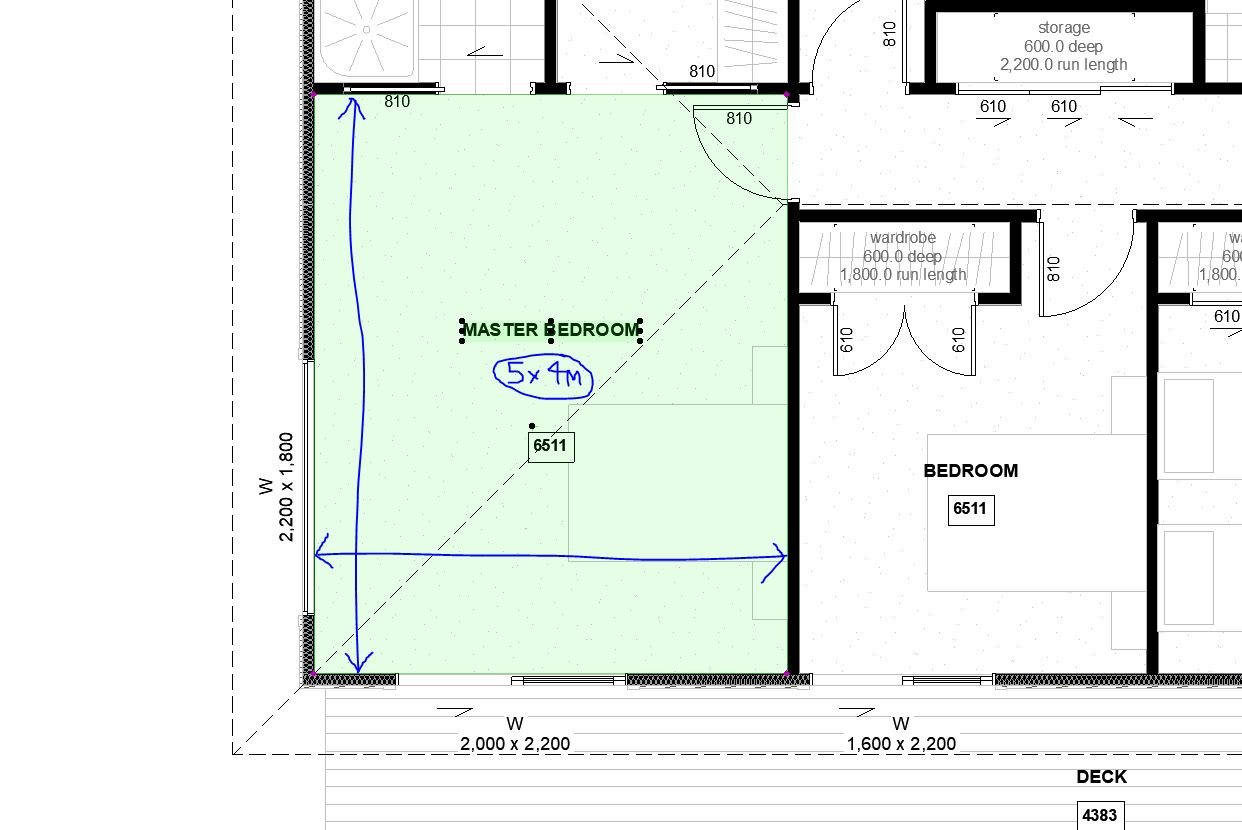
The numbering of the wall sections would always start at the same place and go counterclockwise so that the indexes could be identified. The indexing would come from the room number. This way you could make a list of the lengths of the wall sections.
Do you think this could be done using zones?
Regards:
Gábor
Versions 6.5 to 28, AMD Ryzen 9 3900x, 32GB ram, GeForce RTX 2070 super, Windows 10

Cosminn
Enthusiast
Options
- Mark as New
- Bookmark
- Subscribe
- Mute
- Subscribe to RSS Feed
- Permalink
- Report Inappropriate Content
2026-01-17 10:37 PM - edited 2026-01-17 10:43 PM
2026-01-17
10:37 PM
Hello,
Archicad doesn’t natively display overall X/Y room dimensions automatically in plan view (zones only report area by default).
I ran into the same limitation, so I built a small GDL-based solution that calculates and displays the overall zone dimensions live, directly from the zone geometry.
It works in plan (and also in sections/elevations if needed), with video tutorials included:
https://www.occular.eu/product-page/automatic-dimensions
Hope this helps.
Sincerely,
Daniel
Daniel
Cosminn
Enthusiast
Options
- Mark as New
- Bookmark
- Subscribe
- Mute
- Subscribe to RSS Feed
- Permalink
- Report Inappropriate Content
2026-01-17 10:49 PM
2026-01-17
10:49 PM
Hi Gabor,
Yes — this is absolutely possible in Archicad, but not with native zone stamps or labels.
I actually developed a GDL-based solution that reads the full zone polygon and places the length of each edge directly along the corresponding side — regardless of how many sides the zone has (rectangular or irregular).
The data can also be exposed for listing/scheduling, so reports per zone are possible.
At the moment this tool is still in internal use and not yet released publicly (the UI needs some refinement), but it’s on my roadmap following the zone overall dimensions tool.
Your use case description is exactly how I’ve been using it in practice.
However, I’ve recently released a related solution that automatically displays overall X/Y zone dimensions in plans (and can also be used in sections via labels):
https://www.occular.eu/product-page/automatic-dimensions
It solves a slightly different part of the workflow, but it might already help in many cases.
Sincerely,
Daniel
Daniel

Barry Kelly
Moderator
Options
- Mark as New
- Bookmark
- Subscribe
- Mute
- Subscribe to RSS Feed
- Permalink
- Report Inappropriate Content
2026-01-18 03:30 AM
2026-01-18
03:30 AM
Sorry I thought I got rid of all the macros.
Must have missed something.
I will have a look at it again later today.
Barry.
One of the forum moderators.
Versions 6.5 to 27
i7-10700 @ 2.9Ghz, 32GB ram, GeForce RTX 2060 (6GB), Windows 10
Lenovo Thinkpad - i7-1270P 2.20 GHz, 32GB RAM, Nvidia T550, Windows 11
Versions 6.5 to 27
i7-10700 @ 2.9Ghz, 32GB ram, GeForce RTX 2060 (6GB), Windows 10
Lenovo Thinkpad - i7-1270P 2.20 GHz, 32GB RAM, Nvidia T550, Windows 11

Mathias Jonathan
Expert
Options
- Mark as New
- Bookmark
- Subscribe
- Mute
- Subscribe to RSS Feed
- Permalink
- Report Inappropriate Content
2026-01-18 07:54 PM
2026-01-18
07:54 PM
Zones are rarely "orthogonal" in our project. I didn't see any orientation option in your objects. Is there something on the subject?
Archicad 27 - GDL - PYTHON
Cosminn
Enthusiast
Options
- Mark as New
- Bookmark
- Subscribe
- Mute
- Subscribe to RSS Feed
- Permalink
- Report Inappropriate Content
2026-01-18 09:34 PM
2026-01-18
09:34 PM
Thanks for raising this — could you share a quick screenshot of one of those zones?
I’d like to better understand the geometry you’re referring to and how you typically document it.
Sincerely,
Daniel
Daniel
Cosminn
Enthusiast
Options
- Mark as New
- Bookmark
- Subscribe
- Mute
- Subscribe to RSS Feed
- Permalink
- Report Inappropriate Content
2026-01-18 09:55 PM
2026-01-18
09:55 PM
Please check this link below, there are video tutorials as well:
https://www.occular.eu/product-page/automatic-dimensions
let me know if I can help.
Sincerely,
Daniel
Daniel
Barry Kelly
Moderator
Options
- Mark as New
- Bookmark
- Subscribe
- Mute
- Subscribe to RSS Feed
- Permalink
- Report Inappropriate Content
2026-01-19 04:01 AM
2026-01-19
04:01 AM
Here is the amended object with no macros.
I will update the file in the previous post as well.
Barry.
One of the forum moderators.
Versions 6.5 to 27
i7-10700 @ 2.9Ghz, 32GB ram, GeForce RTX 2060 (6GB), Windows 10
Lenovo Thinkpad - i7-1270P 2.20 GHz, 32GB RAM, Nvidia T550, Windows 11
Versions 6.5 to 27
i7-10700 @ 2.9Ghz, 32GB ram, GeForce RTX 2060 (6GB), Windows 10
Lenovo Thinkpad - i7-1270P 2.20 GHz, 32GB RAM, Nvidia T550, Windows 11

Shir_2025
Booster
Options
- Mark as New
- Bookmark
- Subscribe
- Mute
- Subscribe to RSS Feed
- Permalink
- Report Inappropriate Content
2026-01-22 11:01 PM
2026-01-22
11:01 PM
Hi Barry
This is exactly what i was after. Thank you very much

Still looking?

Suggested topics
- Issues with 3Dconnexxion CadMouse Pro Wireless in Installation & update
- Detail marker as plan in Documentation
- Is there a way to hyperlink files in order to place their drawings into a common layout book? in Documentation
- Automatic mesh hatching on floorplan in Documentation
- Keynot labels and Quick Layers in Documentation
