
Turn on suggestions
Auto-suggest helps you quickly narrow down your search results by suggesting possible matches as you type.
Showing results for
EN
Turn on suggestions
Auto-suggest helps you quickly narrow down your search results by suggesting possible matches as you type.
Showing results for
- English
- :
- Forum
- :
- Documentation
- :
- Re: Wall surfaces : what's the best way to do a lo...
Options
- Subscribe to RSS Feed
- Mark Topic as New
- Mark Topic as Read
- Pin this post for me
- Bookmark
- Subscribe to Topic
- Mute
- Printer Friendly Page

Anonymous
Not applicable
Options
- Mark as New
- Bookmark
- Subscribe
- Mute
- Subscribe to RSS Feed
- Permalink
- Report Inappropriate Content
2018-04-22
10:25 PM
- last edited on
2025-02-06
01:18 PM
by
 Aruzhan Ilaikova
Wall surfaces : what's the best way to do a location plan
2018-04-22
10:25 PM
Hi everyone,
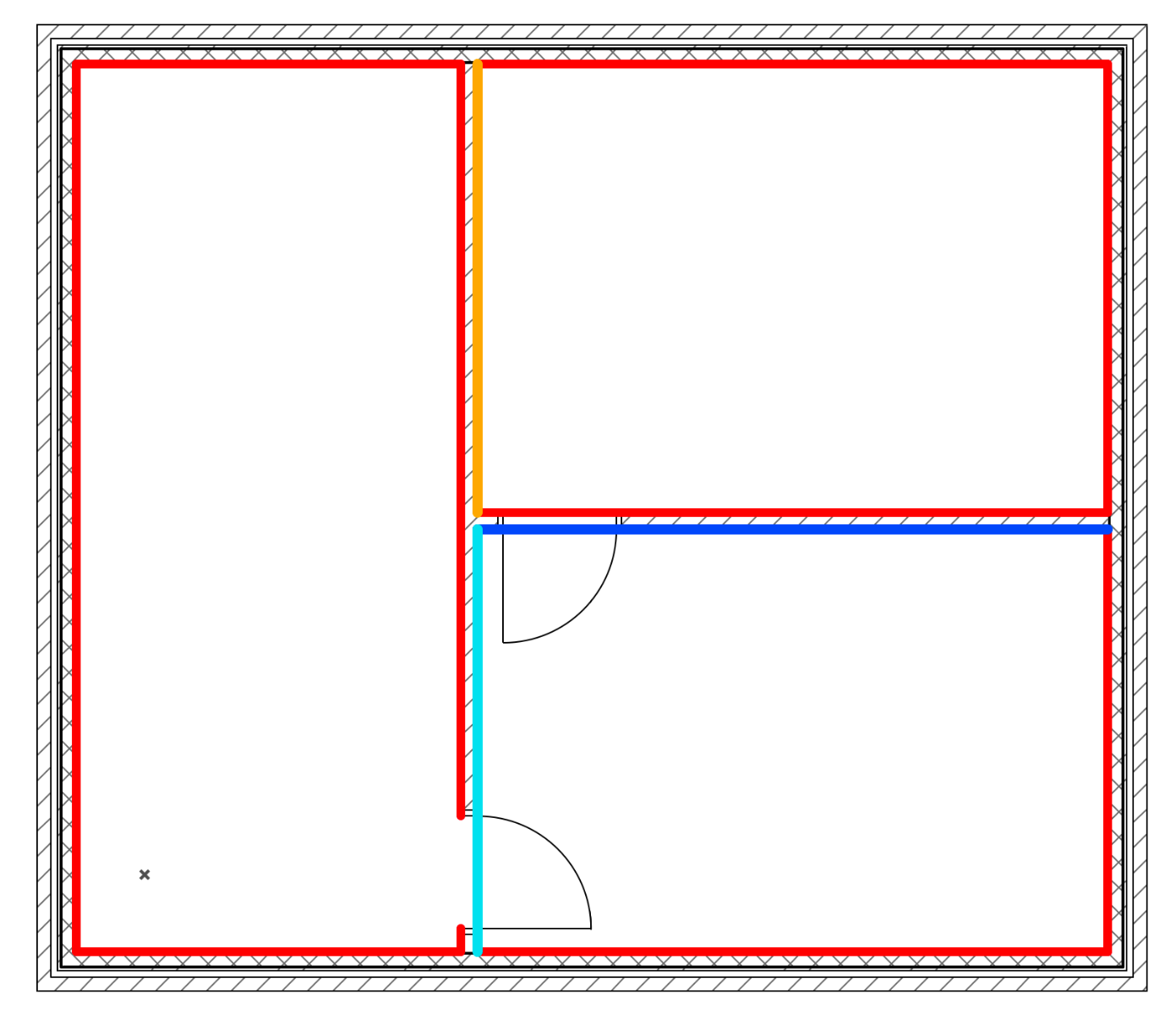
I need to do schematic plans to illustrate the wall finish of a big project. Theses plans will be accompanied by a wall surface schedule.
GO are very powerful for a lot of similar situations but not this particular case as you cannot modify the graphical property of a single component of a wall.
I joined two images to illustrate what I am trying to do. In this example I just used lines with a specific pen for each surface. This is one technique possible for such a plan but it is not very efficient. If you change wall surfaces, you have to be very careful and modify the lines one by one. Plus, the schedule will always be "right", but you can end up with weird differences between the wall finish plan and the schedule.
What technique do you use to produce such documents?
Does someone have a miracle solution?
Thank you in advance for your counsels!
Johan
I need to do schematic plans to illustrate the wall finish of a big project. Theses plans will be accompanied by a wall surface schedule.
GO are very powerful for a lot of similar situations but not this particular case as you cannot modify the graphical property of a single component of a wall.
I joined two images to illustrate what I am trying to do. In this example I just used lines with a specific pen for each surface. This is one technique possible for such a plan but it is not very efficient. If you change wall surfaces, you have to be very careful and modify the lines one by one. Plus, the schedule will always be "right", but you can end up with weird differences between the wall finish plan and the schedule.
What technique do you use to produce such documents?
Does someone have a miracle solution?
Thank you in advance for your counsels!
Johan

1 Reply 1

Andre_Steynberg
Enthusiast
Options
- Mark as New
- Bookmark
- Subscribe
- Mute
- Subscribe to RSS Feed
- Permalink
- Report Inappropriate Content
2018-04-23 08:43 PM
2018-04-23
08:43 PM
Johan
what sort of wall surfaces?
I've recently completed a small clinic and to indicate (schedule & spec) the tiled wall surfaces areas I drew in a morph to each wall spaced about 20mm from the wall.
Its then easy to adjust where the tiled areas are in section and add necessary specs etc via Properties.
I could also schedule all the tiled areas
You say it's a big project so this method may not work for you, but maybe it can help you to work out something else.
Andre
what sort of wall surfaces?
I've recently completed a small clinic and to indicate (schedule & spec) the tiled wall surfaces areas I drew in a morph to each wall spaced about 20mm from the wall.
Its then easy to adjust where the tiled areas are in section and add necessary specs etc via Properties.
I could also schedule all the tiled areas
You say it's a big project so this method may not work for you, but maybe it can help you to work out something else.
Andre
Andre Steynberg
Win 10 64-bit
AC27
Win 10 64-bit
AC27
Still looking?
Suggested topics
- GDL objects - Materials vs surfaces in Libraries & objects
- Custom Door Leaf - File location & Customized Surfaces in Libraries & objects
- How do I optimize my PLN from embedded surfaces using container library? in Libraries & objects
- hotel on a terrain in Modeling
- What settings for B & W line drawn elevations with surface fill, but no color of surface? in Documentation
