
Turn on suggestions
Auto-suggest helps you quickly narrow down your search results by suggesting possible matches as you type.
Showing results for
EN
Turn on suggestions
Auto-suggest helps you quickly narrow down your search results by suggesting possible matches as you type.
Showing results for
- English
- :
- Forum
- :
- Documentation
- :
- Re: grid / bounding box / elevation / curtain wall
Options
- Subscribe to RSS Feed
- Mark Topic as New
- Mark Topic as Read
- Pin this post for me
- Bookmark
- Subscribe to Topic
- Mute
- Printer Friendly Page

Piotr Walerysiak
Enthusiast
Options
- Mark as New
- Bookmark
- Subscribe
- Mute
- Subscribe to RSS Feed
- Permalink
- Report Inappropriate Content
2022-09-20 02:36 PM
grid / bounding box / elevation / curtain wall
2022-09-20
02:36 PM
Hi all
I have a problem with proper grid display in elevations. Length of grid line does not adjust to model bounding box. Seems that bounding box does not include curtain walls. There are other building elements hidden by CW, but they do not affect grid lines display.
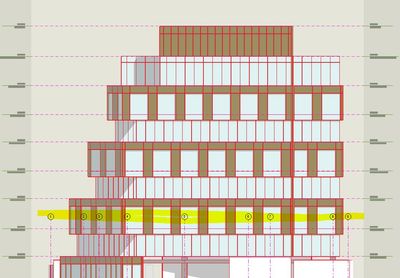
If I add other element visible in elevations (wall, column etc.), grids are shown correctly.
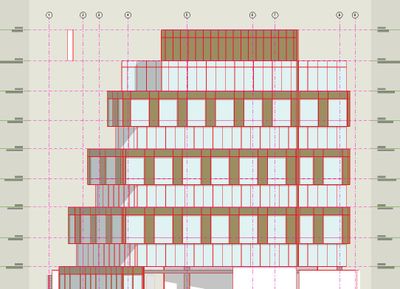
Also checked in other pln files and grid acts the same. Is there any setting for this?
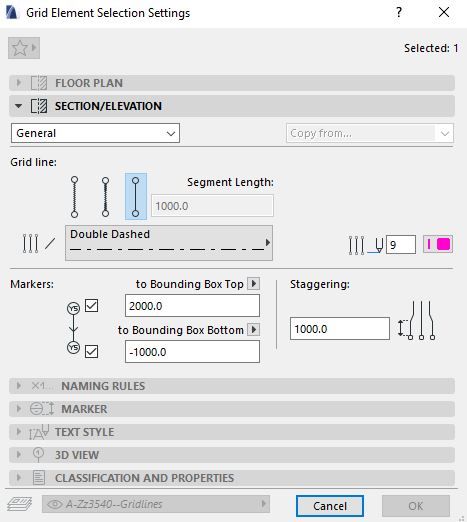
Read-Only
3 Replies 3

Julio C Freitas
Advocate
Options
- Mark as New
- Bookmark
- Subscribe
- Mute
- Subscribe to RSS Feed
- Permalink
- Report Inappropriate Content
2022-09-20 06:26 PM
2022-09-20
06:26 PM
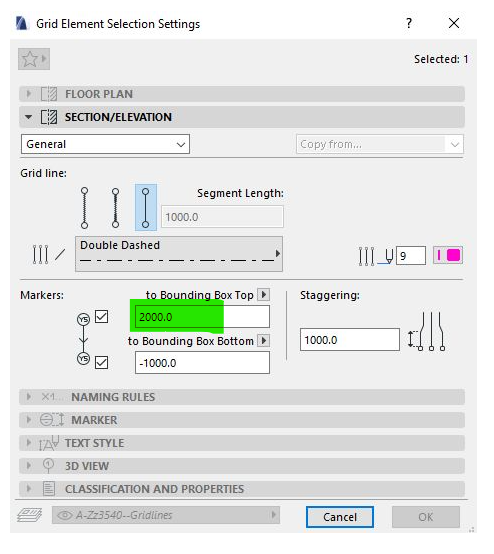
in the grid settings of the image you attached, it is necessary to increase this value. Have you tried this?

Andrii Levko
Expert
Options
- Mark as New
- Bookmark
- Subscribe
- Mute
- Subscribe to RSS Feed
- Permalink
- Report Inappropriate Content
2022-09-21 06:54 AM
2022-09-21
06:54 AM
I think it was about automatically changing the axis height to match the bounding box, because it is possible to set a static "From zero" height. But the curtain wall does not seem to be included in the bounding box anyway.
Andrii
AC 8.1 - 28 INT/POL 3001
Win11
AC 8.1 - 28 INT/POL 3001
Win11
Piotr Walerysiak
Enthusiast
Options
- Mark as New
- Bookmark
- Subscribe
- Mute
- Subscribe to RSS Feed
- Permalink
- Report Inappropriate Content
2022-09-21 10:39 AM
2022-09-21
10:39 AM
Yes, I need grid to adjust height automatically. I have partial sections in the project which shows only few stories, so gridlines shall be much shorter there.

Still looking?

Suggested topics
- Railing and Curtain Wall in Modeling
- Creating a pitched curtain wall in Modeling
- How to model curved vertical wood slat wall paneling + fluted glass wall. Efficient workflow? in Modeling
- Stuck at 4 | Calculating Split Polygons in opening an Elevation in Modeling
- section marker position vs plan sheet dimension in Documentation
