
Turn on suggestions
Auto-suggest helps you quickly narrow down your search results by suggesting possible matches as you type.
Showing results for
EN
Turn on suggestions
Auto-suggest helps you quickly narrow down your search results by suggesting possible matches as you type.
Showing results for
- English
- :
- Forum
- :
- Installation & update
- :
- Re: Add-Ons 25 UKR
Options
- Subscribe to RSS Feed
- Mark Topic as New
- Mark Topic as Read
- Pin this post for me
- Bookmark
- Subscribe to Topic
- Mute
- Printer Friendly Page

Petro_mo
Contributor
Options
- Mark as New
- Bookmark
- Subscribe
- Mute
- Subscribe to RSS Feed
- Permalink
- Report Inappropriate Content
2022-07-15 04:21 PM
Add-Ons 25 UKR
2022-07-15
04:21 PM
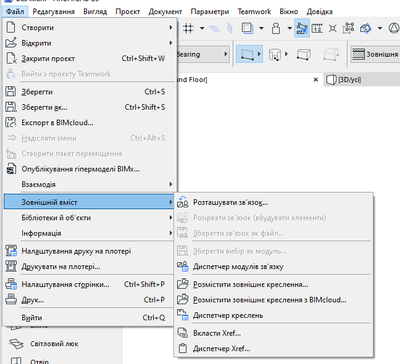
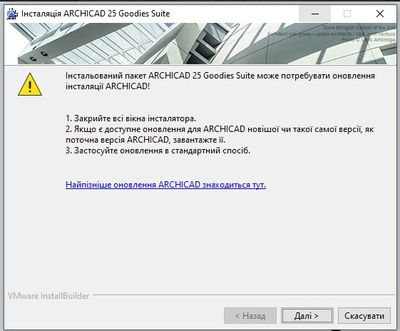

Good day) Faced with such a problem. Why doesn't the add-on install?
Read-Only
6 Replies 6

Andrii Levko
Expert
Options
- Mark as New
- Bookmark
- Subscribe
- Mute
- Subscribe to RSS Feed
- Permalink
- Report Inappropriate Content
2022-07-16 03:48 PM - edited 2022-07-16 05:09 PM
2022-07-16
03:48 PM
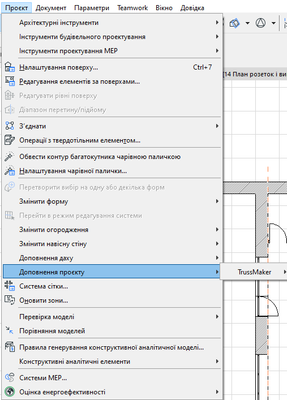
Hi Petro, it needs more details, but you can press "Next" (Далi) , What happens then? Have you checked in menubar the "Design/Design Extras" ( в головному меню Проект/ Додатки) , there should be installed accessories and other.
Andrii
AC 8.1 - 28 INT/POL 3001
Win11
AC 8.1 - 28 INT/POL 3001
Win11
Petro_mo
Contributor
Options
- Mark as New
- Bookmark
- Subscribe
- Mute
- Subscribe to RSS Feed
- Permalink
- Report Inappropriate Content
2022-07-16 08:05 PM
2022-07-16
08:05 PM
I checked all settings, Desktop. But they are not displayed.
Andrii Levko
Expert
Options
- Mark as New
- Bookmark
- Subscribe
- Mute
- Subscribe to RSS Feed
- Permalink
- Report Inappropriate Content
2022-07-16 08:58 PM
2022-07-16
08:58 PM
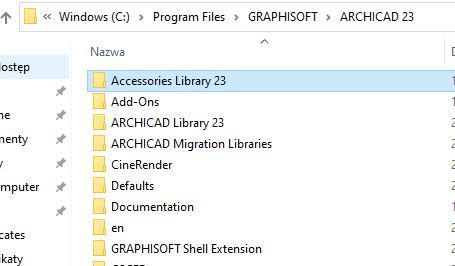
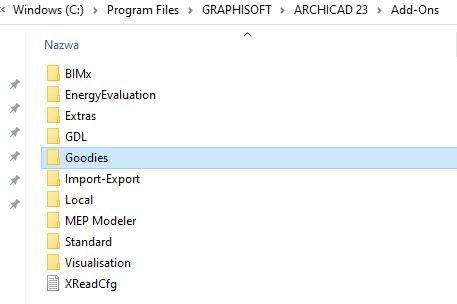
You can only check in menubar or you can also check folder of instalation in Program Files. If it's right folder, there should be installed Accessories library 25 and Goodies folder in Add-ons folder.
Andrii
AC 8.1 - 28 INT/POL 3001
Win11
AC 8.1 - 28 INT/POL 3001
Win11
Petro_mo
Contributor
Options
- Mark as New
- Bookmark
- Subscribe
- Mute
- Subscribe to RSS Feed
- Permalink
- Report Inappropriate Content
2022-07-16 09:00 PM
2022-07-16
09:00 PM
Yes, these folders are available.
Andrii Levko
Expert
Options
- Mark as New
- Bookmark
- Subscribe
- Mute
- Subscribe to RSS Feed
- Permalink
- Report Inappropriate Content
2022-07-16 09:22 PM
2022-07-16
09:22 PM
I had such a problem when I had several language versions of Archicad installed, and I accidentally installed the UKR goodies in folder with the International version of Archicad. If you have it downloaded in the appropriate folder, then it is strange, you need to contact your local reseller.
Andrii
AC 8.1 - 28 INT/POL 3001
Win11
AC 8.1 - 28 INT/POL 3001
Win11
Andrii Levko
Expert
Options
- Mark as New
- Bookmark
- Subscribe
- Mute
- Subscribe to RSS Feed
- Permalink
- Report Inappropriate Content
2022-07-27 10:44 AM - edited 2022-07-27 10:45 AM
2022-07-27
10:44 AM
Hi, I don't know if this issue is still valid for you, but recently I came across some information on the Graphisoft website:
The newly installed Goodies are of build 4013. If your Archicad have a higher build you need to run the latest update installer of Archicad. It will update your installed Goodies to the build of your Archicad. This is necessary before you first start working with Goodies. Later when you update your Archicad again, your Goodies will be updated automatically too."
https://Graphisoft.com/downloads/goodies/ac25-ukr
Because Goodies UKR has Build 4013 and Archicad UKR has 5010 Build, maybe this information will be useful for you.
Andrii
AC 8.1 - 28 INT/POL 3001
Win11
AC 8.1 - 28 INT/POL 3001
Win11

Still looking?

Suggested topics
- Simple AI rendering Addon in Visualization
- Simple and FREE quantity take-off AddOn (BIMquantsLite) in Project data & BIM
- Automation Addon Name in General discussions
- Localized addons finally released for 28 INT version. in Installation & update
- Grasshopper-Archicad 28 Live Connection User Guide download link unavailable in Parametric design
