
Turn on suggestions
Auto-suggest helps you quickly narrow down your search results by suggesting possible matches as you type.
Showing results for
EN
Turn on suggestions
Auto-suggest helps you quickly narrow down your search results by suggesting possible matches as you type.
Showing results for
- English
- :
- Forum
- :
- Installation & update
- :
- Re: Mac full screen hides menu bar unless mouse ov...
Options
- Subscribe to RSS Feed
- Mark Topic as New
- Mark Topic as Read
- Pin this post for me
- Bookmark
- Subscribe to Topic
- Mute
- Printer Friendly Page

TENNIS-LIFE
Booster
Options
- Mark as New
- Bookmark
- Subscribe
- Mute
- Subscribe to RSS Feed
- Permalink
- Report Inappropriate Content
2023-10-05
06:20 PM
- last edited on
2023-11-15
10:06 AM
by
 Aruzhan Ilaikova
Mac full screen hides menu bar unless mouse over
2023-10-05
06:20 PM
Basically the title. On Mac when making the archicad 26 window max screen size the top bar (I think it's called menu bar) hides and becomes mouses over to show only. It's the bar that has File, Edit, etc. Is there a way to not make it mouse over and just show full time. My search hasn't found an answer. Too many common terms clogs up results.
I wasn't sure where to post there. There isn't really a forum that included toolbar layouts.
Solved! Go to Solution.
2 Solutions
Accepted Solutions

Lee Hankins
Virtuoso
Options
- Mark as New
- Bookmark
- Subscribe
- Mute
- Subscribe to RSS Feed
- Permalink
- Report Inappropriate Content
2023-10-06 08:04 AM
2023-10-06
08:04 AM
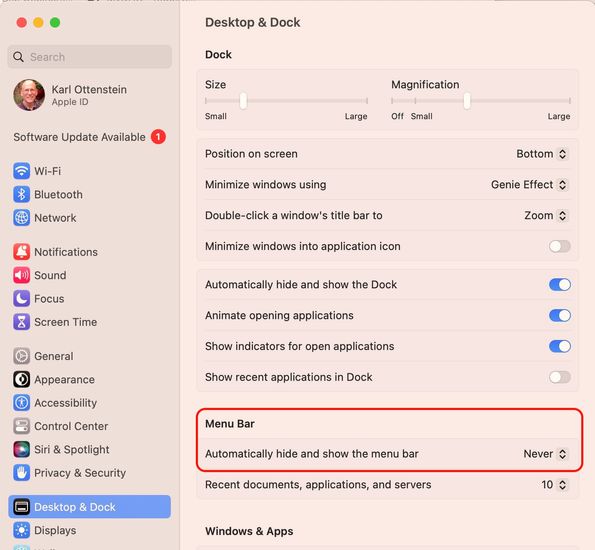
If you go in to system preferences and dock and menu bar settings you can uncheck the option to automatically show and hide menu bar in full screen so it stays on screen.
Lee Hankins
ArchiCAD 4.5 - Archicad 29
macOS Tahoe (26.0)
ArchiCAD 4.5 - Archicad 29
macOS Tahoe (26.0)

Karl Ottenstein
Moderator Emeritus
Options
- Mark as New
- Bookmark
- Subscribe
- Mute
- Subscribe to RSS Feed
- Permalink
- Report Inappropriate Content
2023-10-06 11:42 PM
2023-10-06
11:42 PM
Screenshot here is macOS Ventura... what version of macOS are you using @TENNIS-LIFE ?
Vote for Wish: Copy/Paste in 3D
AC 29 USA and earlier • hardware key • macOS Tahoe 26.7 MacBook Pro M2 Max 12CPU/30GPU cores, 32GB
AC 29 USA and earlier • hardware key • macOS Tahoe 26.7 MacBook Pro M2 Max 12CPU/30GPU cores, 32GB
8 Replies 8

DGSketcher
Legend
Options
- Mark as New
- Bookmark
- Subscribe
- Mute
- Subscribe to RSS Feed
- Permalink
- Report Inappropriate Content
2023-10-05 07:55 PM
2023-10-05
07:55 PM
It is a Mac thing. It happens with all apps including Apple's own. I know it is a bit odd but that is the way Apple made it work.
Apple iMac Intel i9 / macOS Sonoma / AC27UKI (most recent builds.. if they work)
TENNIS-LIFE
Booster
Options
- Mark as New
- Bookmark
- Subscribe
- Mute
- Subscribe to RSS Feed
- Permalink
- Report Inappropriate Content
2023-10-05 08:03 PM
2023-10-05
08:03 PM
Oh, Ok. I just switched to Apple, so still figuring a lot out.
DGSketcher
Legend
Options
- Mark as New
- Bookmark
- Subscribe
- Mute
- Subscribe to RSS Feed
- Permalink
- Report Inappropriate Content
2023-10-05 08:27 PM
2023-10-05
08:27 PM
I don't regret switching. 👍
Apple iMac Intel i9 / macOS Sonoma / AC27UKI (most recent builds.. if they work)
Lee Hankins
Virtuoso
Options
- Mark as New
- Bookmark
- Subscribe
- Mute
- Subscribe to RSS Feed
- Permalink
- Report Inappropriate Content
2023-10-06 08:04 AM
2023-10-06
08:04 AM
If you go in to system preferences and dock and menu bar settings you can uncheck the option to automatically show and hide menu bar in full screen so it stays on screen.
Lee Hankins
ArchiCAD 4.5 - Archicad 29
macOS Tahoe (26.0)
ArchiCAD 4.5 - Archicad 29
macOS Tahoe (26.0)
DGSketcher
Legend
Options
- Mark as New
- Bookmark
- Subscribe
- Mute
- Subscribe to RSS Feed
- Permalink
- Report Inappropriate Content
2023-10-06 10:09 AM
2023-10-06
10:09 AM
Thanks Lee, that's good to know. I guess we're all still figuring it out.
Apple iMac Intel i9 / macOS Sonoma / AC27UKI (most recent builds.. if they work)
TENNIS-LIFE
Booster
Options
- Mark as New
- Bookmark
- Subscribe
- Mute
- Subscribe to RSS Feed
- Permalink
- Report Inappropriate Content
2023-10-06 08:39 PM
2023-10-06
08:39 PM
I don't have that setting. There is a setting to not auto hide the dock which is at the bottom of the screen. There's nothing about the menu bar at the top of the screen that is in most programs. I'm sitting at an older machine right now, so it's possible it's only on newer OS. I find it kind of annoying as it's not hiding OS menu bars, it's actually hiding the menu bar inside of software.
Karl Ottenstein
Moderator Emeritus
Options
- Mark as New
- Bookmark
- Subscribe
- Mute
- Subscribe to RSS Feed
- Permalink
- Report Inappropriate Content
2023-10-06 11:42 PM
2023-10-06
11:42 PM
Screenshot here is macOS Ventura... what version of macOS are you using @TENNIS-LIFE ?
Vote for Wish: Copy/Paste in 3D
AC 29 USA and earlier • hardware key • macOS Tahoe 26.7 MacBook Pro M2 Max 12CPU/30GPU cores, 32GB
AC 29 USA and earlier • hardware key • macOS Tahoe 26.7 MacBook Pro M2 Max 12CPU/30GPU cores, 32GB

escott3564
Newcomer
Options
- Mark as New
- Bookmark
- Subscribe
- Mute
- Subscribe to RSS Feed
- Permalink
- Report Inappropriate Content
2024-05-10 07:42 PM
2024-05-10
07:42 PM
If you are using the most recent OS, Sanoma, they have changed the area where you change the menu bar setting. It used to be under Desktop and Dock. Now, it is under Control Center. It was driving me nuts.

Still looking?

Suggested topics
- Finally fixed a bug that Graphisoft was not able to fix for 5+ years in about 30 min in General discussions
- Archicad 30: What have you done? in General discussions
- doors and window missing in reference when publishing layout in Documentation
- Zone boundary excludes curtainwall footprint area. in Project data & BIM
- ArchiTurn (beta) — swept path analysis directly in Archicad: does the vehicle fit or not? in General discussions
