
Turn on suggestions
Auto-suggest helps you quickly narrow down your search results by suggesting possible matches as you type.
Showing results for
EN
Turn on suggestions
Auto-suggest helps you quickly narrow down your search results by suggesting possible matches as you type.
Showing results for
- English
- :
- Forum
- :
- Libraries & objects
- :
- Re: AC26 INT Cabinet Corner Object
Options
- Subscribe to RSS Feed
- Mark Topic as New
- Mark Topic as Read
- Pin this post for me
- Bookmark
- Subscribe to Topic
- Mute
- Printer Friendly Page

hevi
Ace
Options
- Mark as New
- Bookmark
- Subscribe
- Mute
- Subscribe to RSS Feed
- Permalink
- Report Inappropriate Content
2023-01-22
10:42 AM
- last edited on
2025-07-16
02:05 PM
by
 Aruzhan Ilaikova
AC26 INT Cabinet Corner Object
2023-01-22
10:42 AM
EDIT : This was just me being embarrassingly unobservant.
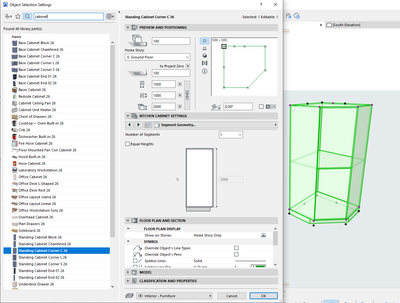
Something seems to be off with the cabinet corner objects in AC26 so that the shape representation does not correspond to the segment settings. In the example below - the setting is set to one segment = no shelf yet it is represented with a shelf = two segments.
Solved! Go to Solution.
1 Solution
Accepted Solutions

David Maudlin
Rockstar
Options
- Mark as New
- Bookmark
- Subscribe
- Mute
- Subscribe to RSS Feed
- Permalink
- Report Inappropriate Content
2023-01-22 03:37 PM
2023-01-22
03:37 PM
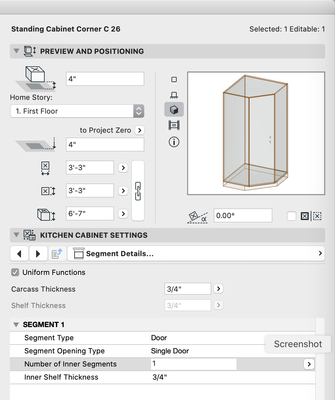
Go to Kitchen Cabinet Settings > Segment Details... > Number of Inner Segments and set it to 1.
You should add a Signature to your Profile (click the Profile button near the top of this page) with your ArchiCAD version and operating system (see mine for an example) for more accurate help in this forum.
David
David Maudlin / Architect
www.davidmaudlin.com
Digital Architecture
AC29 USA Perpetual • Mac mini M4 Pro OSX15 | 64 gb ram • MacBook Pro M3 Pro OSX14 | 36 gb ram
www.davidmaudlin.com
Digital Architecture
AC29 USA Perpetual • Mac mini M4 Pro OSX15 | 64 gb ram • MacBook Pro M3 Pro OSX14 | 36 gb ram
Solution
2 Replies 2
David Maudlin
Rockstar
Options
- Mark as New
- Bookmark
- Subscribe
- Mute
- Subscribe to RSS Feed
- Permalink
- Report Inappropriate Content
2023-01-22 03:37 PM
2023-01-22
03:37 PM
Go to Kitchen Cabinet Settings > Segment Details... > Number of Inner Segments and set it to 1.
You should add a Signature to your Profile (click the Profile button near the top of this page) with your ArchiCAD version and operating system (see mine for an example) for more accurate help in this forum.
David
David Maudlin / Architect
www.davidmaudlin.com
Digital Architecture
AC29 USA Perpetual • Mac mini M4 Pro OSX15 | 64 gb ram • MacBook Pro M3 Pro OSX14 | 36 gb ram
www.davidmaudlin.com
Digital Architecture
AC29 USA Perpetual • Mac mini M4 Pro OSX15 | 64 gb ram • MacBook Pro M3 Pro OSX14 | 36 gb ram
Solution
hevi
Ace
Options
- Mark as New
- Bookmark
- Subscribe
- Mute
- Subscribe to RSS Feed
- Permalink
- Report Inappropriate Content
2023-01-22 04:38 PM - edited 2023-01-22 04:48 PM
2023-01-22
04:38 PM
Had some nagging recollection of such a setting. Too tired being blind - thanks for setting me straight!
Post should be moved to design forum.

Didn't find the answer?
Check other topics in this Forum
Back to ForumRead the latest accepted solutions!
Accepted SolutionsStart a new conversation!

Suggested topics
- Making shelves in the base cabinet object show as dashed hidden lines in Modeling
- How to edit the opening lines for BAse Cabinet Block in Modeling
- gdl custom object snaps back to older version upon opening the file in Libraries & objects
- Profile Stack 2D Detail object in Libraries & objects
- Project origin error, intangible second project origin in 3D view in Modeling
