
Turn on suggestions
Auto-suggest helps you quickly narrow down your search results by suggesting possible matches as you type.
Showing results for
EN
Turn on suggestions
Auto-suggest helps you quickly narrow down your search results by suggesting possible matches as you type.
Showing results for
- English
- :
- Forum
- :
- Libraries & objects
- :
- Re: Doors not showing through cover fills
Options
- Subscribe to RSS Feed
- Mark Topic as New
- Mark Topic as Read
- Pin this post for me
- Bookmark
- Subscribe to Topic
- Mute
- Printer Friendly Page

CYNZ
Participant
Options
- Mark as New
- Bookmark
- Subscribe
- Mute
- Subscribe to RSS Feed
- Permalink
- Report Inappropriate Content
2023-01-19
03:27 AM
- last edited on
2023-05-24
09:40 AM
by
 Rubia Torres
Doors not showing through cover fills
2023-01-19
03:27 AM
Hi
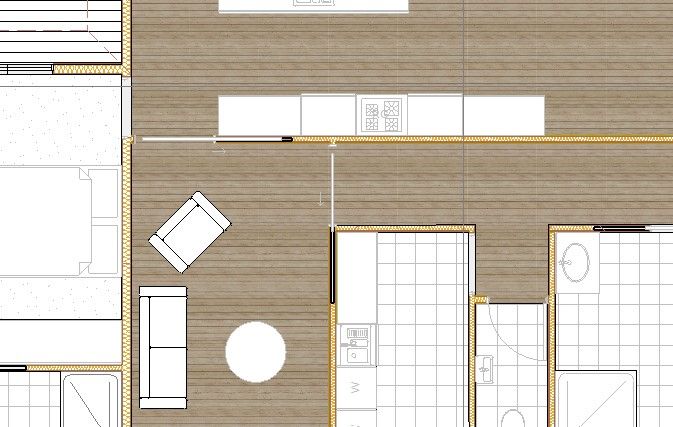
I've added cover fills to a floor slab and have noticed that some of the doors show on top of cover fills and some are obscured by the cover fills.
Any suggestions of how to fix?
Thanks
4 Replies 4

Lee Hankins
Virtuoso
Options
- Mark as New
- Bookmark
- Subscribe
- Mute
- Subscribe to RSS Feed
- Permalink
- Report Inappropriate Content
2023-01-19 08:10 AM
2023-01-19
08:10 AM
It’s to do with the background fill to the symbol of the door. It’s witchcraft figuring out which part of the symbol fill you need to change but once you find it, it makes sense.
Lee Hankins
ArchiCAD 4.5 - Archicad 29
macOS Tahoe (26.0)
ArchiCAD 4.5 - Archicad 29
macOS Tahoe (26.0)
CYNZ
Participant
Options
- Mark as New
- Bookmark
- Subscribe
- Mute
- Subscribe to RSS Feed
- Permalink
- Report Inappropriate Content
2023-01-19 09:28 PM
2023-01-19
09:28 PM
Thanks, its sure seems to be. Still to find it! the setting looks exactly the same of the doors showing and the ones not showing.
Lee Hankins
Virtuoso
Options
- Mark as New
- Bookmark
- Subscribe
- Mute
- Subscribe to RSS Feed
- Permalink
- Report Inappropriate Content
2023-01-19 10:58 PM
2023-01-19
10:58 PM
The different types of doors do seem to utilise fills differently. Try turning the toggle to use objects fills off and then try with it on and change the full type to background and transparent pen.
Lee Hankins
ArchiCAD 4.5 - Archicad 29
macOS Tahoe (26.0)
ArchiCAD 4.5 - Archicad 29
macOS Tahoe (26.0)
CYNZ
Participant
Options
- Mark as New
- Bookmark
- Subscribe
- Mute
- Subscribe to RSS Feed
- Permalink
- Report Inappropriate Content
2023-01-24 11:14 AM
2023-01-24
11:14 AM
Thanks Lee.

Didn't find the answer?
Check other topics in this Forum
Back to ForumRead the latest accepted solutions!
Accepted SolutionsStart a new conversation!

Suggested topics
- how to show timber reveal of a window in an internal elevation view in Modeling
- Graphic Override on a single custom GDL object with multiple independently colored zones (2D and 3D) in Documentation
- How can I combine model data and schedule totals into one building data summary table? in Project data & BIM
- Trying to have all windows show on RCP in Modeling
- Parking layouts and solar parks in a site polygon in Libraries & objects
