
Turn on suggestions
Auto-suggest helps you quickly narrow down your search results by suggesting possible matches as you type.
Showing results for
EN
Turn on suggestions
Auto-suggest helps you quickly narrow down your search results by suggesting possible matches as you type.
Showing results for
- English
- :
- Forum
- :
- Libraries & objects
- :
- Not a General GDL Object?
Options
- Subscribe to RSS Feed
- Mark Topic as New
- Mark Topic as Read
- Pin this post for me
- Bookmark
- Subscribe to Topic
- Mute
- Printer Friendly Page

Anonymous
Not applicable
Options
- Mark as New
- Bookmark
- Subscribe
- Mute
- Subscribe to RSS Feed
- Permalink
- Report Inappropriate Content
2017-04-14 12:59 AM
Not a General GDL Object?
2017-04-14
12:59 AM
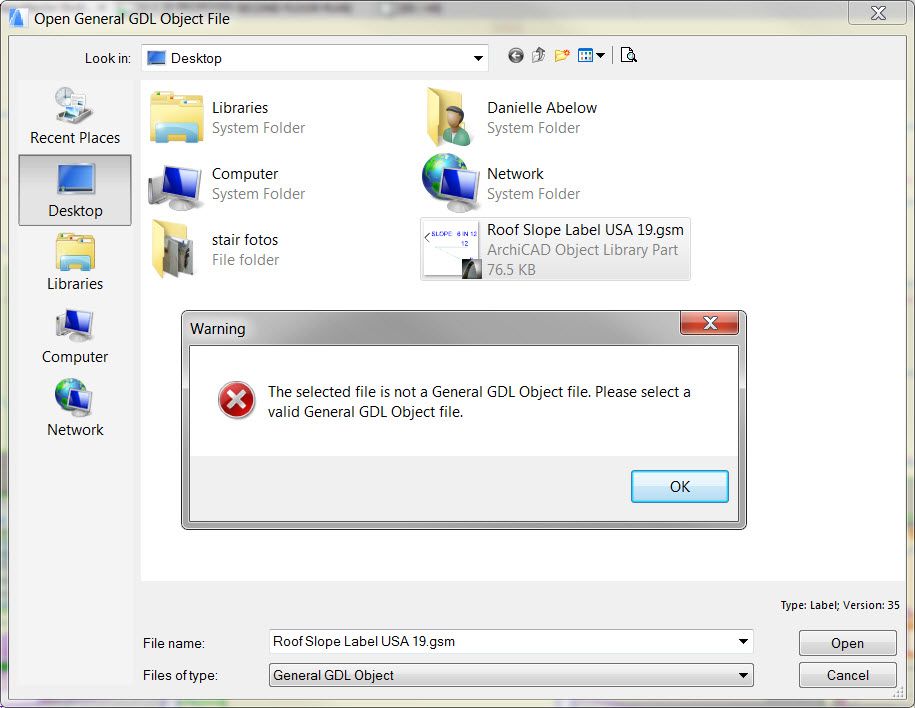
When I try to load the file from the Object dialogue box or the Library Manager, I get this error message:
The selected file is not a General GDL Object file. Please select a valid General GDL Object file.I tried to load it in both 19 and 20 (latest build on each) with the same result.
The object is from Graphisoft and is a .gsm file. Any thoughts on why it won't load and/or how to get it to load would be much appreciated!
2 Replies 2

Karl Ottenstein
Moderator Emeritus
Options
- Mark as New
- Bookmark
- Subscribe
- Mute
- Subscribe to RSS Feed
- Permalink
- Report Inappropriate Content
2017-04-14 01:56 AM
2017-04-14
01:56 AM
Labels are not placeable by the object tool, which is what is used with drag-and-drop.
You'll have to load this label into your project's library - either embedded library, or linked. Use it with the label tool and a roof in a section/elevation view, I'd imagine...
You'll have to load this label into your project's library - either embedded library, or linked. Use it with the label tool and a roof in a section/elevation view, I'd imagine...
Vote for Wish: Copy/Paste in 3D
AC 29 USA and earlier • hardware key • macOS Tahoe 26.7 MacBook Pro M2 Max 12CPU/30GPU cores, 32GB
AC 29 USA and earlier • hardware key • macOS Tahoe 26.7 MacBook Pro M2 Max 12CPU/30GPU cores, 32GB
Anonymous
Not applicable
Options
- Mark as New
- Bookmark
- Subscribe
- Mute
- Subscribe to RSS Feed
- Permalink
- Report Inappropriate Content
2018-10-25 05:33 AM
2018-10-25
05:33 AM
Hi dea0625,
Were you able to make the labels work? I was able to load them through Library manager but they seem to always remain in the same direction regardless of slope both in section or plan.
Thanks,
C.
Were you able to make the labels work? I was able to load them through Library manager but they seem to always remain in the same direction regardless of slope both in section or plan.
Thanks,
C.
Didn't find the answer?
Check other topics in this Forum
Back to ForumRead the latest accepted solutions!
Accepted SolutionsStart a new conversation!

Suggested topics
- Issues with 3Dconnexxion CadMouse Pro Wireless in Installation & update
- Fill Pattern Object in Modeling
- Climate and sunpath objects for analysis presentation in Libraries & objects
- Some free useful objects: Road signs, parametric pathway, roof crickets, crowds in Libraries & objects
- Engineers Bolt in Libraries & objects
