Turn on suggestions
Auto-suggest helps you quickly narrow down your search results by suggesting possible matches as you type.
Showing results for
EN
Turn on suggestions
Auto-suggest helps you quickly narrow down your search results by suggesting possible matches as you type.
Showing results for
- English
- :
- Forum
- :
- Libraries & objects
- :
- Re: Window/Door showing different as their setting...
Options
- Subscribe to RSS Feed
- Mark Topic as New
- Mark Topic as Read
- Pin this post for me
- Bookmark
- Subscribe to Topic
- Mute
- Printer Friendly Page

Anonymous
Not applicable
Options
- Mark as New
- Bookmark
- Subscribe
- Mute
- Subscribe to RSS Feed
- Permalink
- Report Inappropriate Content
2020-03-17
05:17 PM
- last edited on
2023-05-24
12:25 PM
by
 Rubia Torres
Window/Door showing different as their settings
2020-03-17
05:17 PM
I have searched the forum and could not find any topic related to my issue, but please if I'm wrong, redirect me to the existing.
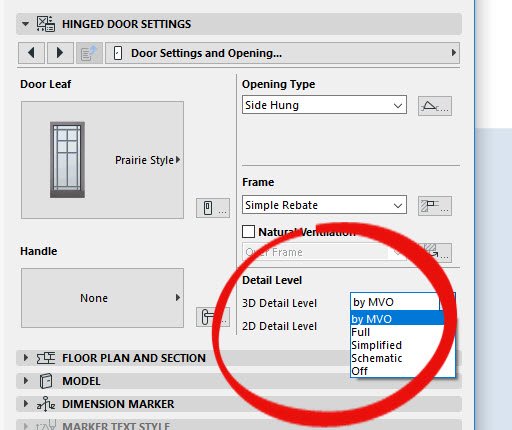
I am using Archicad 23, and I have faced several times the same issue : some doors and/or windows don't show on the 3D window, the same as the preview in their settings. For example, I made printscreens.


Thank you in advance to whom will respond!
Solved! Go to Solution.
1 Solution
Accepted Solutions

Barry Kelly
Moderator
Options
- Mark as New
- Bookmark
- Subscribe
- Mute
- Subscribe to RSS Feed
- Permalink
- Report Inappropriate Content
2020-03-18 02:14 AM
2020-03-18
02:14 AM
This problem has cropped up in these forums a few times.
It is the Level Of Detail settings (LOD).
They may be controlled in the object settings or the object may be set to use the Model View Options (MVO) settings.
To me it is a bug that the object preview does not show the object as it has been set when the LOD is controlled by MVO.
It does seem to show correctly if the LOD is set in the object itself (i.e. not to "by MVO').
Or there should be a warning to say what you see in the preview is not necessarily what you will see in the model.
You will want to check the settings on your MVO.
Barry.
It is the Level Of Detail settings (LOD).
They may be controlled in the object settings or the object may be set to use the Model View Options (MVO) settings.
To me it is a bug that the object preview does not show the object as it has been set when the LOD is controlled by MVO.
It does seem to show correctly if the LOD is set in the object itself (i.e. not to "by MVO').
Or there should be a warning to say what you see in the preview is not necessarily what you will see in the model.
You will want to check the settings on your MVO.
Barry.
One of the forum moderators.
Versions 6.5 to 27
i7-10700 @ 2.9Ghz, 32GB ram, GeForce RTX 2060 (6GB), Windows 10
Lenovo Thinkpad - i7-1270P 2.20 GHz, 32GB RAM, Nvidia T550, Windows 11
Versions 6.5 to 27
i7-10700 @ 2.9Ghz, 32GB ram, GeForce RTX 2060 (6GB), Windows 10
Lenovo Thinkpad - i7-1270P 2.20 GHz, 32GB RAM, Nvidia T550, Windows 11
2 Replies 2
Barry Kelly
Moderator
Options
- Mark as New
- Bookmark
- Subscribe
- Mute
- Subscribe to RSS Feed
- Permalink
- Report Inappropriate Content
2020-03-18 02:14 AM
2020-03-18
02:14 AM
This problem has cropped up in these forums a few times.
It is the Level Of Detail settings (LOD).
They may be controlled in the object settings or the object may be set to use the Model View Options (MVO) settings.
To me it is a bug that the object preview does not show the object as it has been set when the LOD is controlled by MVO.
It does seem to show correctly if the LOD is set in the object itself (i.e. not to "by MVO').
Or there should be a warning to say what you see in the preview is not necessarily what you will see in the model.
You will want to check the settings on your MVO.
Barry.
It is the Level Of Detail settings (LOD).
They may be controlled in the object settings or the object may be set to use the Model View Options (MVO) settings.
To me it is a bug that the object preview does not show the object as it has been set when the LOD is controlled by MVO.
It does seem to show correctly if the LOD is set in the object itself (i.e. not to "by MVO').
Or there should be a warning to say what you see in the preview is not necessarily what you will see in the model.
You will want to check the settings on your MVO.
Barry.
One of the forum moderators.
Versions 6.5 to 27
i7-10700 @ 2.9Ghz, 32GB ram, GeForce RTX 2060 (6GB), Windows 10
Lenovo Thinkpad - i7-1270P 2.20 GHz, 32GB RAM, Nvidia T550, Windows 11
Versions 6.5 to 27
i7-10700 @ 2.9Ghz, 32GB ram, GeForce RTX 2060 (6GB), Windows 10
Lenovo Thinkpad - i7-1270P 2.20 GHz, 32GB RAM, Nvidia T550, Windows 11
Anonymous
Not applicable
Options
- Mark as New
- Bookmark
- Subscribe
- Mute
- Subscribe to RSS Feed
- Permalink
- Report Inappropriate Content
2020-03-19 09:59 AM
2020-03-19
09:59 AM
Hello!
Thank you for your answer, this was the issue. I changed the setting to "full" and now the elements are showing correctly in the 3D view.
Thank you again, it was really frustrating not finding the reason...
Have a nice day!
Thank you for your answer, this was the issue. I changed the setting to "full" and now the elements are showing correctly in the 3D view.
Thank you again, it was really frustrating not finding the reason...
Have a nice day!
Didn't find the answer?
Check other topics in this Forum
Back to ForumRead the latest accepted solutions!
Accepted SolutionsStart a new conversation!