
Turn on suggestions
Auto-suggest helps you quickly narrow down your search results by suggesting possible matches as you type.
Showing results for
EN
Turn on suggestions
Auto-suggest helps you quickly narrow down your search results by suggesting possible matches as you type.
Showing results for
Options
- Subscribe to RSS Feed
- Mark Topic as New
- Mark Topic as Read
- Pin this post for me
- Bookmark
- Subscribe to Topic
- Mute
- Printer Friendly Page

Charles51286
Contributor
Options
- Mark as New
- Bookmark
- Subscribe
- Mute
- Subscribe to RSS Feed
- Permalink
- Report Inappropriate Content
2022-09-11 05:03 AM - edited 2022-09-11 05:04 AM
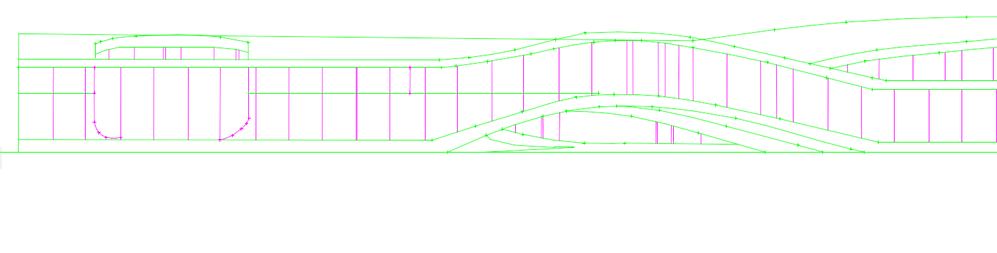
How do I remove these tick marks off my spline connections... Sorry, if this is unclear newby here.
2022-09-11
05:03 AM
Solved! Go to Solution.
Solved
Read-Only
3 Solutions
Accepted Solutions

hevi
Ace
Options
- Mark as New
- Bookmark
- Subscribe
- Mute
- Subscribe to RSS Feed
- Permalink
- Report Inappropriate Content
2022-09-11 08:38 AM

PVBergkrantz
Expert
Options
- Mark as New
- Bookmark
- Subscribe
- Mute
- Subscribe to RSS Feed
- Permalink
- Report Inappropriate Content
2022-09-13 02:29 PM
2022-09-13
02:29 PM
It's worth adding that those won't show up in layouts and pdfs, and are just a visual guide for you while working, same as text boxes or reference lines.
| AC 29 Int | Win11 | i7-7800X | 32 GB | GeForce RTX 2060 6GB |
Solution
Charles51286
Contributor
Options
- Mark as New
- Bookmark
- Subscribe
- Mute
- Subscribe to RSS Feed
- Permalink
- Report Inappropriate Content
2022-09-13 09:43 PM
2022-09-13
09:43 PM
This is great to know, thank you for adding this, this is important to know... I did notice they weren't there when I moved them over to illustrator!
Solution
4 Replies 4
hevi
Ace
Options
- Mark as New
- Bookmark
- Subscribe
- Mute
- Subscribe to RSS Feed
- Permalink
- Report Inappropriate Content
2022-09-11 08:38 AM
2022-09-11
08:38 AM
View > On-Screen View Option > Spline Handles
PVBergkrantz
Expert
Options
- Mark as New
- Bookmark
- Subscribe
- Mute
- Subscribe to RSS Feed
- Permalink
- Report Inappropriate Content
2022-09-13 02:29 PM
2022-09-13
02:29 PM
It's worth adding that those won't show up in layouts and pdfs, and are just a visual guide for you while working, same as text boxes or reference lines.
| AC 29 Int | Win11 | i7-7800X | 32 GB | GeForce RTX 2060 6GB |
Solution
Charles51286
Contributor
Options
- Mark as New
- Bookmark
- Subscribe
- Mute
- Subscribe to RSS Feed
- Permalink
- Report Inappropriate Content
2022-09-13 09:41 PM
2022-09-13
09:41 PM
Thank you and sorry, for the late reply! It worked perfectly!
Charles51286
Contributor
Options
- Mark as New
- Bookmark
- Subscribe
- Mute
- Subscribe to RSS Feed
- Permalink
- Report Inappropriate Content
2022-09-13 09:43 PM
2022-09-13
09:43 PM
This is great to know, thank you for adding this, this is important to know... I did notice they weren't there when I moved them over to illustrator!
Solution

Still looking?

Suggested topics
- Grasshopper Live Connection to create driveway from Mesh geometry and spline in Parametric design
- Archicad 25 - spline tool errors in Modeling
- Distribute stuff along connected multiple spline segments? in Libraries & objects
- Objects with splines from C4D gets blurry in Archicad in Collaboration with other software
