
Turn on suggestions
Auto-suggest helps you quickly narrow down your search results by suggesting possible matches as you type.
Showing results for
EN
Turn on suggestions
Auto-suggest helps you quickly narrow down your search results by suggesting possible matches as you type.
Showing results for
Options
- Subscribe to RSS Feed
- Mark Topic as New
- Mark Topic as Read
- Pin this post for me
- Bookmark
- Subscribe to Topic
- Mute
- Printer Friendly Page

ER
Newcomer
Options
- Mark as New
- Bookmark
- Subscribe
- Mute
- Subscribe to RSS Feed
- Permalink
- Report Inappropriate Content
2021-12-10 06:15 PM
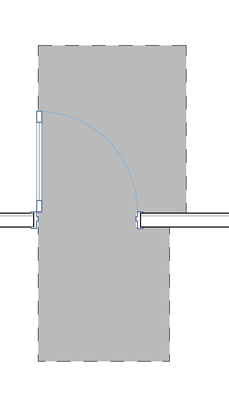
How to remove grey shaded areas from doors?
2021-12-10
06:15 PM
I just switched from Archicad 19 to Archicad 25 so a lot of things are new to me. But one thing I cannot figure out is how to remove this gray shaded area (also what is it for?) from the doors. Does anyone know how to do this?
Thanks
Solved! Go to Solution.
Solved
Read-Only
1 Solution
Accepted Solutions

Jan Mi
Enthusiast
Options
- Mark as New
- Bookmark
- Subscribe
- Mute
- Subscribe to RSS Feed
- Permalink
- Report Inappropriate Content
2021-12-10 06:25 PM
2021-12-10
06:25 PM
Turn off "Minimal space of Door and Object" in your Model View Options
See attached screenshot

macOS 26 (Latest Build) - Archicad 29 (Latest Build)
2 Replies 2
Jan Mi
Enthusiast
Options
- Mark as New
- Bookmark
- Subscribe
- Mute
- Subscribe to RSS Feed
- Permalink
- Report Inappropriate Content
2021-12-10 06:25 PM
2021-12-10
06:25 PM
Turn off "Minimal space of Door and Object" in your Model View Options
See attached screenshot
macOS 26 (Latest Build) - Archicad 29 (Latest Build)
ER
Newcomer
Options
- Mark as New
- Bookmark
- Subscribe
- Mute
- Subscribe to RSS Feed
- Permalink
- Report Inappropriate Content
2021-12-10 06:31 PM
2021-12-10
06:31 PM
Thanks!

Still looking?
Suggested topics
- Wall continuing through sliding door in 3D. in Visualization
- Archicad to Revit for MEP: the workaround Graphisoft's own method couldn't give me in Collaboration with other software
- Removing a library without placed objects corrupts other objects in Libraries & objects
- Missing Library Parts Warnings in Libraries & objects
- How to remove Door Handles from the outside of the door in Libraries & objects
