
Turn on suggestions
Auto-suggest helps you quickly narrow down your search results by suggesting possible matches as you type.
Showing results for
EN
Turn on suggestions
Auto-suggest helps you quickly narrow down your search results by suggesting possible matches as you type.
Showing results for
Options
- Subscribe to RSS Feed
- Mark Topic as New
- Mark Topic as Read
- Pin this post for me
- Bookmark
- Subscribe to Topic
- Mute
- Printer Friendly Page

kosta
Booster
Options
- Mark as New
- Bookmark
- Subscribe
- Mute
- Subscribe to RSS Feed
- Permalink
- Report Inappropriate Content
2022-04-23 11:16 AM
How to select elements of that menu with keyboard ?
2022-04-23
11:16 AM
Hi !
I understand that it is personal preference but I found annoying to select that floating menu elements with mouse, can I do that with keyboard ?
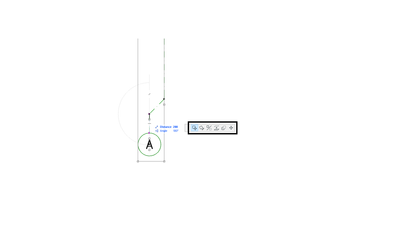
Solved! Go to Solution.
Solved
Read-Only
1 Solution
Accepted Solutions

Barry Kelly
Moderator
Options
- Mark as New
- Bookmark
- Subscribe
- Mute
- Subscribe to RSS Feed
- Permalink
- Report Inappropriate Content
2022-04-23 11:49 AM
2022-04-23
11:49 AM
That is known as the Pet Palette.
You can't turn it off, but you can invoke most of the commands by keyboard shortcuts before you invoke the pet palette - certainly the move commands (drag, rotate, mirror, etc.).
But once the pet palette is open then, you have to pick from one of the choices - or ESC or right click +cancel to close it.
You can press the "F" key to cycle forwards through the options (SHIFT+F will go backwards).
But as far as I know, you can't pick a particular command with a keyboard shortcut once it is open.
Barry.
One of the forum moderators.
Versions 6.5 to 27
i7-10700 @ 2.9Ghz, 32GB ram, GeForce RTX 2060 (6GB), Windows 10
Lenovo Thinkpad - i7-1270P 2.20 GHz, 32GB RAM, Nvidia T550, Windows 11
Versions 6.5 to 27
i7-10700 @ 2.9Ghz, 32GB ram, GeForce RTX 2060 (6GB), Windows 10
Lenovo Thinkpad - i7-1270P 2.20 GHz, 32GB RAM, Nvidia T550, Windows 11
Solution
1 Reply 1
Barry Kelly
Moderator
Options
- Mark as New
- Bookmark
- Subscribe
- Mute
- Subscribe to RSS Feed
- Permalink
- Report Inappropriate Content
2022-04-23 11:49 AM
2022-04-23
11:49 AM
That is known as the Pet Palette.
You can't turn it off, but you can invoke most of the commands by keyboard shortcuts before you invoke the pet palette - certainly the move commands (drag, rotate, mirror, etc.).
But once the pet palette is open then, you have to pick from one of the choices - or ESC or right click +cancel to close it.
You can press the "F" key to cycle forwards through the options (SHIFT+F will go backwards).
But as far as I know, you can't pick a particular command with a keyboard shortcut once it is open.
Barry.
One of the forum moderators.
Versions 6.5 to 27
i7-10700 @ 2.9Ghz, 32GB ram, GeForce RTX 2060 (6GB), Windows 10
Lenovo Thinkpad - i7-1270P 2.20 GHz, 32GB RAM, Nvidia T550, Windows 11
Versions 6.5 to 27
i7-10700 @ 2.9Ghz, 32GB ram, GeForce RTX 2060 (6GB), Windows 10
Lenovo Thinkpad - i7-1270P 2.20 GHz, 32GB RAM, Nvidia T550, Windows 11
Solution

Still looking?

Suggested topics
- Detailing | Better methods of 2d drafting, creation of Blocks , Detail Elements , 2d Objects in Documentation
- ArchiTurn (beta) — swept path analysis directly in Archicad: does the vehicle fit or not? in General discussions
- Railing and Curtain Wall in Modeling
- Erase/Trim Tools (Drag-to-erase or -trim option) in General discussions
- Archicad 26 incorrectly keeps Shift modifier active after the physical key is released in General discussions
