
Turn on suggestions
Auto-suggest helps you quickly narrow down your search results by suggesting possible matches as you type.
Showing results for
EN
Turn on suggestions
Auto-suggest helps you quickly narrow down your search results by suggesting possible matches as you type.
Showing results for
Options
- Subscribe to RSS Feed
- Mark Topic as New
- Mark Topic as Read
- Pin this post for me
- Bookmark
- Subscribe to Topic
- Mute
- Printer Friendly Page

cokashi232
Participant
Options
- Mark as New
- Bookmark
- Subscribe
- Mute
- Subscribe to RSS Feed
- Permalink
- Report Inappropriate Content
2022-03-31 12:45 PM
How to select fills with same color?
2022-03-31
12:45 PM
I need to export shadows from Archicad to dwg. So I set the shadows, then exported the file into Archicad 2D lines. When I open this last file I have lines and fillings for every surface, but I need to select only those of the shadows (which have a specific color). I tried with the find and select tool but I can’t find an option to select same fill color, any help?? Thanks
Read-Only
2 Replies 2

hevi
Ace
Options
- Mark as New
- Bookmark
- Subscribe
- Mute
- Subscribe to RSS Feed
- Permalink
- Report Inappropriate Content
2022-03-31 12:53 PM - edited 2022-03-31 01:07 PM
2022-03-31
12:53 PM
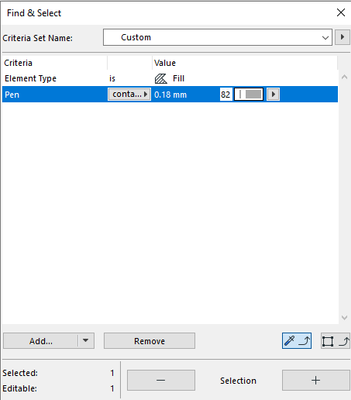
This selects any Fill using a Pen as either Background, Foreground or Outline.
hevi
Ace
Options
- Mark as New
- Bookmark
- Subscribe
- Mute
- Subscribe to RSS Feed
- Permalink
- Report Inappropriate Content
2022-03-31 12:58 PM
2022-03-31
12:58 PM
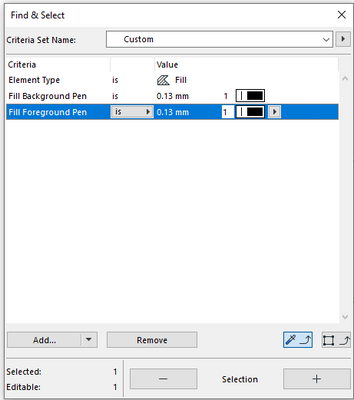
Actually. If you first select Fill as Element Type you can then choose Fill Background Pen and Fill Foreground Pen specifically.

Still looking?

