
Turn on suggestions
Auto-suggest helps you quickly narrow down your search results by suggesting possible matches as you type.
Showing results for
EN
Turn on suggestions
Auto-suggest helps you quickly narrow down your search results by suggesting possible matches as you type.
Showing results for
Options
- Subscribe to RSS Feed
- Mark Topic as New
- Mark Topic as Read
- Pin this post for me
- Bookmark
- Subscribe to Topic
- Mute
- Printer Friendly Page

juanfran_87
Contributor
Options
- Mark as New
- Bookmark
- Subscribe
- Mute
- Subscribe to RSS Feed
- Permalink
- Report Inappropriate Content
2022-09-15 03:41 PM
Mesh SEO not working
2022-09-15
03:41 PM
Hi everyone,
I'm having some issues doing SEO to a mesh. I want to do a road with the slope of the terrain, but I don't know the reason why is not working the intersection operation. I've already tried to do the mesh as a morph, but the issue continues.
Someone has already been in the same situation?
I've attached a screenshot of the result of the SEO.
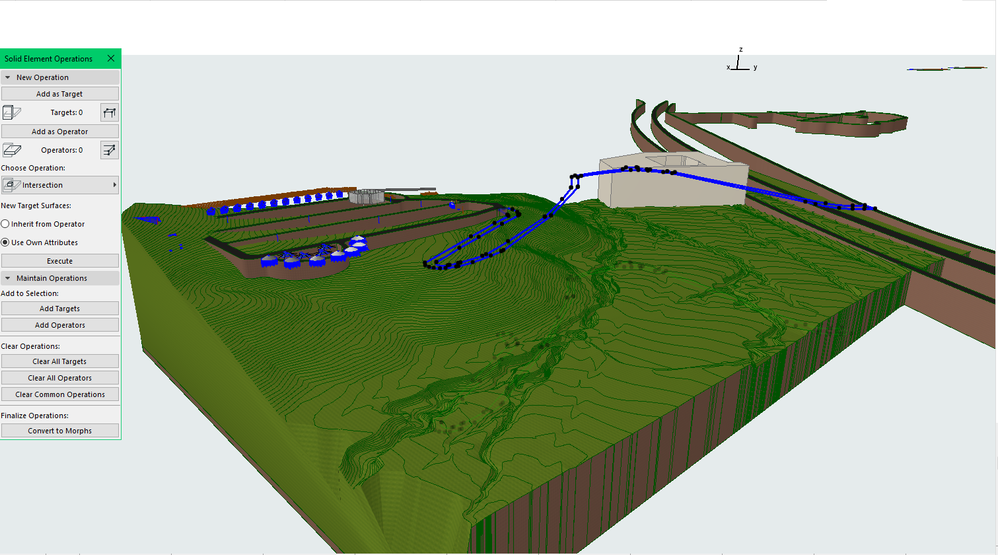
Read-Only
7 Replies 7

Turit
Booster
Options
- Mark as New
- Bookmark
- Subscribe
- Mute
- Subscribe to RSS Feed
- Permalink
- Report Inappropriate Content
2022-09-15 06:41 PM
2022-09-15
06:41 PM
If the terrain is too detailed, it doesn't always work the SEO.
Try to split it if possible.

JeffH
Expert
Options
- Mark as New
- Bookmark
- Subscribe
- Mute
- Subscribe to RSS Feed
- Permalink
- Report Inappropriate Content
2022-09-15 08:13 PM
2022-09-15
08:13 PM
Be sure the top of your " Road" is above the high point of your mesh, and that the bottom is below your low point. Based on the screenshot that may be a portion of the issue.
AC24 / AC26 / AC27
Win10
Win10
juanfran_87
Contributor
Options
- Mark as New
- Bookmark
- Subscribe
- Mute
- Subscribe to RSS Feed
- Permalink
- Report Inappropriate Content
2022-09-15 09:58 PM
2022-09-15
09:58 PM
I've tried to split it but continue without working... If not possible I must redo the terrain with fewer curve levels.
juanfran_87
Contributor
Options
- Mark as New
- Bookmark
- Subscribe
- Mute
- Subscribe to RSS Feed
- Permalink
- Report Inappropriate Content
2022-09-15 10:01 PM
2022-09-15
10:01 PM
Yes, the level of the "road" is above the high point of the mesh and the bottom is below... I'm thinking the issue could be the high level detail of the mesh... but I'm not sure, and the client want this level of detail for the topo
JeffH
Expert
Options
- Mark as New
- Bookmark
- Subscribe
- Mute
- Subscribe to RSS Feed
- Permalink
- Report Inappropriate Content
2022-09-15 10:26 PM
2022-09-15
10:26 PM
Is the road Layer set to a higher layer priority than the mesh in your current layer combination?
AC24 / AC26 / AC27
Win10
Win10
juanfran_87
Contributor
Options
- Mark as New
- Bookmark
- Subscribe
- Mute
- Subscribe to RSS Feed
- Permalink
- Report Inappropriate Content
2022-09-16 02:30 PM
2022-09-16
02:30 PM
Yes, it's already set in a higher priority

DGSketcher
Legend
Options
- Mark as New
- Bookmark
- Subscribe
- Mute
- Subscribe to RSS Feed
- Permalink
- Report Inappropriate Content
2022-09-16 06:55 PM
2022-09-16
06:55 PM
@juanfran_87 There is something strange about your road as it has no vertical edges. Are you sure it is a "Solid" if it is a morph?
What are the properties of the road?
Apple iMac Intel i9 / macOS Sonoma / AC27UKI (most recent builds.. if they work)

Still looking?

Suggested topics
- A small IFC reference tool I've been working on in General discussions
- After 3 years with Archicad, I'm honestly disappointed in General discussions
- MacOS27 in General discussions
- Libraries and Polygons in Libraries & objects
- Teamwork: Complex Profiles can be edited even when reserved by another user. in Teamwork & BIMcloud
