
Turn on suggestions
Auto-suggest helps you quickly narrow down your search results by suggesting possible matches as you type.
Showing results for
EN
Turn on suggestions
Auto-suggest helps you quickly narrow down your search results by suggesting possible matches as you type.
Showing results for
Options
- Subscribe to RSS Feed
- Mark Topic as New
- Mark Topic as Read
- Pin this post for me
- Bookmark
- Subscribe to Topic
- Mute
- Printer Friendly Page

griggadee
Booster
Options
- Mark as New
- Bookmark
- Subscribe
- Mute
- Subscribe to RSS Feed
- Permalink
- Report Inappropriate Content
2016-06-04 06:49 PM
Vectorial 3d Hatching
2016-06-04
06:49 PM
Regarding my elevations, can anyone advise how I can select one colour for my vectorial hatching (fills) and another for my outlines?
The 'Vectorial 3D Hatching' box is ticked in the Elevation Settings, but I can't seem to find out how to select one colour for the hatching and another for the uncut lines, i.e. the outlines of my elevations. I have attached a jpeg image showing what I need, on the left, and what I get, on the right.
Naturally, I can achieve this by using fills, but this is extremely time consuming and I would like to find a more practical, automatic solution instead.
Any input would be greatly appreciated!
Cheers,

Paul Griggs BSc (Hons) MCIAT MCIOB
Chartered Architectural Technologist
AC23, i5 3570K Processor, 16gb RAM, NVidia 570GTX Graphics Card, 250gb SSD Drive
Chartered Architectural Technologist
AC23, i5 3570K Processor, 16gb RAM, NVidia 570GTX Graphics Card, 250gb SSD Drive
2 Replies 2

Anonymous
Not applicable
Options
- Mark as New
- Bookmark
- Subscribe
- Mute
- Subscribe to RSS Feed
- Permalink
- Report Inappropriate Content
2016-06-04 07:16 PM
2016-06-04
07:16 PM
Hi, man!
This makes by some combo of settings: 1) Outline pen in object options 2) Hatching pen in Material options
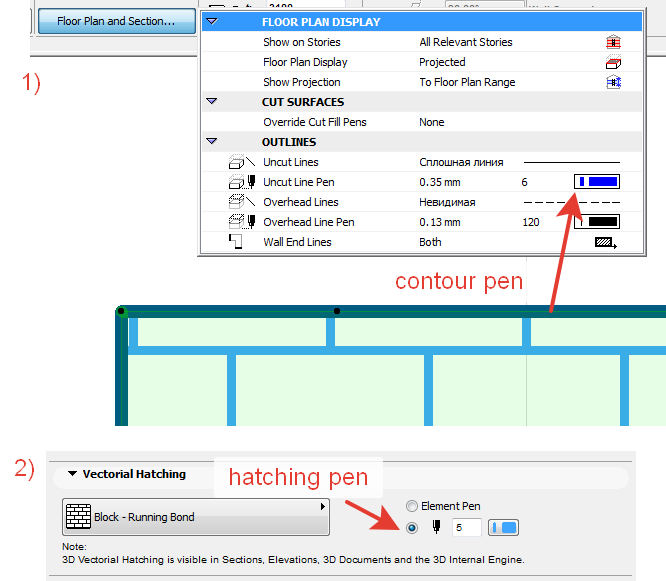
This makes by some combo of settings: 1) Outline pen in object options 2) Hatching pen in Material options
griggadee
Booster
Options
- Mark as New
- Bookmark
- Subscribe
- Mute
- Subscribe to RSS Feed
- Permalink
- Report Inappropriate Content
2016-06-05 02:33 PM
2016-06-05
02:33 PM
Hi Int_Skylined,
It took me a while to find the material options, but when I did, they allowed me to do exactly what I needed! Thanks very much for the help!
For those of you with the same issue, you can find the vectorial hatching pen settings in the 'Surface Settings' options. See attached jpeg.
Cheers,
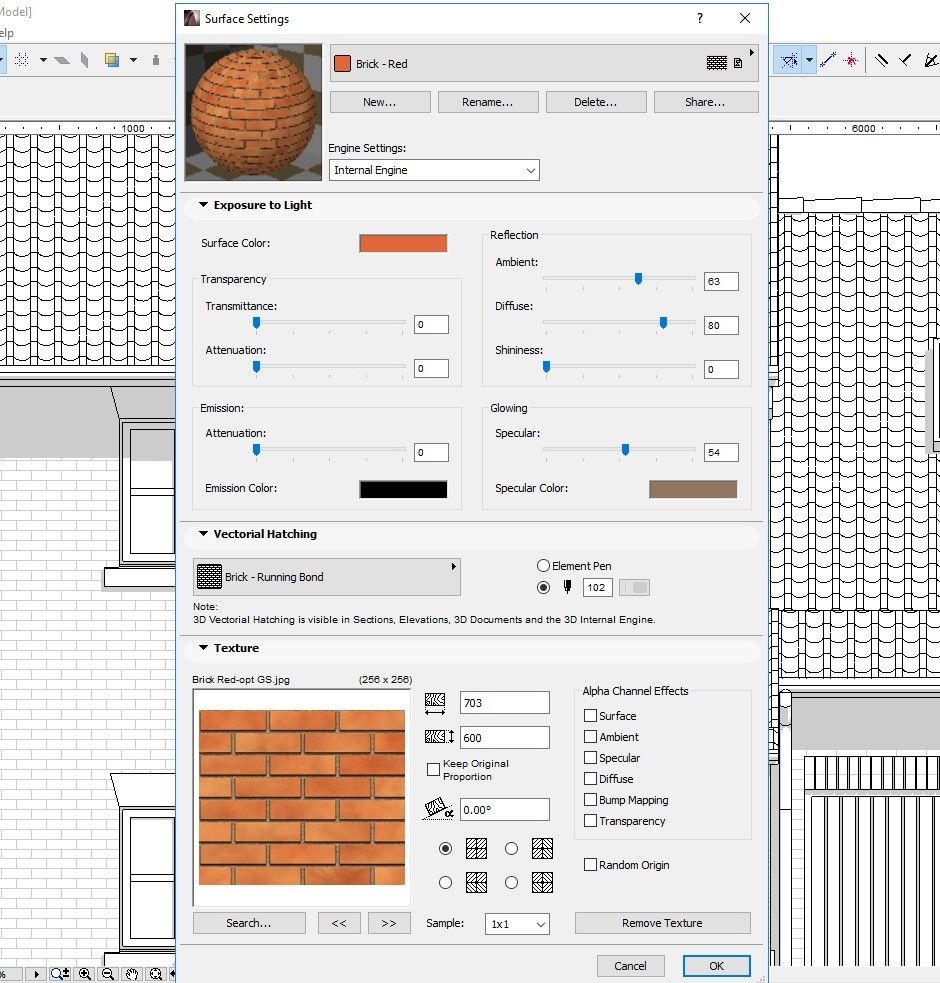
It took me a while to find the material options, but when I did, they allowed me to do exactly what I needed! Thanks very much for the help!
For those of you with the same issue, you can find the vectorial hatching pen settings in the 'Surface Settings' options. See attached jpeg.
Cheers,
Paul Griggs BSc (Hons) MCIAT MCIOB
Chartered Architectural Technologist
AC23, i5 3570K Processor, 16gb RAM, NVidia 570GTX Graphics Card, 250gb SSD Drive
Chartered Architectural Technologist
AC23, i5 3570K Processor, 16gb RAM, NVidia 570GTX Graphics Card, 250gb SSD Drive
Still looking?

