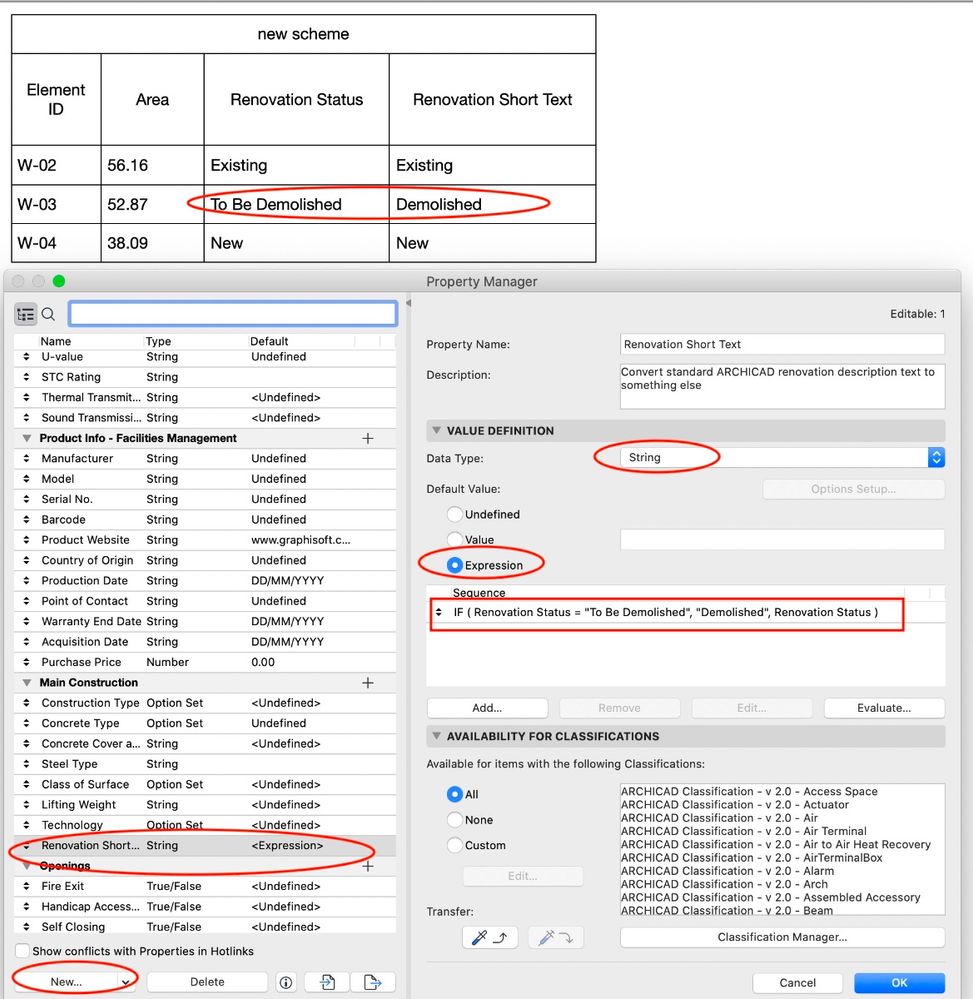
A user - who is no longer on the forum - asked how to change the name of the renovation status in a schedule from "To Be Demolished" to "Demolished" (English version obviously - tip applies to any language). Typically, nobody ever sees the status per se in any construction documentation - but, rather, it affects what is displayed in views, schedules, etc. and nobody has every asked or cared about the actual name before that I can recall...
Property Expressions allow you to convert any value to anything else. See the attached screenshot where I have one column with the standard Renovation Status value (text) - and another column with a new property that I called "Renovation Short Text". This new property uses an IF to compare the value of the renovation text and output something else. I've kept this super simple to address just the issue first raised - converting "To Be Demolished" to simply "Demolished". (Arguably, 'to be demolished' really does mean something different than 'demolished'... where the 'to be' applies to existing plans.)
If you were instead translating all three renovation statuses... for example, you're a Canadian user and want the status displayed in French ... use the IFS function to check and convert each status value.