
Turn on suggestions
Auto-suggest helps you quickly narrow down your search results by suggesting possible matches as you type.
Showing results for
EN
Turn on suggestions
Auto-suggest helps you quickly narrow down your search results by suggesting possible matches as you type.
Showing results for
- English
- :
- Forum
- :
- Visualization
- :
- Re: Add Enscape Material Library to e.g. walls
Options
- Subscribe to RSS Feed
- Mark Topic as New
- Mark Topic as Read
- Pin this post for me
- Bookmark
- Subscribe to Topic
- Mute
- Printer Friendly Page

Equinoctial
Booster
Options
- Mark as New
- Bookmark
- Subscribe
- Mute
- Subscribe to RSS Feed
- Permalink
- Report Inappropriate Content
2023-03-27 09:23 AM - last edited on 2023-03-27 10:42 AM by Barry Kelly
Add Enscape Material Library to e.g. walls
2023-03-27
09:23 AM
Hi, I'm trying to add Enscape Material Library to walls.
It's wallpaper I was thinking of putting on about a dozen walls.
Wondering if you can add that pattern on walls?
Solved! Go to Solution.
1 Solution
Accepted Solutions

Barry Kelly
Moderator
Options
- Mark as New
- Bookmark
- Subscribe
- Mute
- Subscribe to RSS Feed
- Permalink
- Report Inappropriate Content
2023-03-31 04:48 AM
2023-03-31
04:48 AM
In the surface settings dialogue, you can create new surfaces or you can change the image in an existing surface.
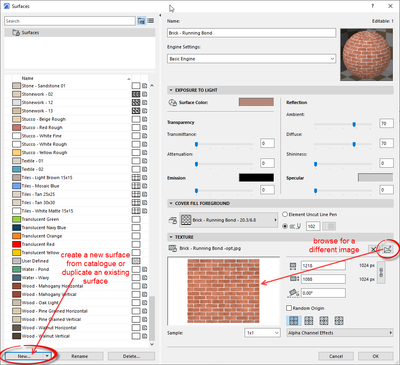
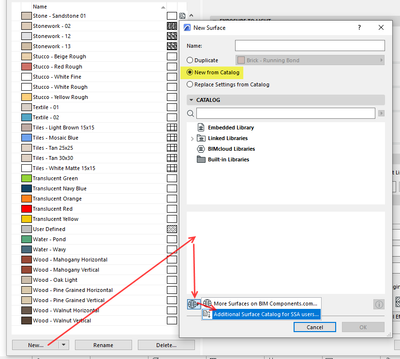
If you create a new surface, you can duplicate an existing one and edit it, or create a new surface from a catalogue.
If you have a SSA/Forward subscription, you can download an 'addition surface catalogue' that has some wallpaper surface in it.
Barry.
One of the forum moderators.
Versions 6.5 to 27
i7-10700 @ 2.9Ghz, 32GB ram, GeForce RTX 2060 (6GB), Windows 10
Lenovo Thinkpad - i7-1270P 2.20 GHz, 32GB RAM, Nvidia T550, Windows 11
Versions 6.5 to 27
i7-10700 @ 2.9Ghz, 32GB ram, GeForce RTX 2060 (6GB), Windows 10
Lenovo Thinkpad - i7-1270P 2.20 GHz, 32GB RAM, Nvidia T550, Windows 11
Solution
10 Replies 10
Barry Kelly
Moderator
Options
- Mark as New
- Bookmark
- Subscribe
- Mute
- Subscribe to RSS Feed
- Permalink
- Report Inappropriate Content
2023-03-27 10:45 AM
2023-03-27
10:45 AM
You can't use Enscape materials directly, but you could create your own Archicad surface (material) possibly using images from the Enscape materials.
Barry.
One of the forum moderators.
Versions 6.5 to 27
i7-10700 @ 2.9Ghz, 32GB ram, GeForce RTX 2060 (6GB), Windows 10
Lenovo Thinkpad - i7-1270P 2.20 GHz, 32GB RAM, Nvidia T550, Windows 11
Versions 6.5 to 27
i7-10700 @ 2.9Ghz, 32GB ram, GeForce RTX 2060 (6GB), Windows 10
Lenovo Thinkpad - i7-1270P 2.20 GHz, 32GB RAM, Nvidia T550, Windows 11
Equinoctial
Booster
Options
- Mark as New
- Bookmark
- Subscribe
- Mute
- Subscribe to RSS Feed
- Permalink
- Report Inappropriate Content
2023-03-27 11:51 AM - edited 2023-03-27 11:51 AM
2023-03-27
11:51 AM
Ok, maybe it's better to put a painting/board on the wall with pictures in it.
I've tried it but can't. It would be easier to do it directly on the wall, I thought, especially if you have sloping walls that are difficult to tilt the same way with paintings/boards.
Barry Kelly
Moderator
Options
- Mark as New
- Bookmark
- Subscribe
- Mute
- Subscribe to RSS Feed
- Permalink
- Report Inappropriate Content
2023-03-27 04:28 PM
2023-03-27
04:28 PM
If you have a picture (image file) of the wallpaper to add to a painting/board (I assume you mean a picture object?), then just create a new surface using the image file.
Barry.
One of the forum moderators.
Versions 6.5 to 27
i7-10700 @ 2.9Ghz, 32GB ram, GeForce RTX 2060 (6GB), Windows 10
Lenovo Thinkpad - i7-1270P 2.20 GHz, 32GB RAM, Nvidia T550, Windows 11
Versions 6.5 to 27
i7-10700 @ 2.9Ghz, 32GB ram, GeForce RTX 2060 (6GB), Windows 10
Lenovo Thinkpad - i7-1270P 2.20 GHz, 32GB RAM, Nvidia T550, Windows 11
Equinoctial
Booster
Options
- Mark as New
- Bookmark
- Subscribe
- Mute
- Subscribe to RSS Feed
- Permalink
- Report Inappropriate Content
2023-03-30 07:47 AM - edited 2023-03-30 07:48 AM
2023-03-30
07:47 AM
I do not understand. My walls are inclined at 80° and I somehow want to put (preferably wallpaper) on one side of the wall(s).
I can think of using other images as well if it is not possible to use enscape wallpaper.

Lingwisyer
Guru
Options
- Mark as New
- Bookmark
- Subscribe
- Mute
- Subscribe to RSS Feed
- Permalink
- Report Inappropriate Content
2023-03-30 08:13 AM
2023-03-30
08:13 AM
Options => Element Attributes => Surfaces...
If you look at the bottom of the Surfaces Dialogue you will see that you can just insert any image to use as a basic texture. Easiest way to get something that looks correct is to duplicate an existing surface, then change the image used. If you use any of the other AC render engines, you will need to replicate the image over to the engine specific settings.
Ling.
| AC22-29 AUS 3200 | Help Those Help You - Add a Signature |
| Self-taught, bend it till it breaks | Creating a Thread |
| Win11 | i9 10850K | 64GB | RX6600 | Win11 | 7800X3D | 32GB | RTX5070TI |
Barry Kelly
Moderator
Options
- Mark as New
- Bookmark
- Subscribe
- Mute
- Subscribe to RSS Feed
- Permalink
- Report Inappropriate Content
2023-03-30 08:26 AM
2023-03-30
08:26 AM
All you have to do is create the surface material and then apply it yo the wall surface.
You can't use Enscape surfaces (materials) directly, but you may be able to use the image files (texture) from those Enscape materials if you need to.
There are default wallpaper surfaces in Archicad if you want to use those.
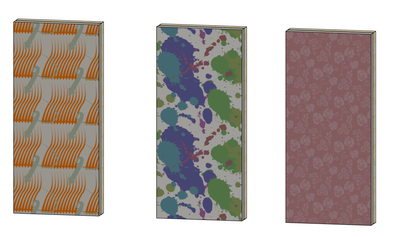
Barry.
One of the forum moderators.
Versions 6.5 to 27
i7-10700 @ 2.9Ghz, 32GB ram, GeForce RTX 2060 (6GB), Windows 10
Lenovo Thinkpad - i7-1270P 2.20 GHz, 32GB RAM, Nvidia T550, Windows 11
Versions 6.5 to 27
i7-10700 @ 2.9Ghz, 32GB ram, GeForce RTX 2060 (6GB), Windows 10
Lenovo Thinkpad - i7-1270P 2.20 GHz, 32GB RAM, Nvidia T550, Windows 11
Equinoctial
Booster
Options
- Mark as New
- Bookmark
- Subscribe
- Mute
- Subscribe to RSS Feed
- Permalink
- Report Inappropriate Content
2023-03-30 09:33 AM
2023-03-30
09:33 AM
How do I get these on the walls?
Barry Kelly
Moderator
Options
- Mark as New
- Bookmark
- Subscribe
- Mute
- Subscribe to RSS Feed
- Permalink
- Report Inappropriate Content
2023-03-30 09:46 AM - edited 2023-03-30 09:47 AM
2023-03-30
09:46 AM
Let's start from the beginning.
I have no idea how much you know about Archicad or where you are getting stuck.
Do you know how the change the surface of a wall with the overrides?
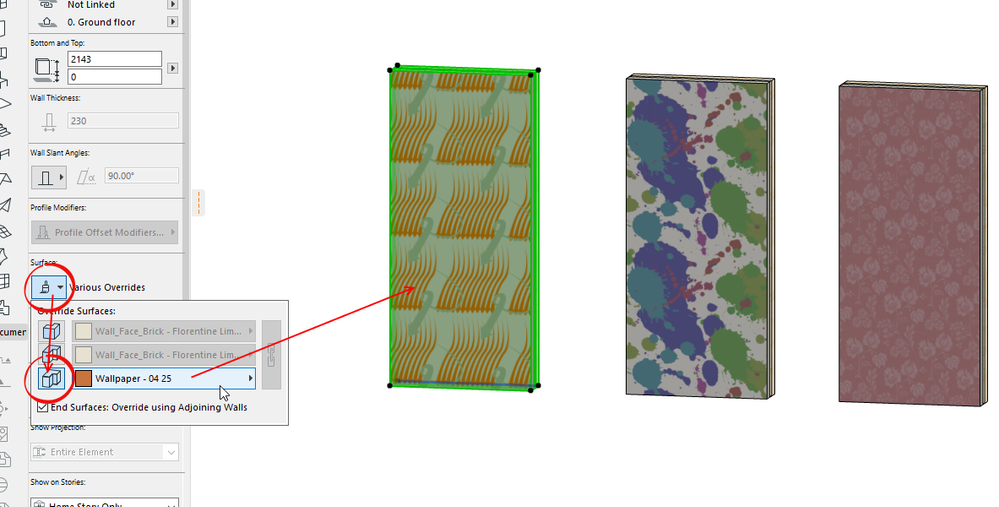
Barry.
One of the forum moderators.
Versions 6.5 to 27
i7-10700 @ 2.9Ghz, 32GB ram, GeForce RTX 2060 (6GB), Windows 10
Lenovo Thinkpad - i7-1270P 2.20 GHz, 32GB RAM, Nvidia T550, Windows 11
Versions 6.5 to 27
i7-10700 @ 2.9Ghz, 32GB ram, GeForce RTX 2060 (6GB), Windows 10
Lenovo Thinkpad - i7-1270P 2.20 GHz, 32GB RAM, Nvidia T550, Windows 11
Equinoctial
Booster
Options
- Mark as New
- Bookmark
- Subscribe
- Mute
- Subscribe to RSS Feed
- Permalink
- Report Inappropriate Content
2023-03-30 12:12 PM - edited 2023-03-30 05:39 PM
2023-03-30
12:12 PM
Yes, I just tried.
I guess I can add my own pictures too. Trying...

Didn't find the answer?
Check other topics in this Forum
Back to ForumRead the latest accepted solutions!
Accepted SolutionsStart a new conversation!

Suggested topics
- Changing wall preview type in favorite window library in Libraries & objects
- Ci Tools Keynotes | Archicad Keynotes | Properties | Attributes in Project data & BIM
- Enscape - Saving asset favorites as an office? in Visualization
- Teamwork and Enscape - Constantly updating Surfaces in Visualization
- Texture mapping incorrectly in Visualization
