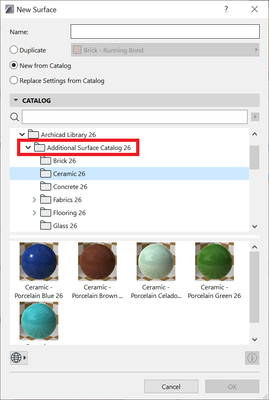
Users with an active SSA (Software Service Agreement) may download an exclusive set of 500+ additional surfaces, which are not included with the standard Archicad library. Please follow these steps to download and load the catalog to your project:
For Standalone Projects (.pln)
- Open Archicad and go to Options > Element Attributes > Surfaces or Options > Surfaces
- Click the "New..." button and select the New Surface option. From the resulting New Surface dialog choose "New from Catalog".
- Click the globe icon near the bottom of the dialog and click on "Additional Surface Catalog for SSA Users..." This command will check your license eligibility, then...
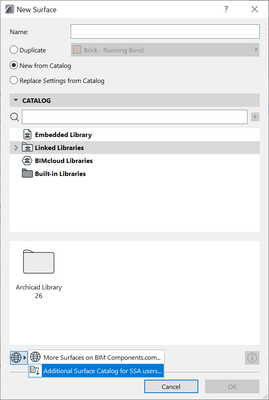
4. a page will open in your web browser. From this page download the ZIP file and extract it to a location on your computer or office server.
5. Return to Archicad and close the Surface Settings dialog box.
6. Open the Library Manager to add the Additional Surfaces to your project(s) by browsing for the newly downloaded and unzipped Additional Surface Catalog library container file (.lcf).
7. Now return to the Surface Settings dialog box and navigate to the folder where you want to import the new surface.
8. Click the "New..." button and select the New Surface option. From the resulting dialog choose "New from Catalog".
9. Browse in the area below to Linked Libraries > Additional Surface Catalog, then select and double-click the desired surface to load. You may load one surface at a time in this manner.
Once completed you will be able to use the newly loaded surfaces on elements in the project.
For Teamwork Projects
The only significant difference in Teamwork is how the libraries are managed. Repeat steps 1-4 in the above workflow, then use the "Manage BIMcloud Libraries..." dialog within Archicad to add the Additional Surface Catalog to the BIMcloud Server. Then use the Library Manager within each Teamwork project to link the library to the project.