
Turn on suggestions
Auto-suggest helps you quickly narrow down your search results by suggesting possible matches as you type.
Showing results for
EN
Turn on suggestions
Auto-suggest helps you quickly narrow down your search results by suggesting possible matches as you type.
Showing results for
- English
- :
- Developer Hub
- :
- Archicad C++ API
- :
- Re: Avoid frame around palette buttons
Options
- Subscribe to RSS Feed
- Mark Topic as New
- Mark Topic as Read
- Pin this post for me
- Bookmark
- Subscribe to Topic
- Mute
- Printer Friendly Page

gehairing
Participant
Options
- Mark as New
- Bookmark
- Subscribe
- Mute
- Subscribe to RSS Feed
- Permalink
- Report Inappropriate Content
2021-11-22 11:32 AM
Avoid frame around palette buttons
2021-11-22
11:32 AM
Hello everybody,
I have an Archicad plugin that contains a small toolbar.
For this toolbar i use the classic 'GDLG' dialog definition.
By default this makes framed buttons.
What should i do to avoid having these frames around my icons ?
Thanks,
Georges
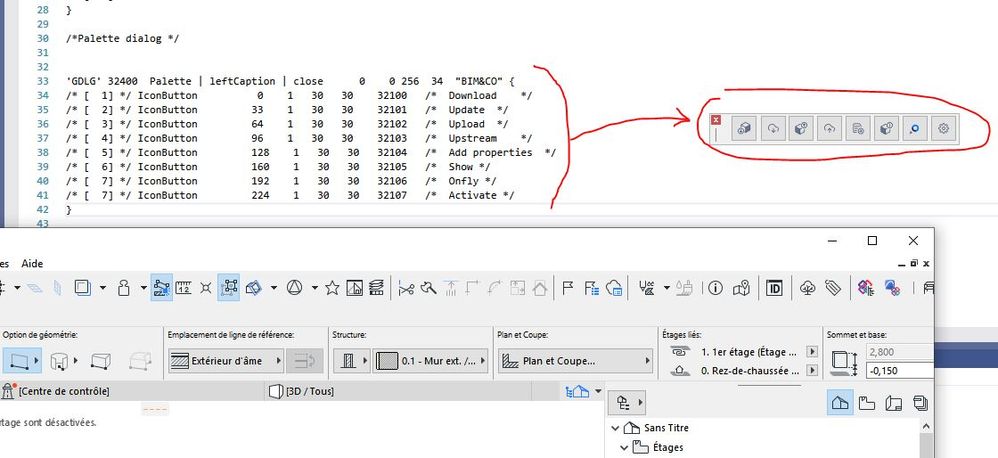
Solved! Go to Solution.
1 Solution
Accepted Solutions

 Viktor Kovacs
Graphisoft
Options
- Mark as New
- Bookmark
- Subscribe
- Mute
- Subscribe to RSS Feed
- Permalink
- Report Inappropriate Content
2021-11-22 11:37 AM
2021-11-22
11:37 AM
Use the noFrame flag in your grc file. For example:
/* [  3] */ IconButton            325    2   23   23    32100 noFrame
/* [  4] */ IconButton            350    2   23   23    32101 noFrame
2 Replies 2
Viktor Kovacs
Graphisoft
Options
- Mark as New
- Bookmark
- Subscribe
- Mute
- Subscribe to RSS Feed
- Permalink
- Report Inappropriate Content
2021-11-22 11:37 AM
2021-11-22
11:37 AM
Use the noFrame flag in your grc file. For example:
/* [  3] */ IconButton            325    2   23   23    32100 noFrame
/* [  4] */ IconButton            350    2   23   23    32101 noFrame
gehairing
Participant
Options
- Mark as New
- Bookmark
- Subscribe
- Mute
- Subscribe to RSS Feed
- Permalink
- Report Inappropriate Content
2021-11-22 11:49 AM
2021-11-22
11:49 AM
Thanks a lot Viktor 🙂

Didn't find the answer?
Check other topics in this Forum
Back to ForumRead the latest accepted solutions!
Accepted SolutionsStart a new conversation!

Suggested topics
- API can create a View Map view outside the navigator hierarchy- impossible to delete in Archicad C++ API
- macOS: numeric-keypad digits steal focus to the Tracker with numbers in the browser in Archicad C++ API
- ACAPI_GraphicalOverride_CreateOverrideRule rejects special pen values 0 and -1 for fillBackgroundPen in Archicad C++ API
- Mooving hotspots in Curtain wall Frame in GDL
- Palette resource id should be unique, even in another addon it cannot be the same in Archicad C++ API
