
Turn on suggestions
Auto-suggest helps you quickly narrow down your search results by suggesting possible matches as you type.
Showing results for
EN
Turn on suggestions
Auto-suggest helps you quickly narrow down your search results by suggesting possible matches as you type.
Showing results for
- English
- :
- Developer Hub
- :
- Archicad C++ API
- :
- Re: Outdated AddOn
Options
- Subscribe to RSS Feed
- Mark Topic as New
- Mark Topic as Read
- Pin this post for me
- Bookmark
- Subscribe to Topic
- Mute
- Printer Friendly Page

Dayiz
Booster
Options
- Mark as New
- Bookmark
- Subscribe
- Mute
- Subscribe to RSS Feed
- Permalink
- Report Inappropriate Content
2022-09-12 03:40 PM - edited 2022-09-12 03:42 PM
Outdated AddOn
2022-09-12
03:40 PM
Dear Community,
I managed to build my first AddOn and it works perfectly on my machine, but when i try it on another i always get the error "Diese Datei ist ein veraltetes Add-On, dass mit dieser Archicad Version nicht verwendet werden kann." (Deepl Translation: "This file is an obsolete add-on that cannot be used with this Archicad version.").
So I found
where a similiar problem is explained. I installed the previous MSVC v142 as explained in the post and added the parameter to my CMake Project

But even after just building the Example AddOn i got the same error on other machines.
I tried it through command prompt instead of using the CMake GUI
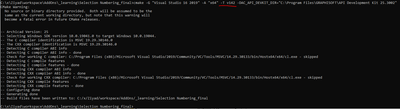
But I'm still getting the error on other machines.
I also found something similiar in the FAQ:
https://archicadapi.Graphisoft.com/faq
The 2nd point of "My add-on runs perfectly on my development machine, but when I install it on the client’s machine it refuses to load." it says:
[...] The required runtime version can be correctly set in the add-on’s manifest file.
Where or what is that manifest file? I can't find any further explanation on it.
What am I missing?
Solved! Go to Solution.
1 Solution
Accepted Solutions
Dayiz
Booster
Options
- Mark as New
- Bookmark
- Subscribe
- Mute
- Subscribe to RSS Feed
- Permalink
- Report Inappropriate Content
2022-09-12 04:27 PM
2022-09-12
04:27 PM
Well, i found my problem. It was actually the first point of https://archicadapi.Graphisoft.com/faq , I always published a debug version and not a release version. So i changed the settings in VS to Build and it works!
But I'm still curious about the manifest file, still havn't found it
Solution
3 Replies 3

julienK
Advocate
Options
- Mark as New
- Bookmark
- Subscribe
- Mute
- Subscribe to RSS Feed
- Permalink
- Report Inappropriate Content
2022-09-12 04:15 PM
2022-09-12
04:15 PM
Dayiz
Booster
Options
- Mark as New
- Bookmark
- Subscribe
- Mute
- Subscribe to RSS Feed
- Permalink
- Report Inappropriate Content
2022-09-12 04:24 PM
2022-09-12
04:24 PM
Yes, otherwise it wouldn't work on my EDU version (addons without mdid should only work with demo versions of Archicad)
Dayiz
Booster
Options
- Mark as New
- Bookmark
- Subscribe
- Mute
- Subscribe to RSS Feed
- Permalink
- Report Inappropriate Content
2022-09-12 04:27 PM
2022-09-12
04:27 PM
Well, i found my problem. It was actually the first point of https://archicadapi.Graphisoft.com/faq , I always published a debug version and not a release version. So i changed the settings in VS to Build and it works!
But I'm still curious about the manifest file, still havn't found it
Solution

Didn't find the answer?
Check other topics in this Forum
Back to ForumRead the latest accepted solutions!
Accepted SolutionsStart a new conversation!
Suggested topics
- Numerical parameters digit limit in GDL
- Tapioca - UI for python commands in Archicad Python API
- LibraryManager::FindLibraries recommended instead of ACAPI_LibraryManagement_GetLibraries in Archicad C++ API
- Add-On version information in Add-on Manager in Developer Insights
- Developer Registration in Archicad C++ API
