
Turn on suggestions
Auto-suggest helps you quickly narrow down your search results by suggesting possible matches as you type.
Showing results for
EN
Turn on suggestions
Auto-suggest helps you quickly narrow down your search results by suggesting possible matches as you type.
Showing results for
- English
- :
- Developer Hub
- :
- Archicad C++ API
- :
- Re: DG Message when palette dialog is docked?
Options
- Subscribe to RSS Feed
- Mark Topic as New
- Mark Topic as Read
- Pin this post for me
- Bookmark
- Subscribe to Topic
- Mute
- Printer Friendly Page

Erenford
Enthusiast
Options
- Mark as New
- Bookmark
- Subscribe
- Mute
- Subscribe to RSS Feed
- Permalink
- Report Inappropriate Content
2014-11-17
09:38 AM
- last edited on
2024-09-24
09:52 AM
by
 Doreena Deng
[SOLVED] DG Message when palette dialog is docked?
2014-11-17
09:38 AM
Hello,
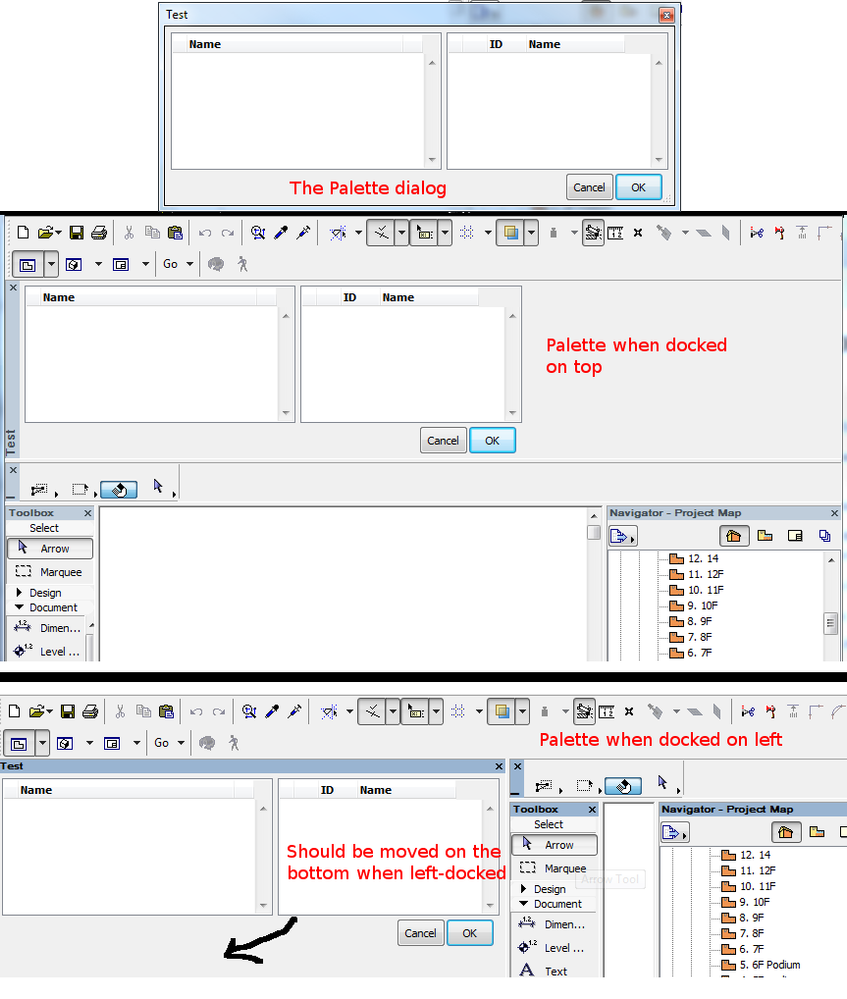
Is there a DG Message in callback when a palette dialog is docked? Or know when docking location changes/what the docked location is?
What I want to do is to re-arrange my dialog items whenever the dialog is docked according to its docked location.
For ex. I have a palette with 2 list box: if I docked it on top, it will look like the 2nd screen. If I docked it on left/right, instead of the one in the 3rd screen it'll move the 2nd list box and put it at the bottom of the 1st list box, taking less space than if I didn't re-arrange it.
Is this possible?
Is there a DG Message in callback when a palette dialog is docked? Or know when docking location changes/what the docked location is?
What I want to do is to re-arrange my dialog items whenever the dialog is docked according to its docked location.
For ex. I have a palette with 2 list box: if I docked it on top, it will look like the 2nd screen. If I docked it on left/right, instead of the one in the 3rd screen it'll move the 2nd list box and put it at the bottom of the 1st list box, taking less space than if I didn't re-arrange it.
Is this possible?
1 Reply 1

 Tibor Lorantfy
Graphisoft Alumni
Options
- Mark as New
- Bookmark
- Subscribe
- Mute
- Subscribe to RSS Feed
- Permalink
- Report Inappropriate Content
2014-11-17 10:27 PM
2014-11-17
10:27 PM
Dear ArchiCAD-Talk forum members,
today I implemented a "new API function" just for you:
ACAPI_Notify_CatchDockStateChanged
With this function you can catch dock/undock events and docked title orientation changed events also.
Interface:
Implementation:
Example:
Feel free to use this and please report me here if you have any problem about this function!
Regards,
Tibor
today I implemented a "new API function" just for you:
ACAPI_Notify_CatchDockStateChanged
With this function you can catch dock/undock events and docked title orientation changed events also.
Interface:
typedef struct {
	short	dialId;
	bool	isDocked;
	bool	isDockedTitleHorizontal;
} API_DockStateInfo;

typedef void	__ACENV_CALL	APIDockStateChangedCallBackProc (short dialId, API_DockStateInfo dockStateInfo);

void	ACAPI_Notify_CatchDockStateChanged (short dialId, APIDockStateChangedCallBackProc *callBackProc);
Implementation:
void	ACAPI_Notify_CatchDockStateChanged (short dialId, APIDockStateChangedCallBackProc *callBackProc)
{
	if (DGGetDialogType (dialId) == DG_DT_PALETTE) {
		static GS::HashTable<short, API_DockStateInfo> dockStateInfos;
		API_DockStateInfo actDockStateInfo;
		actDockStateInfo.dialId = dialId;

		GS::Guid paletteGuid;
		DGGetPaletteGuid (dialId, &paletteGuid);

		actDockStateInfo.isDocked = DGIsPaletteDocked (paletteGuid);

		short hFrameSize;
		short vFrameSize;
		short hClientSize;
		short vClientSize;
		DGGetDialogSize (ACAPI_GetOwnResModule (), dialId, DG_ORIGFRAME, &hFrameSize, &vFrameSize);
		DGGetDialogSize (ACAPI_GetOwnResModule (), dialId, DG_ORIGCLIENT, &hClientSize, &vClientSize);
		actDockStateInfo.isDockedTitleHorizontal = (hFrameSize - hClientSize > vFrameSize - vClientSize);

		API_DockStateInfo prevDockStateInfo;
		if (!dockStateInfos.Get (dialId, &prevDockStateInfo)									||
			prevDockStateInfo.isDocked					!= actDockStateInfo.isDocked				||
			prevDockStateInfo.isDockedTitleHorizontal	!= actDockStateInfo.isDockedTitleHorizontal)
		{
			dockStateInfos.Put (dialId, actDockStateInfo);
			callBackProc (dialId, actDockStateInfo);
		}
	}
}
Example:
void	__ACENV_CALL DockStateChangedCallBack (short dialId, API_DockStateInfo dockStateInfo)
{
	char buffer[512];
	sprintf (buffer, "DockStateChanged: dialId=%d, isDocked=%d, isDockedTitleHorizontal=%d", dialId, dockStateInfo.isDocked, dockStateInfo.isDockedTitleHorizontal);
	ACAPI_WriteReport (buffer, true);
	// Handle dock state changed event as you want!
}

// -------------------------------------- With C++ style Palette: -----------------------------------------------------

// Define the following function in the dialog's observer class:
		virtual void PanelIdle (const DG::PanelIdleEvent&);

// -------------------------------

void	MyDialogObserver:PanelIdle (const DG::PanelIdleEvent& /*ev*/)
{
	ACAPI_Notify_CatchDockStateChanged (myDialog->GetId (), DockStateChangedCallBack);
	// myDialog is a pointer to the dialog
}

// ---------------------------------------- With C style Palette: -----------------------------------------------------

// In the dialog's callback function:
//		at the end of DG_MSG_INIT message handling:
			DGEnableMessage (dialID, DG_ALL_ITEMS, DG_MSG_NULL);
			break;
		case DG_MSG_NULL:
			ACAPI_Notify_CatchDockStateChanged (dialID, DockStateChangedCallBack);
			break;
Feel free to use this and please report me here if you have any problem about this function!
Regards,
Tibor

Didn't find the answer?
Check other topics in this Forum
Back to ForumRead the latest accepted solutions!
Accepted SolutionsStart a new conversation!
Suggested topics
