
Turn on suggestions
Auto-suggest helps you quickly narrow down your search results by suggesting possible matches as you type.
Showing results for
EN
Turn on suggestions
Auto-suggest helps you quickly narrow down your search results by suggesting possible matches as you type.
Showing results for
- English
- :
- Forum
- :
- Collaboration with other software
- :
- Re: How can I make a Symbol bigger in a Schedule?
Options
- Subscribe to RSS Feed
- Mark Topic as New
- Mark Topic as Read
- Pin this post for me
- Bookmark
- Subscribe to Topic
- Mute
- Printer Friendly Page

Anonymous
Not applicable
Options
- Mark as New
- Bookmark
- Subscribe
- Mute
- Subscribe to RSS Feed
- Permalink
- Report Inappropriate Content
2016-03-16 03:37 PM
How can I make a Symbol bigger in a Schedule?
2016-03-16
03:37 PM
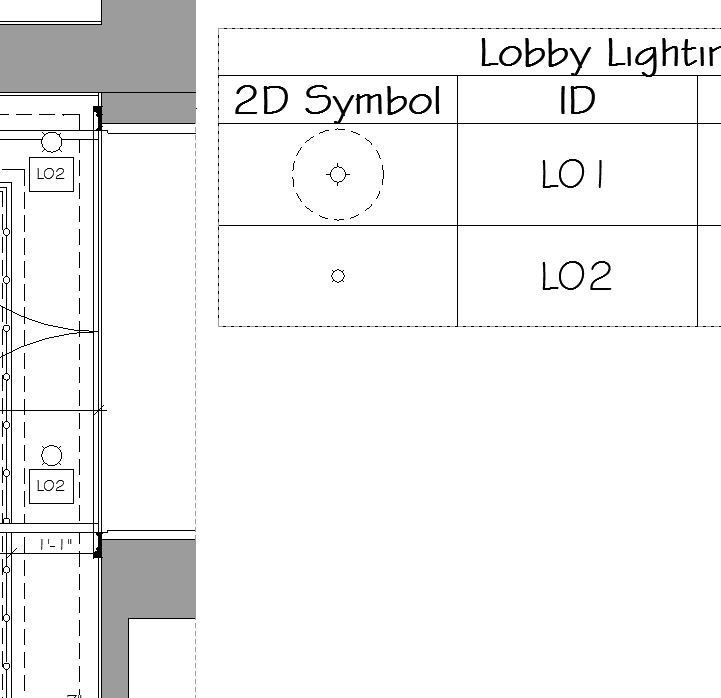
If you see the image you'll see L02 in the plan and in the schedule, in the schedule is smaller than in the plan, with the corresponding scale for printing.
Is there a way to make the light symbol bigger in the schedule?
Thanks!
Read-Only
Labels:
- Labels:
-
Data management
2 Replies 2

David Maudlin
Rockstar
Options
- Mark as New
- Bookmark
- Subscribe
- Mute
- Subscribe to RSS Feed
- Permalink
- Report Inappropriate Content
2016-03-17 01:55 PM
2016-03-17
01:55 PM
arqrivas:
One thing to try: in the Schedule, select Apply Format Options to: Preview, then check Scale to Fit.
David
One thing to try: in the Schedule, select Apply Format Options to: Preview, then check Scale to Fit.
David
David Maudlin / Architect
www.davidmaudlin.com
Digital Architecture
AC29 USA Perpetual • Mac mini M4 Pro OSX15 | 64 gb ram • MacBook Pro M3 Pro OSX14 | 36 gb ram
www.davidmaudlin.com
Digital Architecture
AC29 USA Perpetual • Mac mini M4 Pro OSX15 | 64 gb ram • MacBook Pro M3 Pro OSX14 | 36 gb ram
Anonymous
Not applicable
Options
- Mark as New
- Bookmark
- Subscribe
- Mute
- Subscribe to RSS Feed
- Permalink
- Report Inappropriate Content
2016-03-17 03:54 PM
2016-03-17
03:54 PM
Ok, I'll try that, Thanks David. I'll let you know if it works.
I'm working in another project right now. I'll be back in this project soon.
I'm working in another project right now. I'll be back in this project soon.
Still looking?
Suggested topics
- Unable to edit overide in "Ci tools Doors _ Schedule" Object - Door and Window Schedule all Dashed in Libraries & objects
- Creating a 2D general risk Icon with a GDL object that I can link to a schedule in Libraries & objects
- schedule plan preview not showing line types in Libraries & objects
- Scheduling in Project data & BIM
- Zone stamp - Custom Text in Modeling
