
Turn on suggestions
Auto-suggest helps you quickly narrow down your search results by suggesting possible matches as you type.
Showing results for
EN
Turn on suggestions
Auto-suggest helps you quickly narrow down your search results by suggesting possible matches as you type.
Showing results for
- English
- :
- Forum
- :
- Collaboration with other software
- :
- Re: door schedule - one ID one rapresentation
Options
- Subscribe to RSS Feed
- Mark Topic as New
- Mark Topic as Read
- Pin this post for me
- Bookmark
- Subscribe to Topic
- Mute
- Printer Friendly Page

alemanda
Expert
Options
- Mark as New
- Bookmark
- Subscribe
- Mute
- Subscribe to RSS Feed
- Permalink
- Report Inappropriate Content
2013-10-30 07:17 PM
door schedule - one ID one rapresentation
2013-10-30
07:17 PM
I'm playing with schedules ... that's why so many questions.
Now I have the need to show only one rapresentation for all the doors with the same ID but I need to have the quantity floor by floor ...
Is it possible?
I was able only to have one ID but the same rapresentation repeated for each floor ...
eng. Alessandro Mandala - Italy
AC27 latest hotfix
Win 11 Pro 64bit
Ultra 9 275HX 64GB GeForce RTX 5070ti
AC27 latest hotfix
Win 11 Pro 64bit
Ultra 9 275HX 64GB GeForce RTX 5070ti
Read-Only
Labels:
- Labels:
-
Data management
5 Replies 5

Karl Ottenstein
Moderator Emeritus
Options
- Mark as New
- Bookmark
- Subscribe
- Mute
- Subscribe to RSS Feed
- Permalink
- Report Inappropriate Content
2013-10-30 09:27 PM
2013-10-30
09:27 PM
If I understand correctly, you'd like the door symbol (plan, elev, etc) for a door legend to appear only once while you show the totals per floor?
This does not seem possible. There is the "Show Headline" option (screenshot attached), which lets data fields be displayed once for a group... but if I try to include a graphic field (2D plan view in screenshot) there... then nothing is displayed in the headline.
In the screenshot, I have summarized the total number of doors of ID "01" by floor - with 3 on the 1st, 2 on the 2nd and 1 on the 3rd floor. But, I can't move the graphic to the headline (the line with the ID / 01).
This does not seem possible. There is the "Show Headline" option (screenshot attached), which lets data fields be displayed once for a group... but if I try to include a graphic field (2D plan view in screenshot) there... then nothing is displayed in the headline.
In the screenshot, I have summarized the total number of doors of ID "01" by floor - with 3 on the 1st, 2 on the 2nd and 1 on the 3rd floor. But, I can't move the graphic to the headline (the line with the ID / 01).
Vote for Wish: Copy/Paste in 3D
AC 29 USA and earlier • hardware key • macOS Tahoe 26.7 MacBook Pro M2 Max 12CPU/30GPU cores, 32GB
AC 29 USA and earlier • hardware key • macOS Tahoe 26.7 MacBook Pro M2 Max 12CPU/30GPU cores, 32GB


Anonymous
Not applicable
Options
- Mark as New
- Bookmark
- Subscribe
- Mute
- Subscribe to RSS Feed
- Permalink
- Report Inappropriate Content
2013-10-30 09:29 PM
2013-10-30
09:29 PM
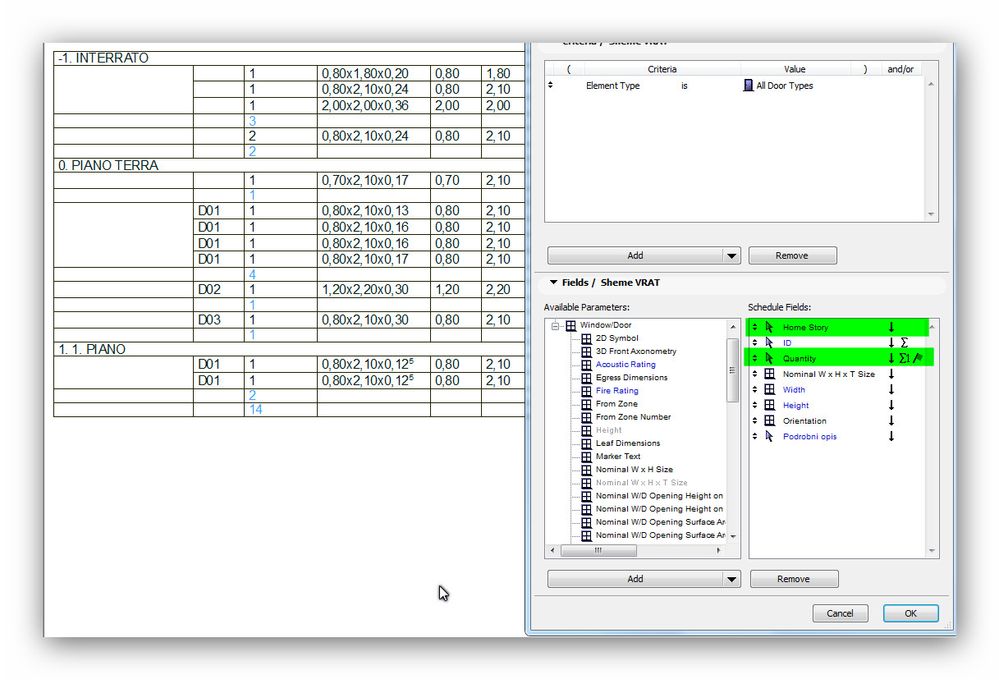
Is this that you want to obtain?
Karl Ottenstein
Moderator Emeritus
Options
- Mark as New
- Bookmark
- Subscribe
- Mute
- Subscribe to RSS Feed
- Permalink
- Report Inappropriate Content
2013-10-30 09:39 PM
2013-10-30
09:39 PM
If by representation, you mean the data that describes the door, you can have the common fields summarized in the 'headline' - but notice in the attached screenshot that that field is called "ID", even though it actually contains 4 data fields, the other 3 not being identified by name.
Vote for Wish: Copy/Paste in 3D
AC 29 USA and earlier • hardware key • macOS Tahoe 26.7 MacBook Pro M2 Max 12CPU/30GPU cores, 32GB
AC 29 USA and earlier • hardware key • macOS Tahoe 26.7 MacBook Pro M2 Max 12CPU/30GPU cores, 32GB

alemanda
Expert
Options
- Mark as New
- Bookmark
- Subscribe
- Mute
- Subscribe to RSS Feed
- Permalink
- Report Inappropriate Content
2013-10-31 07:09 AM
2013-10-31
07:09 AM
Karl,
You got my point in your first post.
I'd like to show the 2d plan and the front view only once.
You got my point in your first post.
I'd like to show the 2d plan and the front view only once.
eng. Alessandro Mandala - Italy
AC27 latest hotfix
Win 11 Pro 64bit
Ultra 9 275HX 64GB GeForce RTX 5070ti
AC27 latest hotfix
Win 11 Pro 64bit
Ultra 9 275HX 64GB GeForce RTX 5070ti

Barry Kelly
Moderator
Options
- Mark as New
- Bookmark
- Subscribe
- Mute
- Subscribe to RSS Feed
- Permalink
- Report Inappropriate Content
2013-10-31 07:31 AM
2013-10-31
07:31 AM
alemanda wrote:That's not possible with the schedules as they are now.
Karl,
You got my point in your first post.
I'd like to show the 2d plan and the front view only once.
Let's hope for changes in the future.
Even though you have identical doors (same ID) on each storey as soon as you list them in a schedule and list the storey they are no longer identical - the storey is different.
Don't list the storey and they will all group as one so long as "show uniform items as single entry" is on.
Barry.
One of the forum moderators.
Versions 6.5 to 27
i7-10700 @ 2.9Ghz, 32GB ram, GeForce RTX 2060 (6GB), Windows 10
Lenovo Thinkpad - i7-1270P 2.20 GHz, 32GB RAM, Nvidia T550, Windows 11
Versions 6.5 to 27
i7-10700 @ 2.9Ghz, 32GB ram, GeForce RTX 2060 (6GB), Windows 10
Lenovo Thinkpad - i7-1270P 2.20 GHz, 32GB RAM, Nvidia T550, Windows 11
Still looking?
Suggested topics
- Missing elevations of doors when making a door schedule in Documentation
- Replace door thickness on just the door schedule with Expression Editor in Project data & BIM
- Ci Tools Keynotes | Archicad Keynotes | Properties | Attributes in Project data & BIM
- Doors and Windows Schedule Automatic Dimension Button not Responding in Project data & BIM
- Possible wish about locking properties in Project data & BIM
