
Turn on suggestions
Auto-suggest helps you quickly narrow down your search results by suggesting possible matches as you type.
Showing results for
EN
Turn on suggestions
Auto-suggest helps you quickly narrow down your search results by suggesting possible matches as you type.
Showing results for
- English
- :
- Forum
- :
- Documentation
- :
- 3D IMAGE SETTINGS
Options
- Subscribe to RSS Feed
- Mark Topic as New
- Mark Topic as Read
- Pin this post for me
- Bookmark
- Subscribe to Topic
- Mute
- Printer Friendly Page

Llian
Advocate
Options
- Mark as New
- Bookmark
- Subscribe
- Mute
- Subscribe to RSS Feed
- Permalink
- Report Inappropriate Content
2011-06-18
11:05 AM
- last edited on
2025-02-07
02:35 PM
by
 Aruzhan Ilaikova
3D IMAGE SETTINGS
2011-06-18
11:05 AM
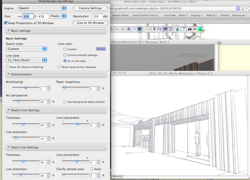
What do I have to do to have this clean marker drawn image ? I tried using the Sketch withe available pen type but my image somehow doesn't come out this clean lines!

Lilian Seow LEED AP | cSBA | CAPM | PMP
AC 29 USA FULL | Windows 11 Enterprise i5 3.10GHz | Archicad-user since 1994!
AC 29 USA FULL | Windows 11 Enterprise i5 3.10GHz | Archicad-user since 1994!
3 Replies 3
Llian
Advocate
Options
- Mark as New
- Bookmark
- Subscribe
- Mute
- Subscribe to RSS Feed
- Permalink
- Report Inappropriate Content
2011-06-18 11:14 AM
2011-06-18
11:14 AM
this is how mine look like...
Lilian Seow LEED AP | cSBA | CAPM | PMP
AC 29 USA FULL | Windows 11 Enterprise i5 3.10GHz | Archicad-user since 1994!
AC 29 USA FULL | Windows 11 Enterprise i5 3.10GHz | Archicad-user since 1994!
Llian
Advocate
Options
- Mark as New
- Bookmark
- Subscribe
- Mute
- Subscribe to RSS Feed
- Permalink
- Report Inappropriate Content
2011-06-18 11:17 AM
2011-06-18
11:17 AM
image.....
Lilian Seow LEED AP | cSBA | CAPM | PMP
AC 29 USA FULL | Windows 11 Enterprise i5 3.10GHz | Archicad-user since 1994!
AC 29 USA FULL | Windows 11 Enterprise i5 3.10GHz | Archicad-user since 1994!

Gorazd
Advocate
Options
- Mark as New
- Bookmark
- Subscribe
- Mute
- Subscribe to RSS Feed
- Permalink
- Report Inappropriate Content
2011-06-18 12:51 PM
2011-06-18
12:51 PM
I think, what you are trying to do is 3D Document, not render. When you are in 3D window, right click with the mouse and select Capture Window for 3D Document. Your 3D view will be in navigator under 3D documents.
------
Gorazd Rajh
From AC 6.5 onward, i9-14900HX, 32 GB RAM, RTX 4060, Win 11
Gorazd Rajh
From AC 6.5 onward, i9-14900HX, 32 GB RAM, RTX 4060, Win 11

Still looking?

Suggested topics
- Is there a way to hyperlink files in order to place their drawings into a common layout book? in Documentation
- View Image at Full Resolution in Our Community
- Missing elevations of doors when making a door schedule in Documentation
- The snap to construction grid doesn't work if I change the plan orientation angle in General discussions
- TIP: Visual Check for custom Dimension Texts in Documentation
