
Turn on suggestions
Auto-suggest helps you quickly narrow down your search results by suggesting possible matches as you type.
Showing results for
EN
Turn on suggestions
Auto-suggest helps you quickly narrow down your search results by suggesting possible matches as you type.
Showing results for
- English
- :
- Forum
- :
- Documentation
- :
- Re: Archicad 25 elevation markers, horizontal rang...
Options
- Subscribe to RSS Feed
- Mark Topic as New
- Mark Topic as Read
- Pin this post for me
- Bookmark
- Subscribe to Topic
- Mute
- Printer Friendly Page

Ignacio Azpiazu
Ace
Options
- Mark as New
- Bookmark
- Subscribe
- Mute
- Subscribe to RSS Feed
- Permalink
- Report Inappropriate Content
2021-10-24 04:12 PM
Archicad 25 elevation markers, horizontal range limited, fills area in floor plan
2021-10-24
04:12 PM
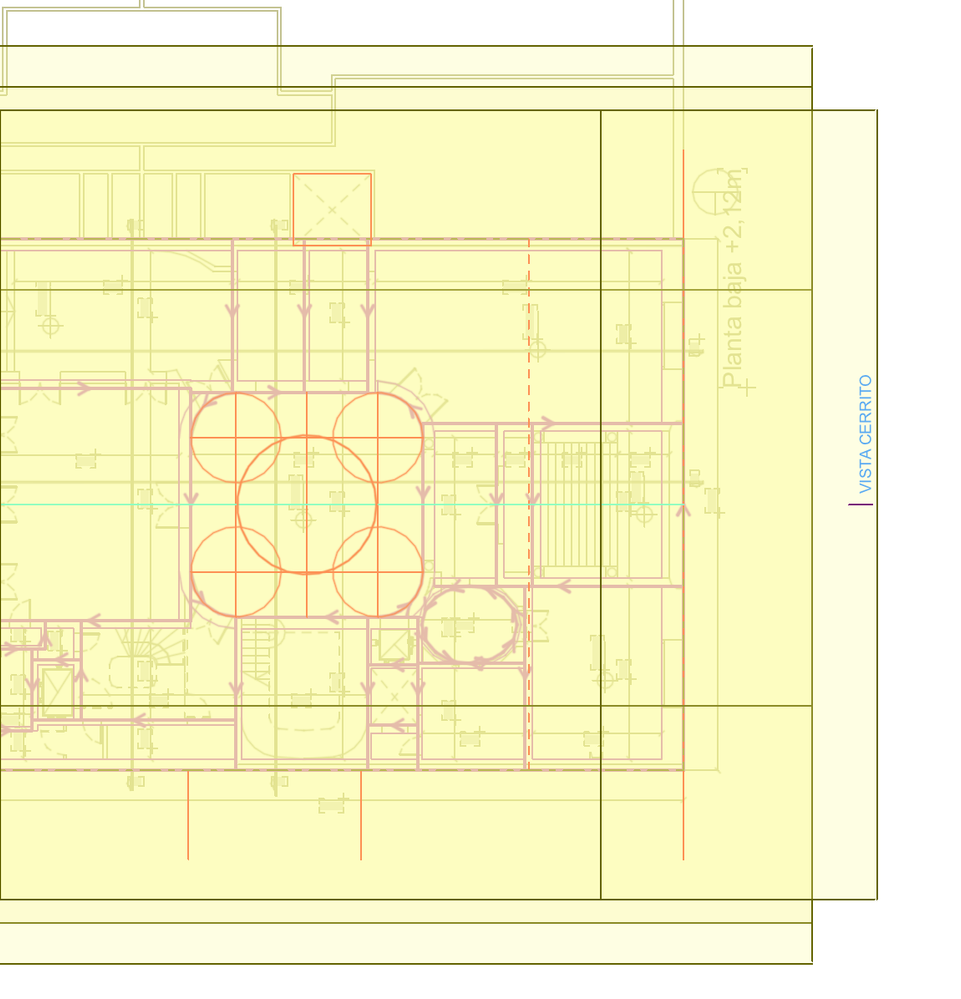
Project started from AC25 INT default template. Those yellow fills appeared when I turned on “horizontal range limited”, and I can't find where to get that back to clear.
Solved! Go to Solution.
Solved
Read-Only
1 Solution
Accepted Solutions

Barry Kelly
Moderator
Options
- Mark as New
- Bookmark
- Subscribe
- Mute
- Subscribe to RSS Feed
- Permalink
- Report Inappropriate Content
2021-10-25 03:21 AM
2021-10-25
03:21 AM
You can turn the fill off in the On-screen Display Options > Highlight Source Markers.
The actual fill colour is set in the Work Environment > On-screen Options > Source Marker Colour.
Barry.
One of the forum moderators.
Versions 6.5 to 27
i7-10700 @ 2.9Ghz, 32GB ram, GeForce RTX 2060 (6GB), Windows 10
Lenovo Thinkpad - i7-1270P 2.20 GHz, 32GB RAM, Nvidia T550, Windows 11
Versions 6.5 to 27
i7-10700 @ 2.9Ghz, 32GB ram, GeForce RTX 2060 (6GB), Windows 10
Lenovo Thinkpad - i7-1270P 2.20 GHz, 32GB RAM, Nvidia T550, Windows 11
2 Replies 2
Barry Kelly
Moderator
Options
- Mark as New
- Bookmark
- Subscribe
- Mute
- Subscribe to RSS Feed
- Permalink
- Report Inappropriate Content
2021-10-25 03:21 AM
2021-10-25
03:21 AM
You can turn the fill off in the On-screen Display Options > Highlight Source Markers.
The actual fill colour is set in the Work Environment > On-screen Options > Source Marker Colour.
Barry.
One of the forum moderators.
Versions 6.5 to 27
i7-10700 @ 2.9Ghz, 32GB ram, GeForce RTX 2060 (6GB), Windows 10
Lenovo Thinkpad - i7-1270P 2.20 GHz, 32GB RAM, Nvidia T550, Windows 11
Versions 6.5 to 27
i7-10700 @ 2.9Ghz, 32GB ram, GeForce RTX 2060 (6GB), Windows 10
Lenovo Thinkpad - i7-1270P 2.20 GHz, 32GB RAM, Nvidia T550, Windows 11
Ignacio Azpiazu
Ace
Options
- Mark as New
- Bookmark
- Subscribe
- Mute
- Subscribe to RSS Feed
- Permalink
- Report Inappropriate Content
2021-10-25 04:01 AM
2021-10-25
04:01 AM
Thanks! I had seen that in Work Environment settings, didn't understand what it was meant to do, and figured I'd turn it on to learn. I couldn't find it in Documentation, searched for all the wrong words.

Still looking?
Suggested topics
- Opening outlines not visible in “Structural Core Only” display mode in elevation view in Modeling
- Angled Beam End Cut in Plan View in Modeling
- Window with adjustable frame extensions (jamb) and automatic insulation return – AC29 / GDL in Modeling
- CiTools Boundary - horizontal lines showing in 3D and driveway obscured by mesh in 2D in Modeling
- Archicad 29 regression - Complex Profile fill orientation bug has returned in Modeling
