
Turn on suggestions
Auto-suggest helps you quickly narrow down your search results by suggesting possible matches as you type.
Showing results for
EN
Turn on suggestions
Auto-suggest helps you quickly narrow down your search results by suggesting possible matches as you type.
Showing results for
- English
- :
- Forum
- :
- Documentation
- :
- Archicad 25 zone tool colour
Options
- Subscribe to RSS Feed
- Mark Topic as New
- Mark Topic as Read
- Pin this post for me
- Bookmark
- Subscribe to Topic
- Mute
- Printer Friendly Page

Bara3
Booster
Options
- Mark as New
- Bookmark
- Subscribe
- Mute
- Subscribe to RSS Feed
- Permalink
- Report Inappropriate Content
2022-01-26 10:20 PM
Archicad 25 zone tool colour
2022-01-26
10:20 PM
Hello,
I do not know how to change the colour of my zones in Archicad 25. My Zone (Cover) Fill Pattern ist checked, but the zone is still blank. It has been blank since default and I cannot find out what I am doing wrong. I checked all settings in zone tool.
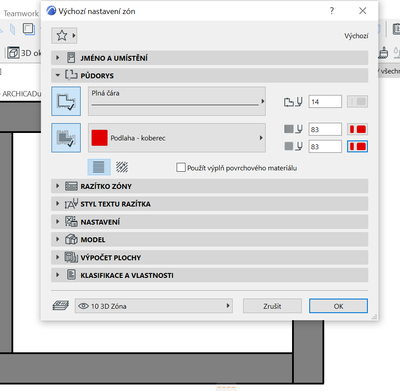
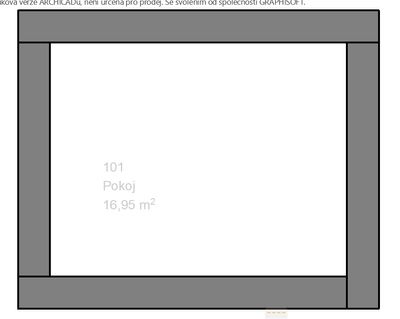
Solved! Go to Solution.
Solved
Read-Only
1 Solution
Accepted Solutions

jfaugustine
Enthusiast
Options
- Mark as New
- Bookmark
- Subscribe
- Mute
- Subscribe to RSS Feed
- Permalink
- Report Inappropriate Content
2022-01-26 10:40 PM
2022-01-26
10:40 PM
Did you check for Graphic Overrides, Renovation Filter, and/or Trace Reference settings?
ArchiCAD since 8.0, currently on 22, waiting on 26, maybe...
Solution
3 Replies 3
jfaugustine
Enthusiast
Options
- Mark as New
- Bookmark
- Subscribe
- Mute
- Subscribe to RSS Feed
- Permalink
- Report Inappropriate Content
2022-01-26 10:40 PM
2022-01-26
10:40 PM
Did you check for Graphic Overrides, Renovation Filter, and/or Trace Reference settings?
ArchiCAD since 8.0, currently on 22, waiting on 26, maybe...
Solution
Bara3
Booster
Options
- Mark as New
- Bookmark
- Subscribe
- Mute
- Subscribe to RSS Feed
- Permalink
- Report Inappropriate Content
2022-01-27 08:34 AM
2022-01-27
08:34 AM
Thank you, I tried Graphic Overrides, but I was am not exactly sure I did it in a right way.
Bara3
Booster
Options
- Mark as New
- Bookmark
- Subscribe
- Mute
- Subscribe to RSS Feed
- Permalink
- Report Inappropriate Content
2022-01-27 08:45 AM - edited 2022-01-27 09:05 AM
2022-01-27
08:45 AM
And I tried Renovation Filter and Trace Reference settings but it did not chage the colours of zones but then I tried Graphic Overrides again and it did work. Thank you so much.

Still looking?

Suggested topics
- Archicad 30: What have you done? in General discussions
- Welcome to our AI Solutions forum | Guidelines for participating in AI solutions
- There will be new renaissance for archicad in General discussions
- Number of Section Elevation and Detail Markers (Total Number of Viewpoints) in Documentation
- Archicad 29 Dimension Lagging issue in Documentation
