
Turn on suggestions
Auto-suggest helps you quickly narrow down your search results by suggesting possible matches as you type.
Showing results for
EN
Turn on suggestions
Auto-suggest helps you quickly narrow down your search results by suggesting possible matches as you type.
Showing results for
- English
- :
- Forum
- :
- Documentation
- :
- Re: Autotext for veneer thickness for columns
Options
- Subscribe to RSS Feed
- Mark Topic as New
- Mark Topic as Read
- Pin this post for me
- Bookmark
- Subscribe to Topic
- Mute
- Printer Friendly Page

KatherineC97
Booster
Options
- Mark as New
- Bookmark
- Subscribe
- Mute
- Subscribe to RSS Feed
- Permalink
- Report Inappropriate Content
2023-02-02 02:49 AM
Autotext for veneer thickness for columns
2023-02-02
02:49 AM
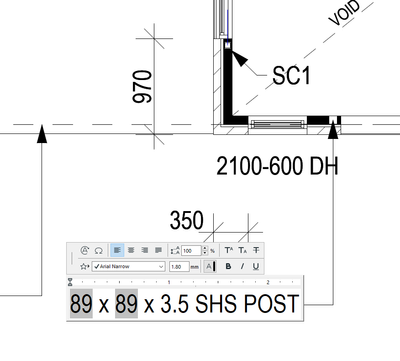
I'm trying to set up an autotext based favourite where when the post size changes, the label will auto update. I'm able to use autotext for the width, but I'm running into trouble with the veneer thickness. Is it possible to autotext this?
Solved! Go to Solution.
Solved
Labels:
- Labels:
-
Annotation
1 Solution
Accepted Solutions

Barry Kelly
Moderator
Options
- Mark as New
- Bookmark
- Subscribe
- Mute
- Subscribe to RSS Feed
- Permalink
- Report Inappropriate Content
2023-02-02 03:38 AM - edited 2023-02-02 03:41 AM
2023-02-02
03:38 AM
Not with an autotext label.
How are you GDL skills?
You could possibly create your own label with GDL, but you need to know what you are doing.
There does appear to be a parameter for the veneer thickness in GDL.
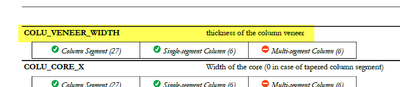
But the ability to have segmented columns where each segment can be different may cause some problems (although that is all controlled in these GDL parameters).
With my intermediate GDL knowledge, I would be struggling to do this.
So unless you are very good with GDL, I don't see a solution.
The only other solution I can think of is Classifications and Properties.
They seem to only have the same fields as the autotext label, so you aren't any better off.
However you can set up expressions in the properties.
So maybe you could calculate the overall column width less the core width and divide that by 2 to get the veneer thickness?
I just did a quick test and this does seem to work.
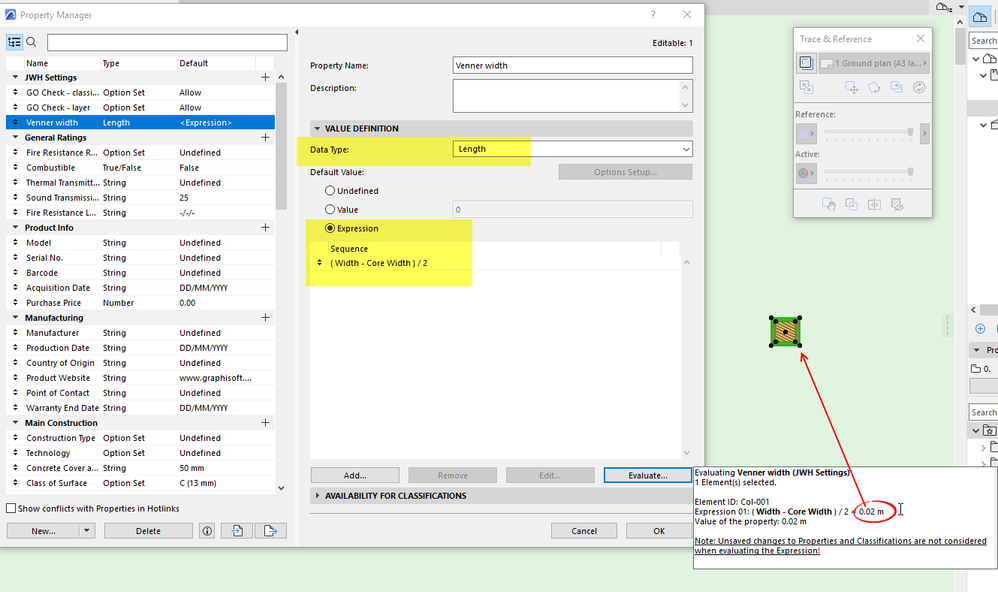
You can then use the property in an autotext label.
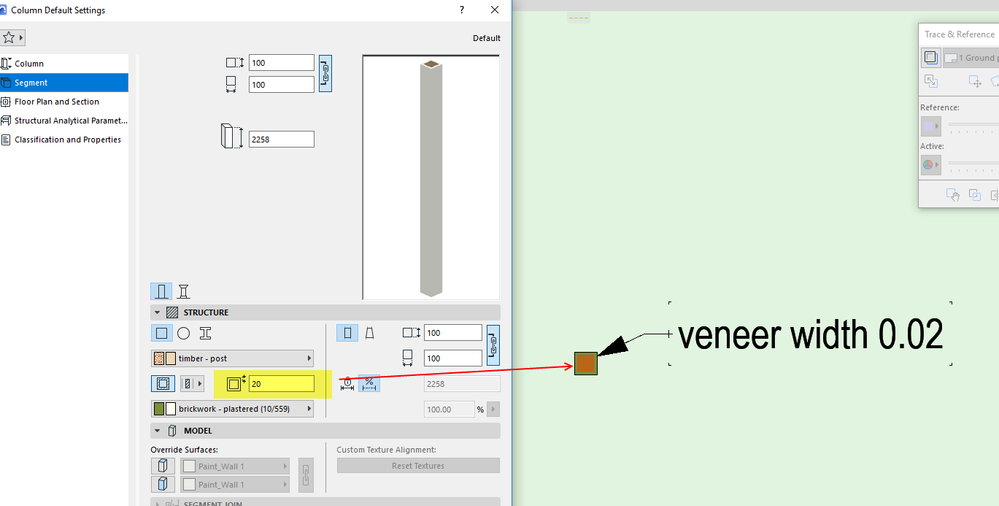
Barry.
One of the forum moderators.
Versions 6.5 to 27
i7-10700 @ 2.9Ghz, 32GB ram, GeForce RTX 2060 (6GB), Windows 10
Lenovo Thinkpad - i7-1270P 2.20 GHz, 32GB RAM, Nvidia T550, Windows 11
Versions 6.5 to 27
i7-10700 @ 2.9Ghz, 32GB ram, GeForce RTX 2060 (6GB), Windows 10
Lenovo Thinkpad - i7-1270P 2.20 GHz, 32GB RAM, Nvidia T550, Windows 11
Solution
5 Replies 5
Barry Kelly
Moderator
Options
- Mark as New
- Bookmark
- Subscribe
- Mute
- Subscribe to RSS Feed
- Permalink
- Report Inappropriate Content
2023-02-02 03:02 AM
2023-02-02
03:02 AM
Not that I can see.
I only see these fields for autotext labels.

Barry.
One of the forum moderators.
Versions 6.5 to 27
i7-10700 @ 2.9Ghz, 32GB ram, GeForce RTX 2060 (6GB), Windows 10
Lenovo Thinkpad - i7-1270P 2.20 GHz, 32GB RAM, Nvidia T550, Windows 11
Versions 6.5 to 27
i7-10700 @ 2.9Ghz, 32GB ram, GeForce RTX 2060 (6GB), Windows 10
Lenovo Thinkpad - i7-1270P 2.20 GHz, 32GB RAM, Nvidia T550, Windows 11
KatherineC97
Booster
Options
- Mark as New
- Bookmark
- Subscribe
- Mute
- Subscribe to RSS Feed
- Permalink
- Report Inappropriate Content
2023-02-02 03:04 AM
2023-02-02
03:04 AM
That's a shame, I was really hoping I was just missing something. Would you happen to know of a workaround?
Barry Kelly
Moderator
Options
- Mark as New
- Bookmark
- Subscribe
- Mute
- Subscribe to RSS Feed
- Permalink
- Report Inappropriate Content
2023-02-02 03:38 AM - edited 2023-02-02 03:41 AM
2023-02-02
03:38 AM
Not with an autotext label.
How are you GDL skills?
You could possibly create your own label with GDL, but you need to know what you are doing.
There does appear to be a parameter for the veneer thickness in GDL.
But the ability to have segmented columns where each segment can be different may cause some problems (although that is all controlled in these GDL parameters).
With my intermediate GDL knowledge, I would be struggling to do this.
So unless you are very good with GDL, I don't see a solution.
The only other solution I can think of is Classifications and Properties.
They seem to only have the same fields as the autotext label, so you aren't any better off.
However you can set up expressions in the properties.
So maybe you could calculate the overall column width less the core width and divide that by 2 to get the veneer thickness?
I just did a quick test and this does seem to work.
You can then use the property in an autotext label.
Barry.
One of the forum moderators.
Versions 6.5 to 27
i7-10700 @ 2.9Ghz, 32GB ram, GeForce RTX 2060 (6GB), Windows 10
Lenovo Thinkpad - i7-1270P 2.20 GHz, 32GB RAM, Nvidia T550, Windows 11
Versions 6.5 to 27
i7-10700 @ 2.9Ghz, 32GB ram, GeForce RTX 2060 (6GB), Windows 10
Lenovo Thinkpad - i7-1270P 2.20 GHz, 32GB RAM, Nvidia T550, Windows 11
Solution

poco2013
Mentor
Options
- Mark as New
- Bookmark
- Subscribe
- Mute
- Subscribe to RSS Feed
- Permalink
- Report Inappropriate Content
2023-02-02 03:51 AM
2023-02-02
03:51 AM
You could calculate veneer thickens using a expression only if the column was rectangular.
Both column core thickness and bottom perimeter are available. The bottom perimeter includes the veneer SO ---
((Perimeter of column bottom/4) - Column core)/2 = veneer thickness. The expression property could than be addressed as a property in a autotext label
Gerry
Windows 11 - Visual Studio 2022; ArchiCAD 27
Windows 11 - Visual Studio 2022; ArchiCAD 27
KatherineC97
Booster
Options
- Mark as New
- Bookmark
- Subscribe
- Mute
- Subscribe to RSS Feed
- Permalink
- Report Inappropriate Content
2023-02-02 04:11 AM
2023-02-02
04:11 AM
I think that's a bit beyond my GDL skills, but the expressions worked perfectly, thank you!

Still looking?
Suggested topics
