
Turn on suggestions
Auto-suggest helps you quickly narrow down your search results by suggesting possible matches as you type.
Showing results for
EN
Turn on suggestions
Auto-suggest helps you quickly narrow down your search results by suggesting possible matches as you type.
Showing results for
- English
- :
- Forum
- :
- Documentation
- :
- Dimensions- Project Preferences
Options
- Subscribe to RSS Feed
- Mark Topic as New
- Mark Topic as Read
- Pin this post for me
- Bookmark
- Subscribe to Topic
- Mute
- Printer Friendly Page

Jen1
Participant
Options
- Mark as New
- Bookmark
- Subscribe
- Mute
- Subscribe to RSS Feed
- Permalink
- Report Inappropriate Content
2022-04-11 06:40 PM
Dimensions- Project Preferences
2022-04-11
06:40 PM
I can not seem to add any new Dimension preferences .
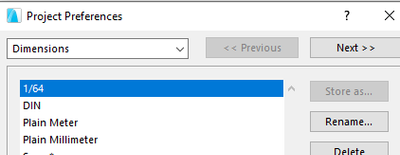
Every time i start modifying a dimension preferences instead of converting to "custom" it jumps to my preference called "1/64"
the "1/64" I believe is the issue I am assuming it is because of the "/" in the name that is causing the issue but I can not delete or rename this preference.
Please help!
14 Replies 14

Gerry Leonor
Advisor
Options
- Mark as New
- Bookmark
- Subscribe
- Mute
- Subscribe to RSS Feed
- Permalink
- Report Inappropriate Content
2022-04-12 12:40 AM
2022-04-12
12:40 AM
did you remember to store/save the updated setting after you made the changes?
because it shouldn't say "custom".
also, there doesn't seem to be an issue with the slash character when it comes to naming a Dimension Preference
AC27 | Win11 | 64Gb RAM | Intel i7 13700F | RTX 4070 Ti
>come join our unofficial Discord server
https://discord.gg/XGHjyvutt8
>come join our unofficial Discord server
https://discord.gg/XGHjyvutt8
Jen1
Participant
Options
- Mark as New
- Bookmark
- Subscribe
- Mute
- Subscribe to RSS Feed
- Permalink
- Report Inappropriate Content
2022-04-14 03:08 AM
2022-04-14
03:08 AM
hmm there must be something corrupting my template because when I go back to an early version I can create a new dimension style.... weird....

Andris_Sh
Contributor
Options
- Mark as New
- Bookmark
- Subscribe
- Mute
- Subscribe to RSS Feed
- Permalink
- Report Inappropriate Content
2022-06-13 05:42 PM
2022-06-13
05:42 PM
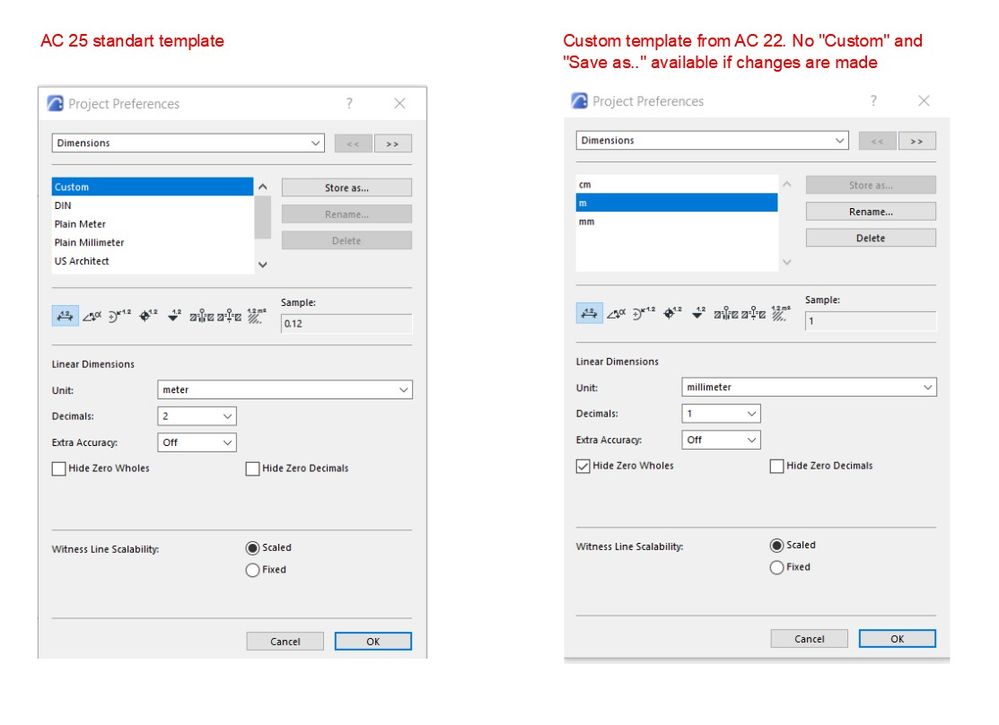
It seems, I have the same problem. Recently I've upgraded from AC22 to AC25 and I can not save changes in dimension preferences styles. The problem is with my old template, everything is ok if I start new file with standart template. Jen1, have you found the solution?
Andris_Sh
Contributor
Options
- Mark as New
- Bookmark
- Subscribe
- Mute
- Subscribe to RSS Feed
- Permalink
- Report Inappropriate Content
2022-06-16 02:01 PM
2022-06-16
02:01 PM
Hi. Recently I've upgraded from AC22 to AC25 and I can not save changes in dimension preferences styles. There is no more "Custom" and "Save as..." options when I change something, just my existing dimension styles. The problem is with my old template from AC22. Everything is ok if I start new file with standart AC25 template. Does anybody know the solution? Thank you!

mija
Enthusiast
Options
- Mark as New
- Bookmark
- Subscribe
- Mute
- Subscribe to RSS Feed
- Permalink
- Report Inappropriate Content
2022-06-16 02:35 PM
2022-06-16
02:35 PM
Hi, custom is made when you change up presaved settings and that is when you get store as option.
You can change existing dimensions in your new template, then they will appear as custom and then you can store them as something.
Archicad 26, build 3001
Montenegro

Barry Kelly
Moderator
Options
- Mark as New
- Bookmark
- Subscribe
- Mute
- Subscribe to RSS Feed
- Permalink
- Report Inappropriate Content
2022-06-16 02:40 PM
2022-06-16
02:40 PM
Post and reply merged into similar thread.
Barry
One of the forum moderators.
Versions 6.5 to 27
i7-10700 @ 2.9Ghz, 32GB ram, GeForce RTX 2060 (6GB), Windows 10
Lenovo Thinkpad - i7-1270P 2.20 GHz, 32GB RAM, Nvidia T550, Windows 11
Versions 6.5 to 27
i7-10700 @ 2.9Ghz, 32GB ram, GeForce RTX 2060 (6GB), Windows 10
Lenovo Thinkpad - i7-1270P 2.20 GHz, 32GB RAM, Nvidia T550, Windows 11
Andris_Sh
Contributor
Options
- Mark as New
- Bookmark
- Subscribe
- Mute
- Subscribe to RSS Feed
- Permalink
- Report Inappropriate Content
2022-06-16 02:43 PM
2022-06-16
02:43 PM
Thank you, mija. The problem is that there is no CUSTOM or STORE AS.. appearing when I start changing dimension settings.
Andris_Sh
Contributor
Options
- Mark as New
- Bookmark
- Subscribe
- Mute
- Subscribe to RSS Feed
- Permalink
- Report Inappropriate Content
2022-06-16 02:50 PM
2022-06-16
02:50 PM
Thank you, Barry. I've started new topic to receive sooner solution. Actually less people see comments to the older topics as I understood. Maybe I'm wrong - I'm new to the forum)).
Jen1
Participant
Options
- Mark as New
- Bookmark
- Subscribe
- Mute
- Subscribe to RSS Feed
- Permalink
- Report Inappropriate Content
2022-06-16 03:30 PM
2022-06-16
03:30 PM
this is exactly the issue I am having. A kind of work around I was able to do was I managed to override one of my other dimension styles... but only a temp solution. I am thinking there must have been something in a recent Archicad update that didnt agree with a previous setting I have in my template.

Still looking?

Suggested topics
- From one hand-drawn sketch to an Archicad construction model, rebar model and 61 structural drawings in AI solutions
- Dimension All Floors with a Single Click in Documentation
- Archicad 30: what the official MCP and Tapir 1.7.1 can each do (side-by-side table) in AI solutions
- Railing and Curtain Wall in Modeling
- Wall reference line location and Reference GDL door in Grasshopper in Parametric design
